U A ::/UHAfiE
OAT A
STORAGE
The OX Data Storage feature permits off-
line backup storage of all of your rhythm
programs.
Making backups of your wqrk is something that you should do frequently, with aU your
machines. You
ll find that keeping copies of your programs wil help speed up your
work and eliminate duplication of effort.
What was that rhythm I had before?' No matter, if you
ve got it stored. You can load it
back into your OX (or anyone else
s for that matter) and get
on with it.
The OX can store its memory in two ways: via the TAPE jacks onto Cassette
, or via
MIDI to another OX or other MIDI device.
TAPE INTERFACE
The DX's Cassette Interface allows programs to be stored externally on an audio cas-
sette. The tape recorder should have a Line or Aux Input if possible; either Line Level
or Speaker Level (Earphone) outputs.
Connection
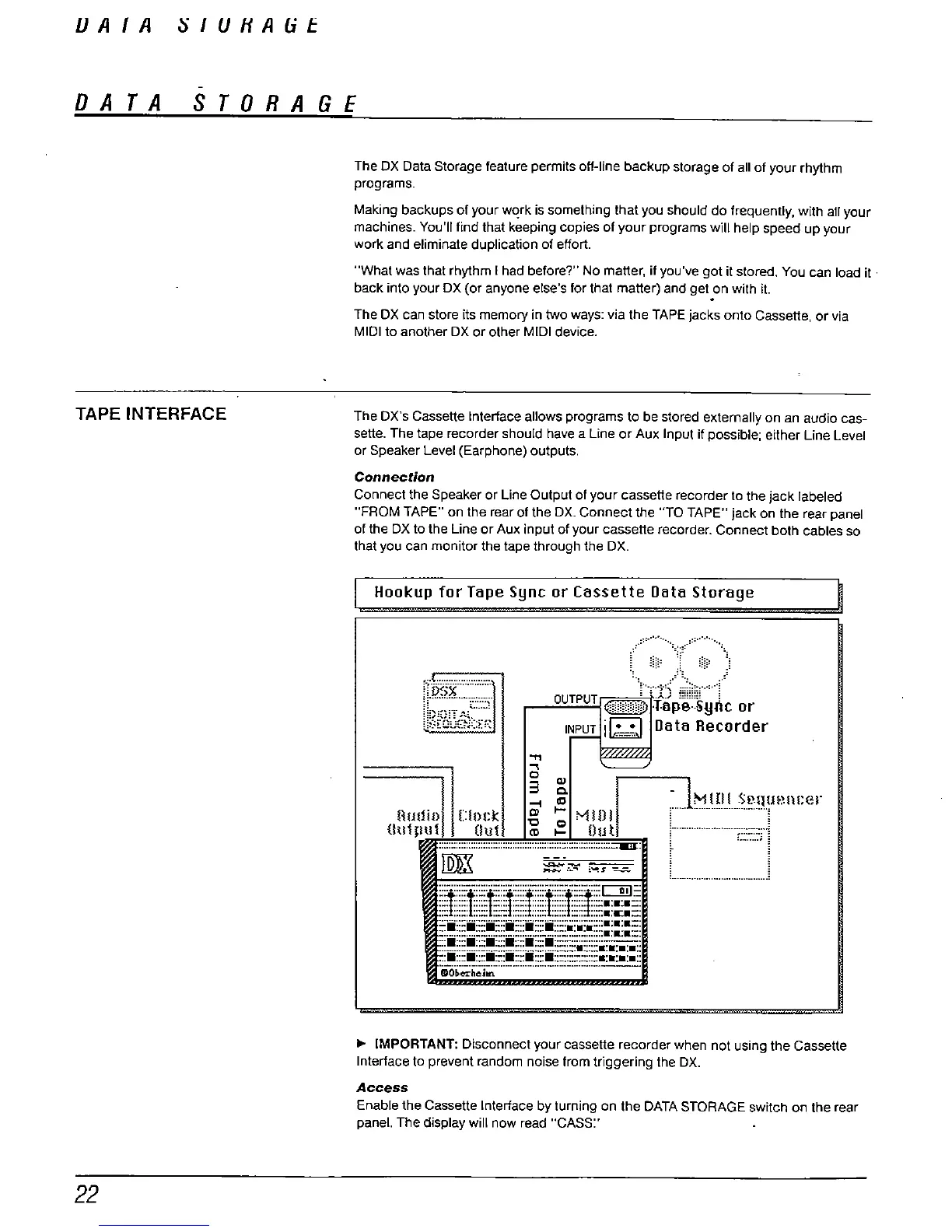
Connect the Speaker or line Output of your cassette recorder to the jack labeled
FROM TAPE" on the rear of the OX. Connect the "
TO TAPE" jack on the rear panel
of the OX to the Line or Aux input of your cassette recorder. Connect both cables so
that you can monitor the tape through the OX,
Hookup for Tape Sync or Cassette Data Storage
" ",,:,~~~~~ ' ;: ;;""" :
OuTPuT
0:,',"',
filp8'"syrtc or
INPUT i
Data Recorder
.. " !!
II)I
r-MI
II!.!'I!!!el\!:er
mw\
t;
:= "'
out
l '
;..".::..:::::::::::::::::::::::::::::::::::::::::::::::::::::::::::::::::::::' =-: ; '.'......
1m
- ,
ff::::t::lt !I":::tj1tj:t'
~~~~~~~~~~~~~~~~~ ~~~~~~~~~~~~~~::: :::: ::: :::: ::::~~~
.::::;:iiix..
:::.::::.::::.::::.::::.::::.::::::::::-.:::::::.:.:.:.::
i"cib-';h
'..'m."m"...".,-""'-.-""."."--
IMPORTANT: Disconnect your cassette recorder when not using the Cassette
Interface to prevent random noise from triggering the DX.
Access
Enable the Cassette Intertace by turning on the DATA STORAGE switch on the rear
panel. The display will now read "
CASS:'



 To Next Page