un,
u'uunuL.
Compatibility
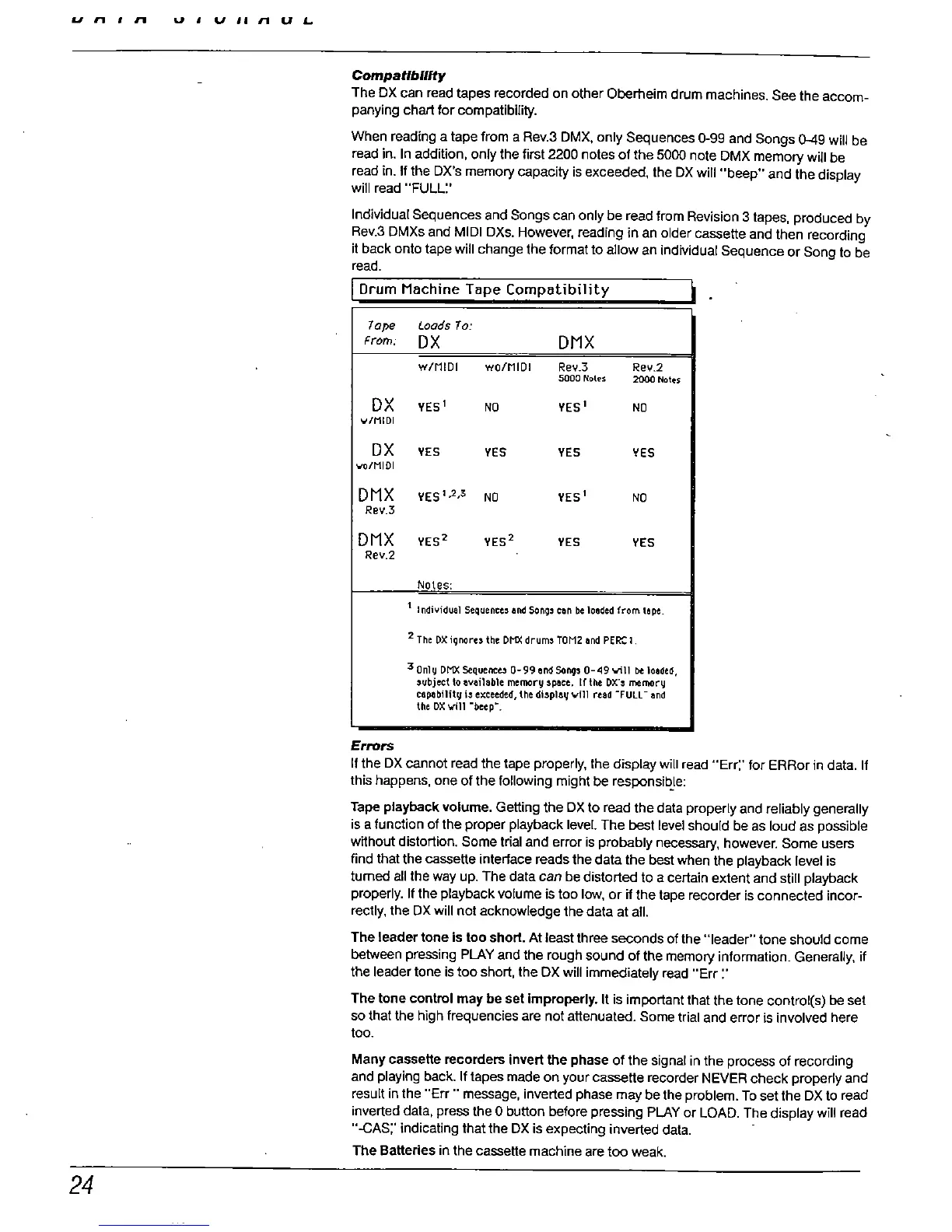
The OX can read tapes recorded on other Oberheim drum machines. See the accom-
panying char for compatibilty.
When reading a tape from a Rev.
3 OMX. only Sequences 0-99 and Songs 0-9 will be
read in. In addition
, only the first 2200 notes of the 5000 note DMX memory will be
read in. II the OX'
s memory capacity is exceeded
, the OX will "
beep
" and the display
will read "FULL:'
Individual Sequences and Songs can only be read from Revision 3 tapes
, produced by
Rev.3 DMXs and MIDI DXs. However
, reading in an older cassette and then recording
it back onto tape will change the format to allow an individual Sequence or Song to be
read.
Drum Machine Tape Compatibility
I .
7ape
toads 70:
From:
DMX
w/MIDI wo/MIDI
Rev. Rev.
sooo Notes
20 Noles
YES YES
../MIDI
YES
YES YES YES
..o/MIDI
DMX
YES 1
YES
Rev.
DMX
YES
YES YES
YES
Rev
Notes:
1 Individual
Sequence, 8nd Song,
can be loaded
fromt.!pe.
2 The DX ignores the DNX drum, TOM2 8nd PER: 1
3 Only DNX Sequence" 0-99.!nd Song, 0-
49 'Wll be 108ded
ubject 10 IIvai1abie memory 'pou. If the DX.
, memory
captbility i, exceeded
thedispl8yvm reed -rULL-
lInd
the DX..il
beep
Errors
If the DX cannot read the tape properly, the display will read "
Err:' for ERRor in data. II
this happens, one of the following might be responsibJe:
Tape playback volume. Gelling the OX to read the data properly and reliably generally
is a function of the proper playback level. The
bet level should be as loud as possible
without distortion. Some trial and error is probably
necesry, however. Some users
find that the cassette intertace reads the data the
be when the
playback level is
tumed all the way up. The data can be distorted to a certain extent and still playback
properly. If the playback volume is too low
, or If the tape recorder is connected incor-
rectly, the DX wil not acknowledge the data at all.
The leader tone Is too short. At least three
sends of the "
leader
" tone should come
between pressing PLAY and the rough sound of the memory information. Generally, if
the leader tone is too short, the DX wil immediately read "
Err:'
The tone control may be set Improperly. It is important that the tone control(s) be set
so that the high frequencies are not attenuated. Some trial and error is involved here
too.
Many cassette recorders invert the phase of the signal in the process of recording
and playing back. If tapes made on your
casstte recorder
NEVER check properly and
result in the "Err
" message, inverted phase may be the problem. To set the DX to read
inverted data, press the 0 button before pressing PLAY or LOAD. The display wil read
-CAS:' indicating that the DX is expecting inverted data.
The Batteries in the cassette machine are too weak.



 To Next Page