SOPHISTICATION
STEP RECORDING
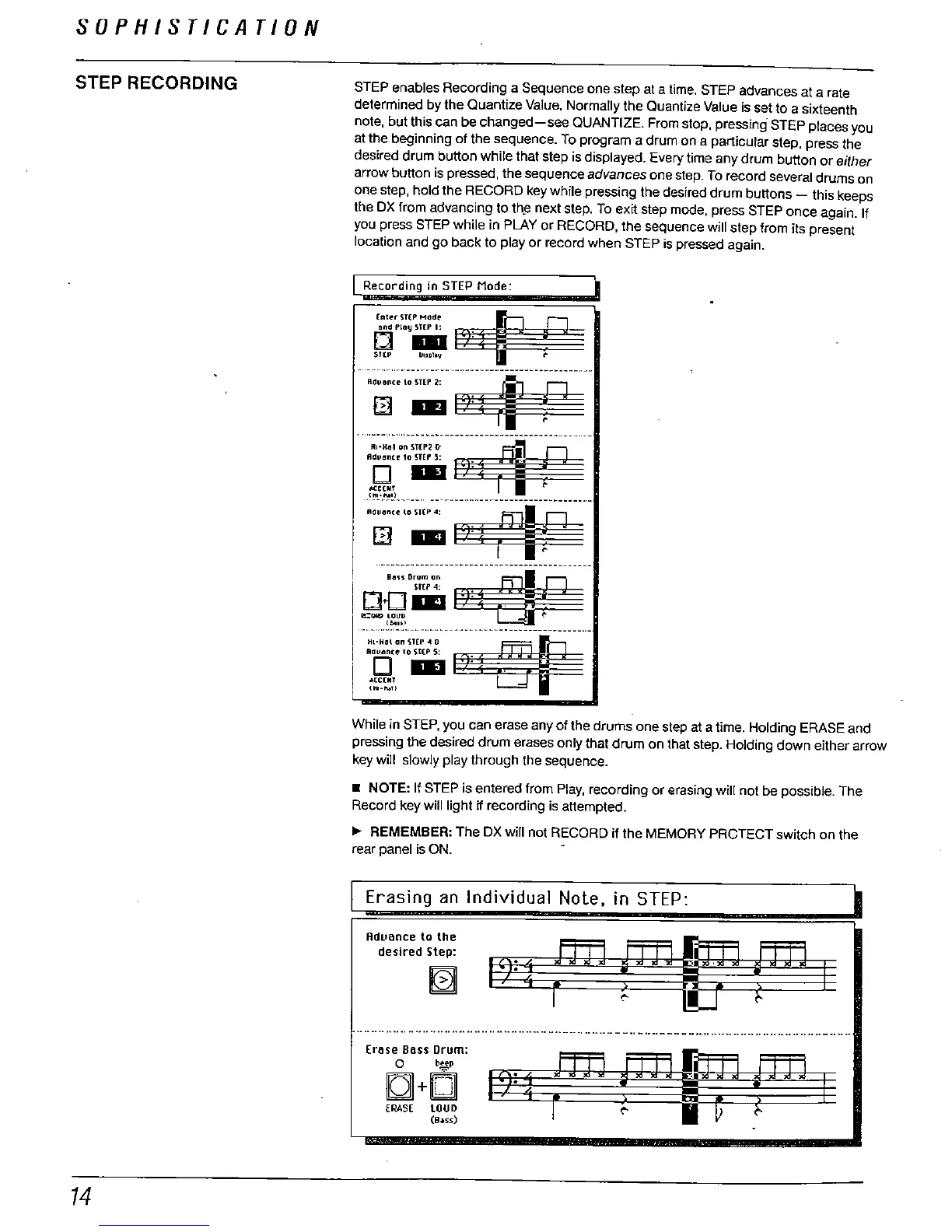
STEP enables Recording a Sequence one step at a time. STEP advances at a rate
determined by the Quantize Value. Normally the Quantize Value is set to a sixteenth
note
, but this can be
changed-see QUANTIZE. From
stop, pressing STEP places you
at the beginning of the sequence. To program a drum on a particular step, press the
desired drum button while that step is displayed. Every time any drum button or
either
arrow button is pressed
, the sequence
advances
one step. To record several drums on
one step, hold the RECORD key while pressing the desired drum buttons
- this keeps
the DX trom advancing to th
e next step. To exit step mode
. press STEP once again. If
you press STEP while in PLAY or RECORD
. the sequence will step from its present
location and go back to play or record when STEP is pressed again.
Recording in STEP Mode:
(""""M"'
and PLay STEP I:
o ..
STtP U"Dlov
------_..-._-_..-..._.._-------- ---_...._'--""""""- --_
_..__nn_____"---------"H___
.....-
5::;'
M.C(lIr
n.. - W-_n..____- _.
- ----------- ----..--_-
H " H"- "
~~~
""""- _n_n___- - --- un
'''D"m''
Sf("4:
D.c l1
-=""t
...... .......... -. ---.:-.----.
I :
Ej'
"CCOIT
(HI-
I\!!
While in STEP
, you can erase any Of the drums one step at a time. Holding ERASE and
pressing the desired drum erases only that drum on that step. Holding down either arrow
key will slowly play through the sequence.
. NOTE: If STEP is entered from Play, recording or erasing will not be possible. The
Record key will light ff recording is attempted.
REMEMBER: The DX will not RECORD if the MEMORY PRCTECT switch on the
rear panel is ON.
Erasing an Individual Note. in STEP:
Aduance to the
desired Step:
-----,....,.,-...-................,..._ --- -- -- - ..-- -,...- --- - -., - .----- - - -.. -- --- --.- -.,.... ,........... -..
Erose Boss Drum:
b.tep
IQ +
ERASE LOUD
(9.55)



 To Next Page