THE
VOICES
Changing Sound Chips
""""""""""'
"""H"......m
'-""_H"_"""""_"_"'HHm
:"H""""'
::8I:
~~~
jl:rijt;;
~~~
7.:
~~~~~~ ~~~~~~~~~~~~~
::!!=-I!
~~~
:.=:.:i:iU::
::.::.:.- .::.:::.:::.:::::: .::::.:.:.:.::-;; -""'--""-
"----'-"-'_W'
I"-
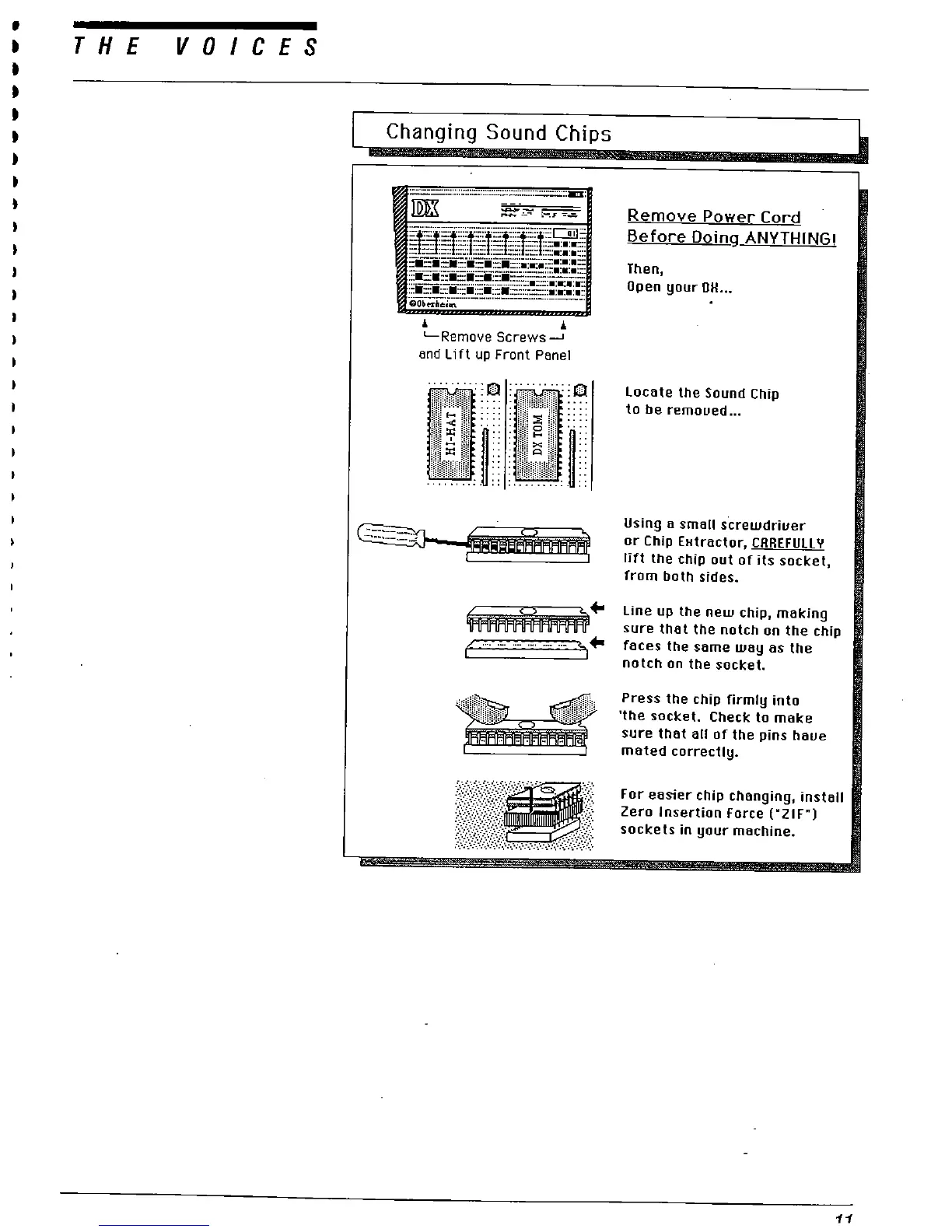
L-Remoye Screws-.
end Lift up Front Pene!
::Q :.
::Q
Remove Power Cord
Before Doin
ANYTHING!
Then
Open your OH...
Locete the Sound Chip
to be remoued..
Using a small s
crewdriuer
or Chip EHtractor
, CAAEFULL Y
lift the chip out of its socket
from both sides.
Line up the new chip, making
sure that the notch on the chip
faces the same way as the
notch on the socket.
Press the chip firmly into
the socket. Check to make
sure that all of the pins haue
mated correctly.
For easier chip changing, install
Zero Insertion Force ("
ZIF"
sockets in your machine.
....



 To Next Page