F A
Noise Reduction / Generally, sync to tape wil work bener without noise reduction.
Noise reduction won
t record the sync signal better
, since the level of the sync tone
doesn t change appreciably the way that music does. However
, using noise reduction
may reduce crosstalk between the sync signal and adjacent tracks. This is another
one of those things to experiment with!
Recording Sync instead of the DX / Many musicians working with 4 and 8 track tape
recorders don t record the drum machine on tape at all-
they record only the sync
track, and then use the sync tone to slave the drum machine when overdubbing other
parts and during mixdown.
TRIGGERED NOTES
I TRIGGER INPUT Programming: I
Rccess EDIT PRRRMETERS:
EO IT
. -- - -...... ....--- - - - -..-----..----
Select ED IT
PRRRMETER D6:
(SETTRIGGER IN)
t;
..... .--- --- - ". ..-.. .------ ---.. ----- -..
Select Orum(s)
to be Triggered:
IC !
Hold Down...
lOUD
(B8ss)
..- .......... -. -- -- -- - .. .... - - -- .. -.. - -- -- -
1)
Set Trigger:
TRIG IN
.- -- .. -... .. .... - -- - -- -..... - - - -- -.... - -- ---
EHit:
EDIT
The OX has an external trigger jack which enables you to control any drum or any
combination of drums from an external source
, such as a footswitch or a GATE.from a
sequencer such as the Oberheim OSX.
The External Trigger Input acts essentially the same as pressing one of the drum but-
tons
on the front panel. When in record
, triggering any of the voices externally wil
cause them to be recorded subject to the same correction schemes (QUANTIZE and
SWING) that would apply to the buttons on the front paneL
The Trigger Input is designed for a switch closure, or an inverted Moog S-
Trig type
trigger. To utiize an acoustic signal such as a live drum or Simmons type drum pad. it
is necessary to utilize one of the trigger interface devices on the market.
Programming
the
Trigger
Input
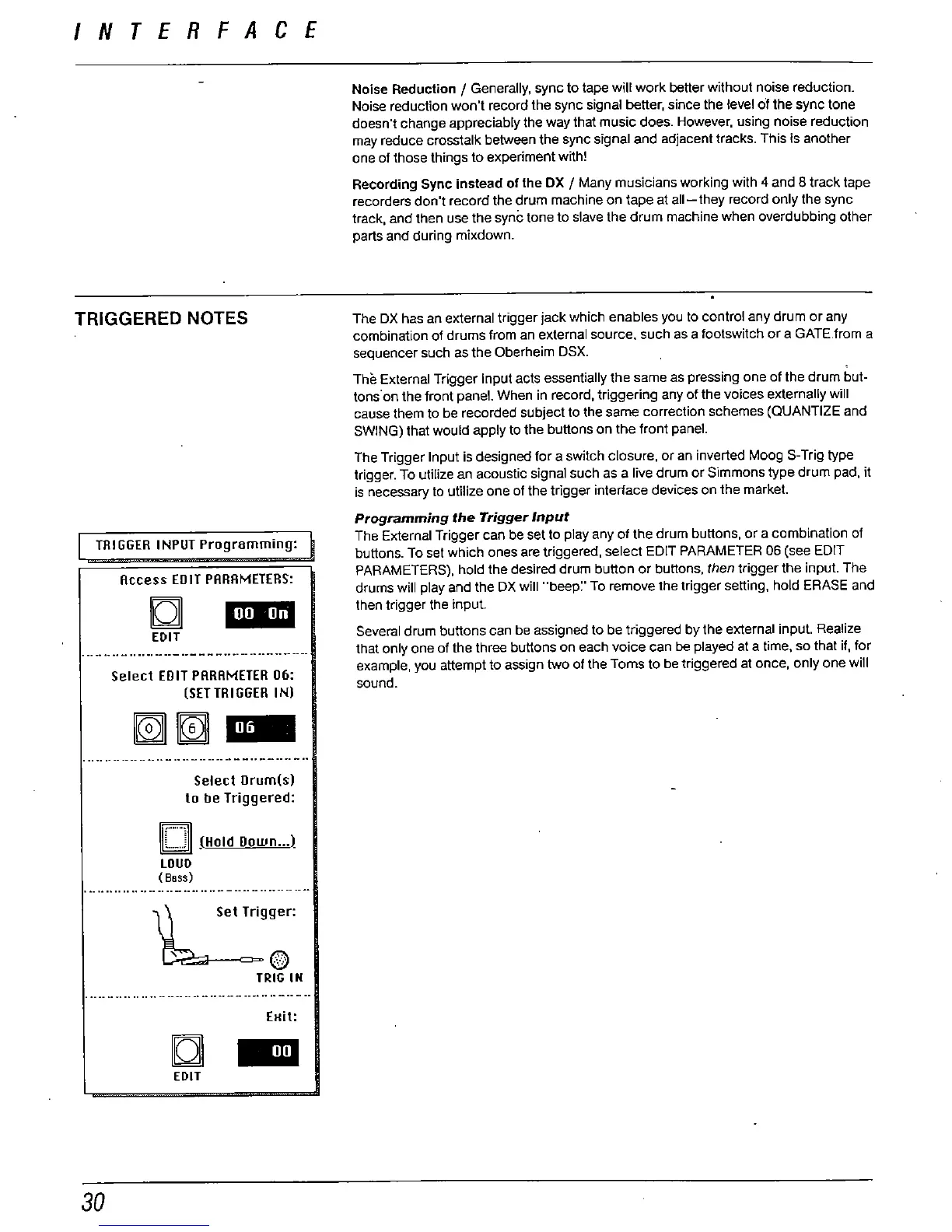
The External Trigger can be set to piay any of the drum buttons. or a combination of
buttons. To set which ones are triggered, select EDIT PARAMETER 06 (see EDIT
PARAMETERS), hold the desired drum button or buttons
then trigger the input. The
drums will piay and the DX wil "
beep:' To remove the trigger setting, hold ERASE and
then trigger the input.
Several drum buttons can be assigned to be triggered by the external input. Realize
that only one of the three buttons on each voice can be played at a time. so that if
, for
example, you attempt to assign two of the Toms to be triggered at once
, only one wiil
sound.



 To Next Page