GETTING
AROUND
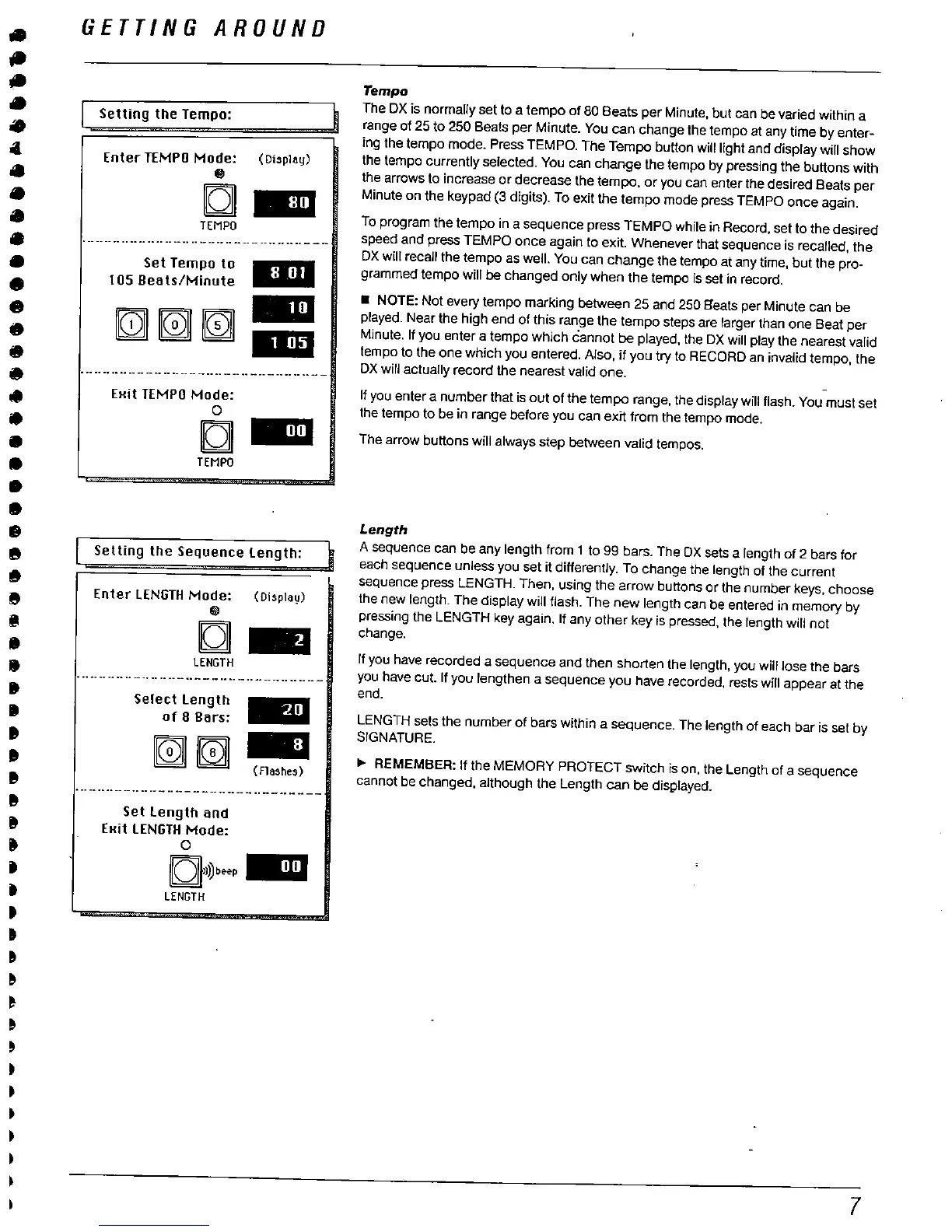
Setting the Tempo:
Enter TEMPO Mode:
(Display)
C 11
TEMPO
"-- -----.. .... .... ---.... ---... --- -.. ...... ---
Set Tempo to
105 Beats/Minute
rn
. - ---..... -- --.. -----..---.. -----.-.. ..--
EHit TEMPO Mode:
TEMPO
Settng the Sequence length:
Enter lENGTH Mode:
(Display)
C 8E
LENGTH
... "--- -.... --..... ---..---.."- - ....--.... ----
Select length
of 8 Bars:
. -- -.... -.... - - - - -- - - - - - -.. - --. - - --
Set length and
EHit LENGTH Mode:
C'I))b..P
LENGTH
Tempo
The DX is normally set to a tempo of 80 Beats per Minute
, but can be varied within a
range of 25 to 250 Beats per Minute. You can change the tempo at any time by enter-
ing the tempo mode. Press TEMPO. The Tempo button will light and display wil show
the tempo currently selected. You can change the tempo by pressing the buttons with
the arrows to increase or decrease the tempo, or you can enter the desired Seats per
Minute on the keypad (3 digits). To exit the tempo mode press TEMPO once again.
To program the tempo in a sequence press TEMPO while in Record, set to the desired
speed and pres TEMPO once again to exit. Whenever that sequence is recalled
, the
DX will recall the tempo as well. You can change the tempo at any time
, but the pro-
grammed tempo will be changed only when the tempo Is set in record.
. NOTE: Not
every tempo marking between 25 and 250 Beats per Minute can be
played. Near the high end of this range the tempo steps are larger than one Beat per
Minute. If you enter a tempo which cannot be played, the DX will play the nearest valid
tempo to the one which you entered. Also
. if you try to RECORD an invalid tempo
, the
DX will actually record the nearest valid one.
If you enter a number that is out of the tempo range
. the display will flash. You must set
the tempo to be in range before you can eXIT from the tempo mode.
The arrow buttons will always step between valid tempos.
Length
A sequence can be any length from 1 to 99 bars. The DX sets a length of 2 bars for
each sequence unless you set it differently. To change the length of the current
sequence press LENGTH. Then
, using the arrow buttons or the number keys, choose
the new length. The display will flash. The new length can be entered in memory by
pressing the LENGTH key again. If any other key is pressed
, the length will not
change.
If you have recorded a sequence and then shorten the length
, you wil lose
the bars
you have cut. If you lengthen a sequence you have recorded
, rests wil appear at the
end.
LENGTH sets the number of bars within a
seuence. The length of each bar is set by
SIGNATURE.
REMEMBER: If the MEMORY PROTECT switch is on
, the Length of a sequence
cannot be changed, although the Length can be displayed.



 To Next Page