17
CD Indicators
Procedure
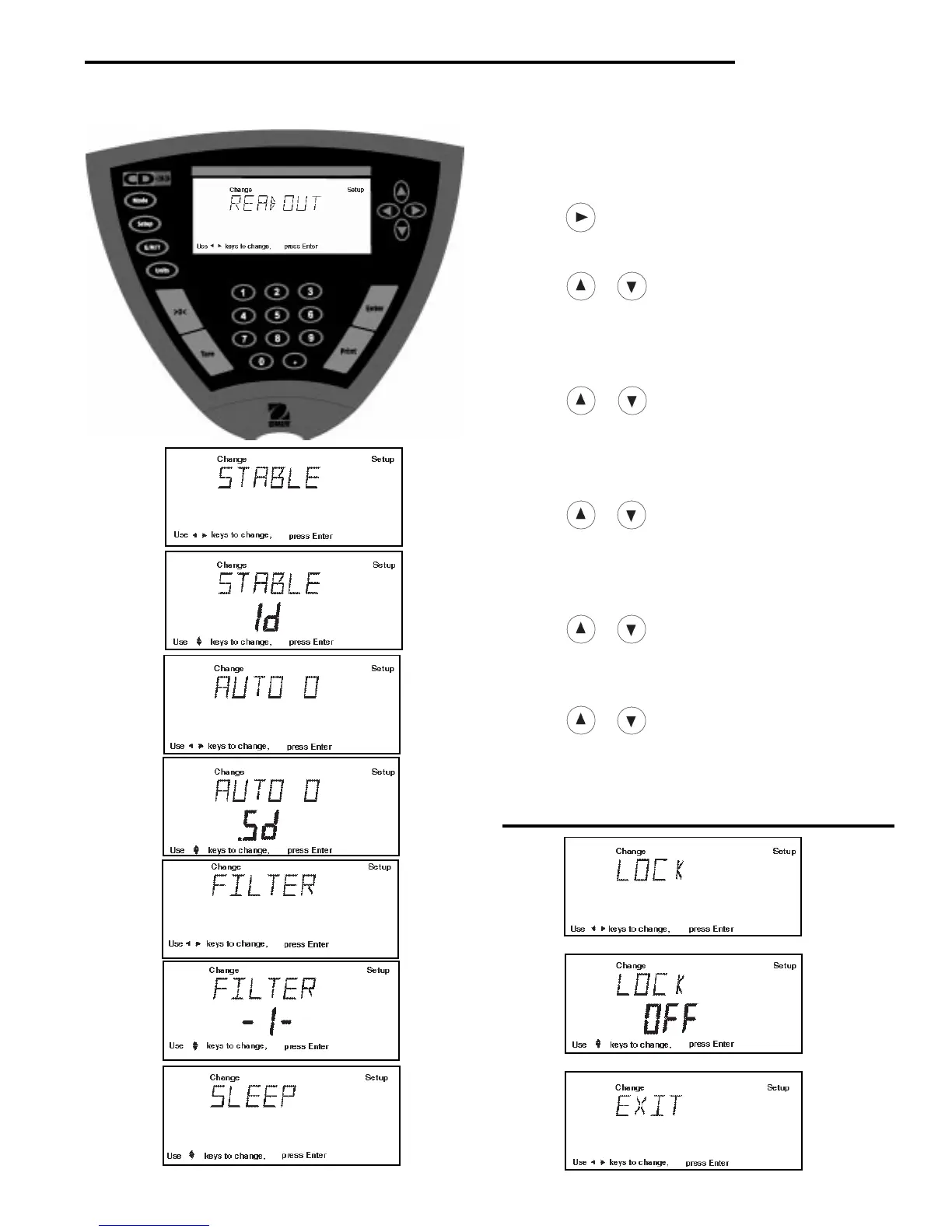
• Press the Setup button, SCALE is displayed.
• Press button until READOUT is displayed.
• Press Enter button, STABLE is displayed.
• Press Enter button, STABLE .5d is displayed.
• Press or button and select either .5d, 1d, 2d,
or 5d. 1d is the default setting.
• Press Enter button, SAVED is momentarily displayed.
Display advances to AUTO 0.
• Press Enter button, AUTO 0 .5d is displayed.
• Press
or button and select either .OFF, .5d,
1d, or 3d. .5d is the default setting.
• Press Enter button, SAVED is momentarily displayed.
Display advances to FILTER.
• Press Enter button, FILTER -1- is displayed.
• Press or button and select either .-0-, .-1-,
-2-, or -3-. -1- is the default setting.
• Press Enter button, SAVED is momentarily displayed.
Display advances to SLEEP.
• Press Enter button, SLEEP OFF is displayed.
• Press
or button and select either ON or OFF.
• Press Enter button, SAVED is displayed momentarily.
display advances to LOCK.
• Press Enter button, LOCK OFF is displayed.
• Press or button and select either ON or OFF.
• Press Enter button, SAVED is displayed momentarily.
display advances to EXIT.
• Press Enter button to save settings. Indicator returns
to weigh mode.
3.2 Readout (Cont.)



 To Next Page