31
CD Indicators
Procedure
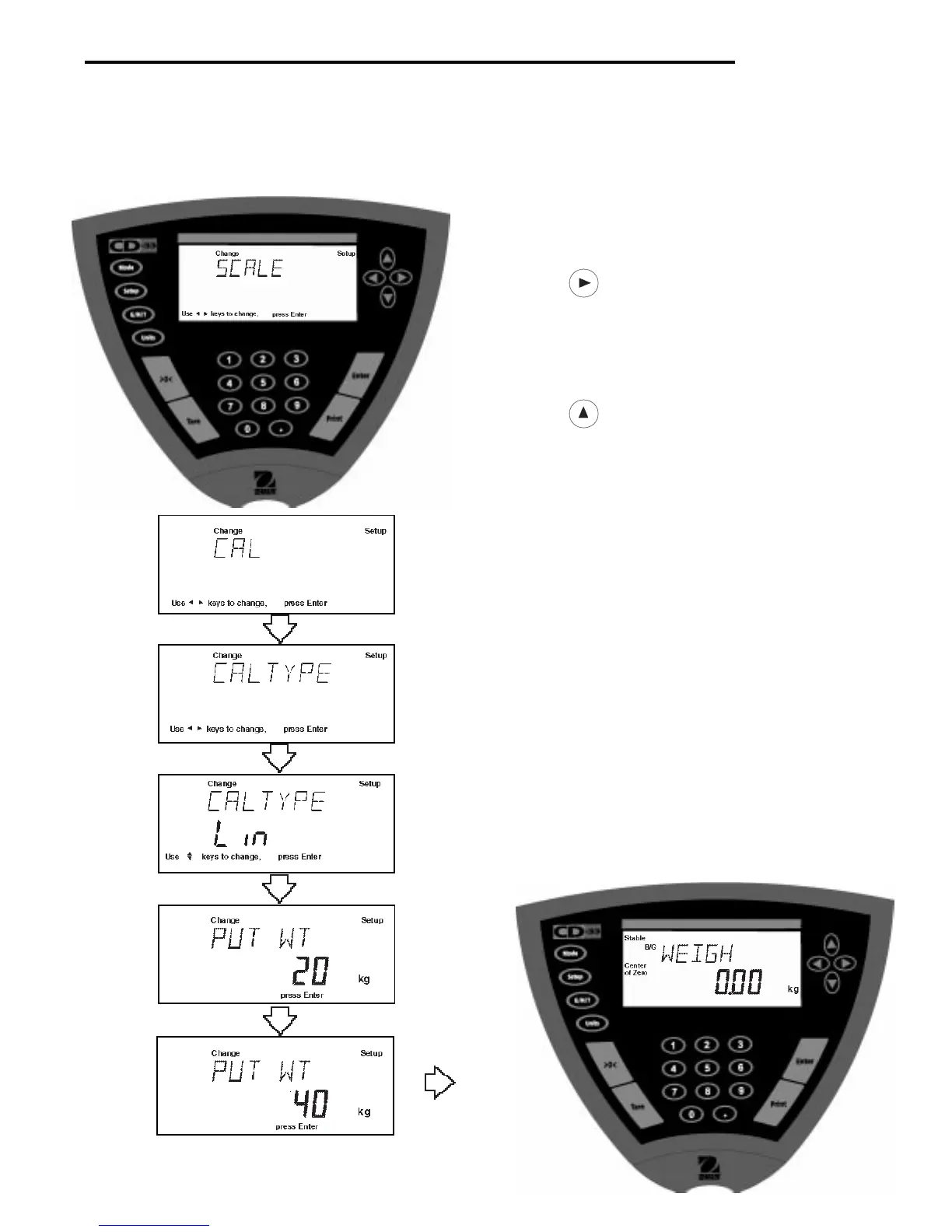
• Press the Setup button, SCALE is displayed.
• Press button UNTIL CAL is displayed.
• Press Enter button, CAL TYPE is displayed.
• Press Enter button, SPAN is displayed.
• Press
button to select linear calibration. CAL
TYPE Lin is displayed.
• Press Enter button, CLR PAN is displayed.
• Press Enter button, WORKING is momentarily dis-
played, then PUT WT 20kg is displayed.
• Place specified calibration mass on pan.
• Press Enter button, WORKING is displayed. After a
few seconds, display changes to PUT WT 40kg.
The displayed weight is the full capacity of the
Indicator.
• Place specified calibration mass on pan.
• Press Enter button, WORKING, is displayed. After a
few seconds, CAL SET is displayed; the display then
returns to WEIGH mode and indicates mass on pan.
• Remove calibration mass from the pan.
• Linearity calibration is completed.
4.1.3 Linearity Calibration
Linearity calibration utilizes three calibration points; one at zero, center span and full span. This method minimizes
deviation between actual and displayed weights within the Indicator's weighing range. Three weight values are used;
zero, a weight value at or near midpoint of the Indicator's weighing range and a weight value at specified capacity.
Sample display illustrates a 40 kg scale base.



 To Next Page