Defender 3000 Indicators EN-45
6.2 Troubleshooting
TABLE 6-1 Troubleshooting
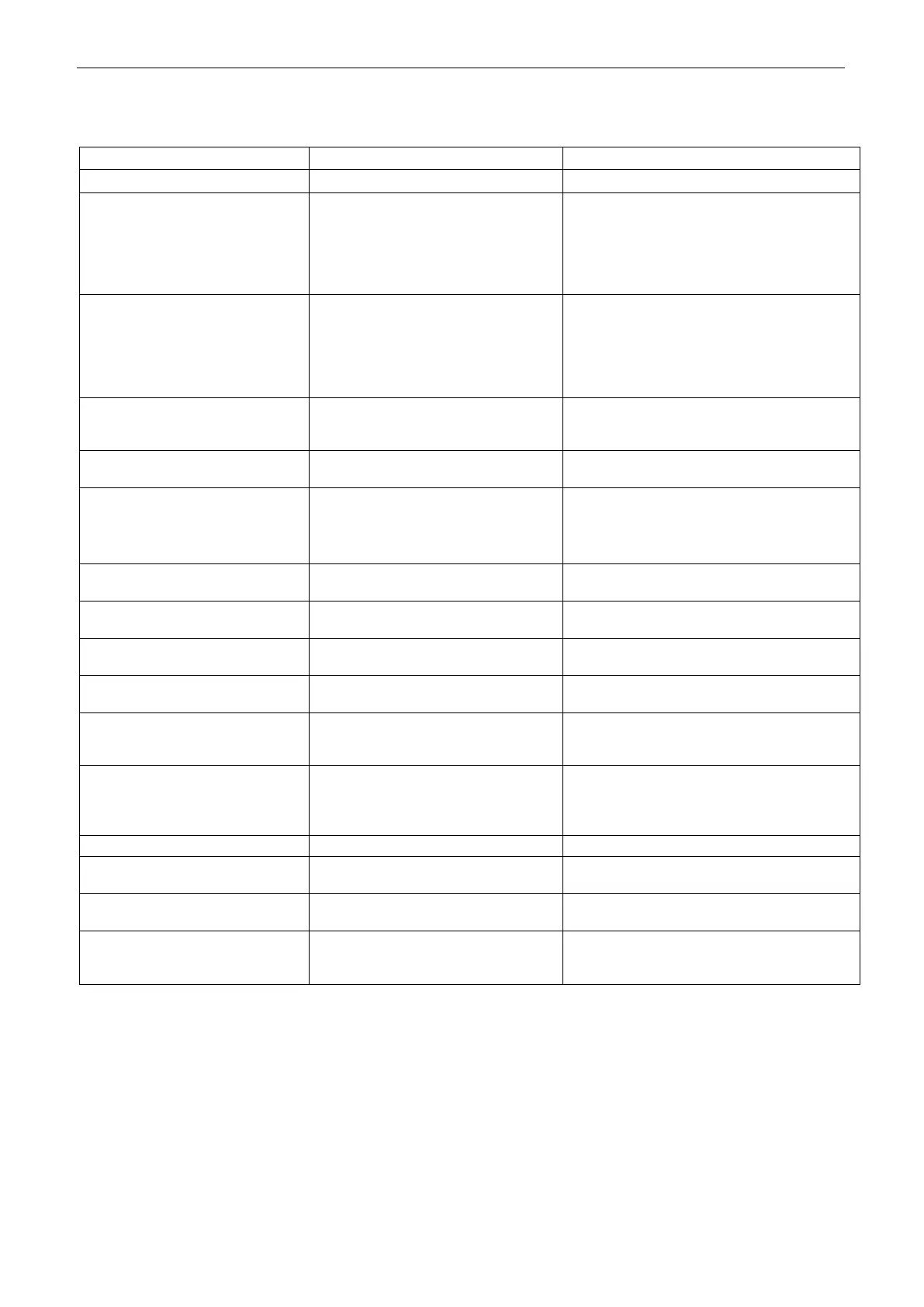
Unable to turn on the indicator.
1. Power cord not plugged in or
properly connected.
2. Power outlet not supplying
electricity.
3. Battery discharged.
4. Other failure.
1. Check power cord connections. Make
sure power cord is plugged in properly
into the power outlet.
2. Check power source.
3. Recharge battery.
4. Service required.
Cannot zero the scale, or will not
zero when turned on the indicator.
1. Weights on the pan exceeds
allowable limits.
2. Weight is not stable.
3. Load cell is damaged.
1. Remove weights on the pan.
2. Wait for weight to become stable,
check area around the scale and weight
on scale for excessive vibration or
movement, or increase filtering.
3. Service required.
1. LFT security switch is turned on.
2. Incorrect value for calibration
mass.
1. Turn the LFT security switch off.
2. Use correct calibration mass.
Cannot display weight in desired
weighing unit.
Enable unit in the Units Menu.
Refer to Unit Menu section for help.
Cannot change menu settings.
The Menu button has been locked.
1. Enable the Menu button in the L.O.C.k
Menu.
2. The LFT security switch may need to be
switched off.
Weight reading exceeds Power On
Zero limit.
1. Remove weight from the pan.
2. Recalibrate the scale.
Weight reading below Power On Zero
limit.
1. Add weight to the pan.
2. Recalibrate the scale.
Weight reading exceeds Overload
limit.
Reduce weight on the pan.
Weight reading below Underload limit.
1. Add weight to the pan.
2. Recalibrate the scale.
Factory calibration data in the
EasyConnect
TM
module on load cell
cable is not valid under LFT off status.
Fail to read serial number from the
EasyConnect
TM
module or the serial
number does not match the LFT ON
status.
1. Break the seal or replace the original
base/indicator.
2. Service required.
Calibration data not presented.
Replace dry batteries for i-DT33P model or
recharge battery for i-DT33XW model.
Calibration value outside allowable
limits
Use correct calibration weight.
The average piece of weight (APW)
on the pan is too small and less than
0.1d.
Replace a heavier batch of samples or
change to a scale with readability suitable for
your samples.
Note: Please refer to the LEGAL FOR TRADE chapter, Settings section for the positon of the LFT security
switch for each model.
6.3 Service Information
If the troubleshooting section does not resolve your problem, contact an authorized OHAUS Service Agent. For
Service assistance in the United States, call toll-free 1-800-526-0659 between 8:00 AM and 5:00 PM Eastern
Standard Time. An OHAUS Product Service Specialist will be available to assist you. Outside the USA, please
visit our website www.ohaus.com to locate the OHAUS office nearest you.



 To Next Page