EN-8 EB SERIES
NOTES:
• If only a Hi value was set (Lo value is “0”), the check-alarm will activate
and display “OK” above this value. If only a Lo value was set (Hi value is
“0”), the check-alarm will activate and display “OK” below this value.
• Weight must be more than 20 scale divisions for Check-Weighing/Counting
to operate.
• Hi-Lo values are retained when the unit is turned off.
• Separate Hi-Lo values for check-weighing and counting (pcs) may be
entered.
• To clear the Hi-Lo values, press
Clear
then
Enter
as the values are
displayed. This effectively exits from Check-Weighing/Counting Mode also.
4.6 Sampling, Calculating Average Piece Weight (APW)
Counting Mode is indicated by “pcs” or “pc” on the display.
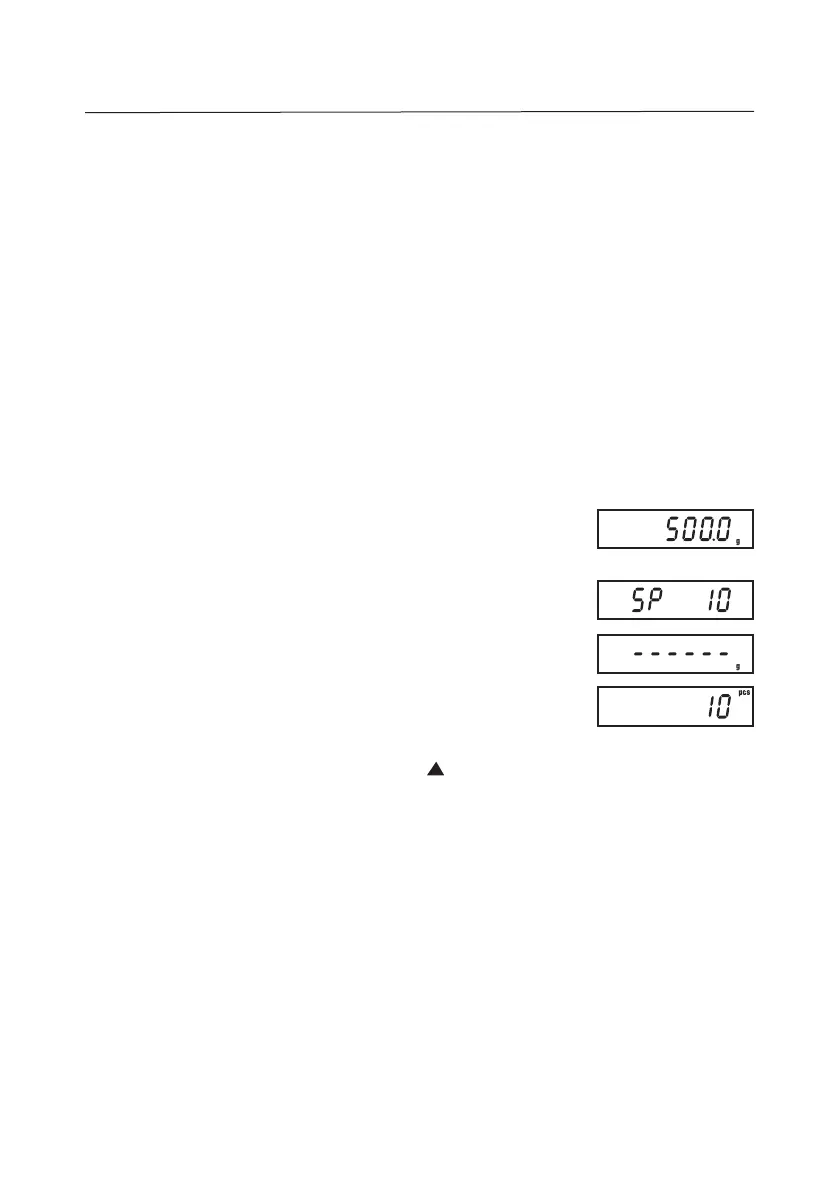
Place the desired sample onto the weighing pan (or into a
tared container) (ex. 500g).
Press COUNT to initiate sampling. “SP 10” (or last sample
sized used) will be displayed, then press
Enter.
“------“ will be
displayed momentarily before the sample size piece count is
displayed.
NOTES:
• To change the sample size, press successively to display: “SP 20”,
“SP 50”, “SP 100”, “SP 200”, “SP 500”, “SP 1000”. Press
Enter
to select
the displayed sample size.
• APW values are not retained when the unit is turned off.
• To exit from Counting Mode and clear the APW, press COUNT.


 To Next Page