43502101TH Rev.1 151 /
Oki Data CONFIDENTIAL
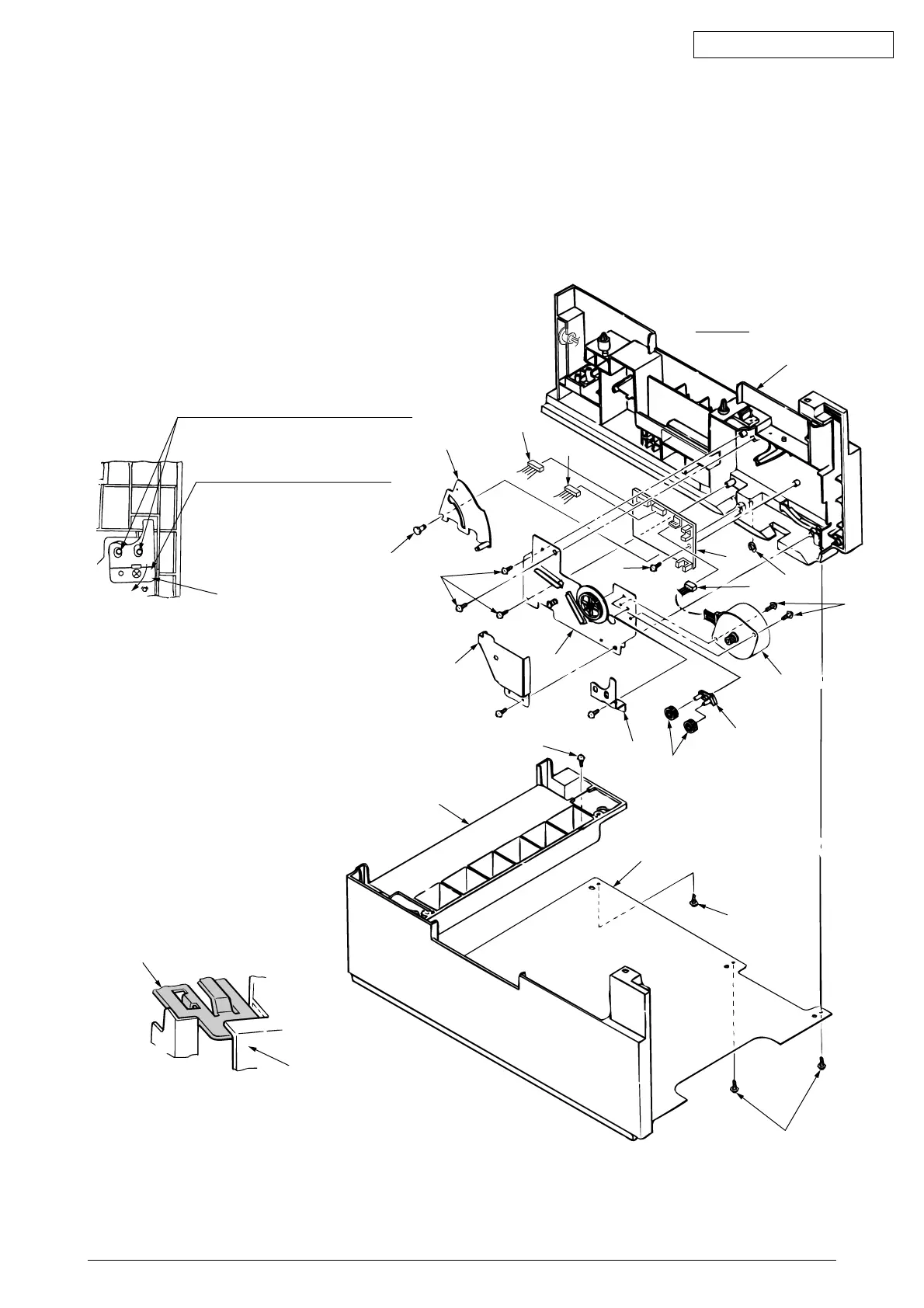
(6) Remove three screws 9 which are holding the guide R (2nd) assy 0 to the bottom plate A.
Remove the screw B which is keeping the rear cover C and guide R (2nd) assy 0. Remove the
guide R (2nd) assy 0.
(7) Remove the protect (M) D, guide bracket E, planet gears F and planet gear bracket G.
(8) Remove the E-ring H which is keeping the sheet link I on the guide R (2nd) assy 0, and pull out
the hinge stand J.
(9) Remove three remaining screws K which are keeping the motor on the motor bracket L, and
remove the connector off the Stepping Motor M.
(10) Remove two screws N on the Stepping Motor M.
No jutting of the gear shaft
G
is
allowed into the oval hole
E
.
Turn
E
clockwise for screw
looseness to affix firmly.
E
Detail A
C
A
9
9
B
L
E
F
G
M
N
H
O
P
S
Q
R
I
J
K
C
0
Note :
The guide bracket E must be attached
as shown in the following illustration:
The upper plate 3 must be at-
tached as shown in the following
illustration.
3
0



 To Next Page