43502101TH Rev.1 56 /
Oki Data CONFIDENTIAL
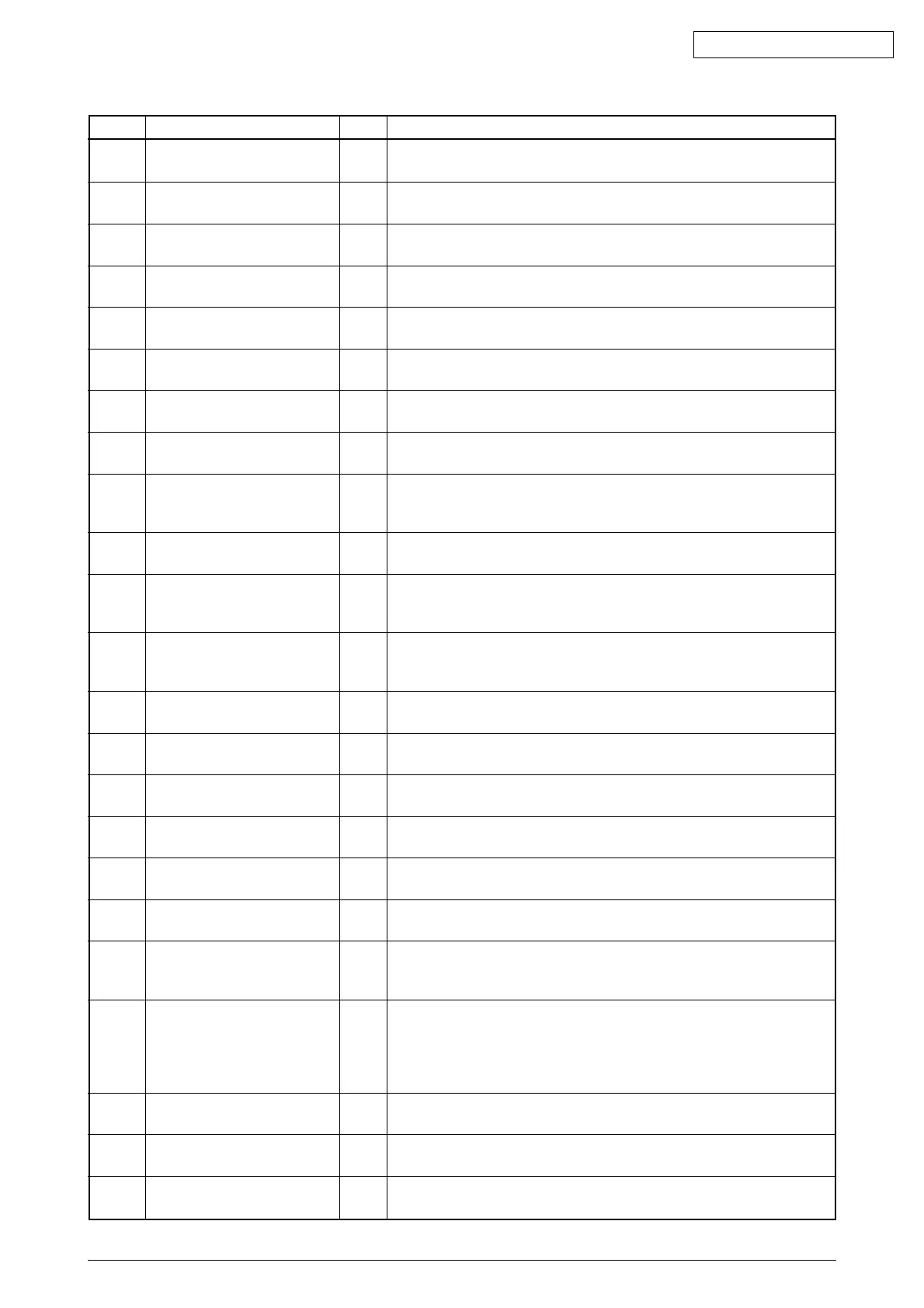
LEDStatus level
Table 5-1 (2/5)
LCD Descroption
Normal
Normal
Normal
-
Normal
Normal
Normal
Normal
Warning
Warning
Warning
Warning
Warning
Warning
Warning
Warning
Warning
Warning
Warning
Warning
Warning
Warning
Warning
DL MSG
ACTIVE
DL MSG
WRITING
DL MSG
SUCCESS
DL MODE
xxxx
INITIAL-
IZING
EEPROM
RESET'NG
RAM CHK
********
■■■■■■■■
■■■■■■■■
FLUSHING
(LOG)
■■
TONER LOW
■■
NON OEM TONER
DETECTED
■■
TONER REGIONAL
MISMATCH
■■
NON GENUINE TONER
■■
TONER EMPTY
■■
TONER SENSOR
■■
TONER NOT INSTALLED
■■
ORDER DRUM
■■
CHANGE DRUM
INVALID
DATA
■■
ERR PSE
■■
tttt EMPTY
■■
TRAY2 COVER OPEN
■■
FILE SYSTEM IS FULL
Varies
Varies
Varies
Varies
No Light
No Light
No Light
No Light
Blink
Varies
or Blink
Varies
Varies
Varies
Varies
Varies
Varies
Varies
Varies
Varies
Blink
Varies
Varies
Varies
The download Message data is being receiving.
The download Message data is being writing.
Writing the download message data succeeded.
Downloading via NIC. The download status is indicated in the bottom line.
Indicates that the controller side is initializing.
Indicates that EEPROM is initializing.
Indicates that the RAM is being checked.
Displayed at power ON.
Indicates that a job has been cancelled as the area storing logs
inside the printer has been drained and furthermore, a "cancel job"
instruction appears when logs are full.
Toner amount is low. Exchange a toner cartridge.
The toner cartridge is not proper.
Install a proper toner cartridge.
The toner cartridge is not proper.
Install a proper toner cartridge.
The toner cartridge is not proper.
Install a proper toner cartridge.
Toner near empty.
Exchange a toner cartridge.
Something is wrong with the toner sensor.
Start a printer again. Exchange an image drum cartridge.
A toner cartridge isn't being set.
Set a toner cartridge.
The image drum is near life. Please do the exchange preparation of the
image drum and the toner cartridge, and exchange it.
The image drum is over of life. Please do the exchange preparation of the
image drum and the toner cartridge, and exchange it.
Received invalid data. Prompts the user to press ON-LINE switch
to clear Warning display. Displayed when the printer receives an
unsupported PDL command.
Interpreter detects an error due to following reasons.
Data received after this is ignored till the end of the job.
When the job is received completely, this is automatically cleared.
- The job has a grammatical error.
- The page is complicated, and VM was used up.
Tray tttt has run out of paper. Handled as Warning until the user
designates the tray that has run out of paper.
Second Tray Cover Open. To continue, close cover.
Flash Full has occurred. This is a transient warning.
Displayed until the job is completed, then, cleared.



 To Next Page