C5550 MFP User’s Guide
A guide to printing > 205
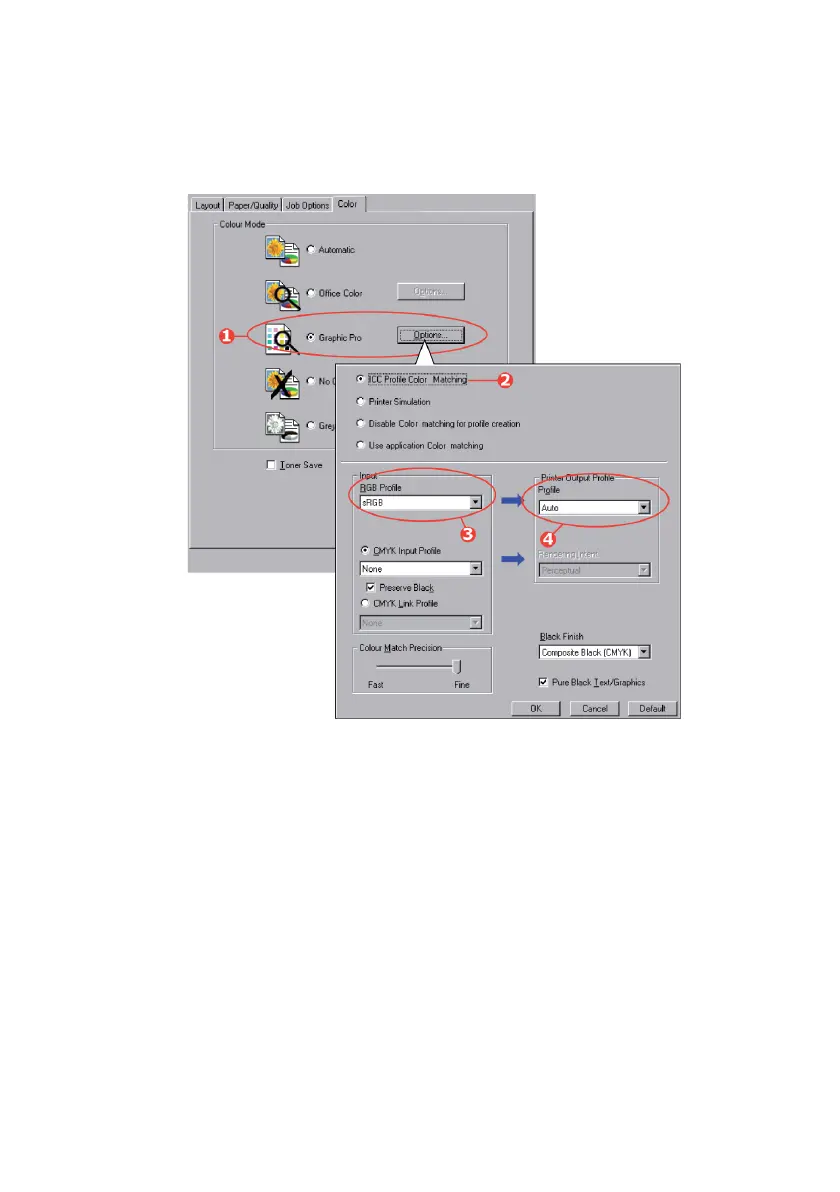
1. On the printer driver [Color] tab, select [Graphic Pro] (1)
and click [Options].
Win-RGB source_oda.jpg
2. Select [ICC Profile Color Matching] (2).
3. Select the ICC profile that corresponds to the device you
are trying to match such as your monitor, scanner or
digital camera (3).
Remember that the names “RGB Source 1”, “RGB
Source 2” and so on relate to the number assigned to the
profile using Profile Assistant. See “Step 2 - Down loading
ICC profiles to the hard disk” on page 202.
4. Select a Printer Output Profile (4).
If [Auto] is selected, the factory default profiles that are
embedded in the MFP will be used. If you have created a



 To Next Page