22
4. Press .
5. Press
. The change due to
the customer is displayed.
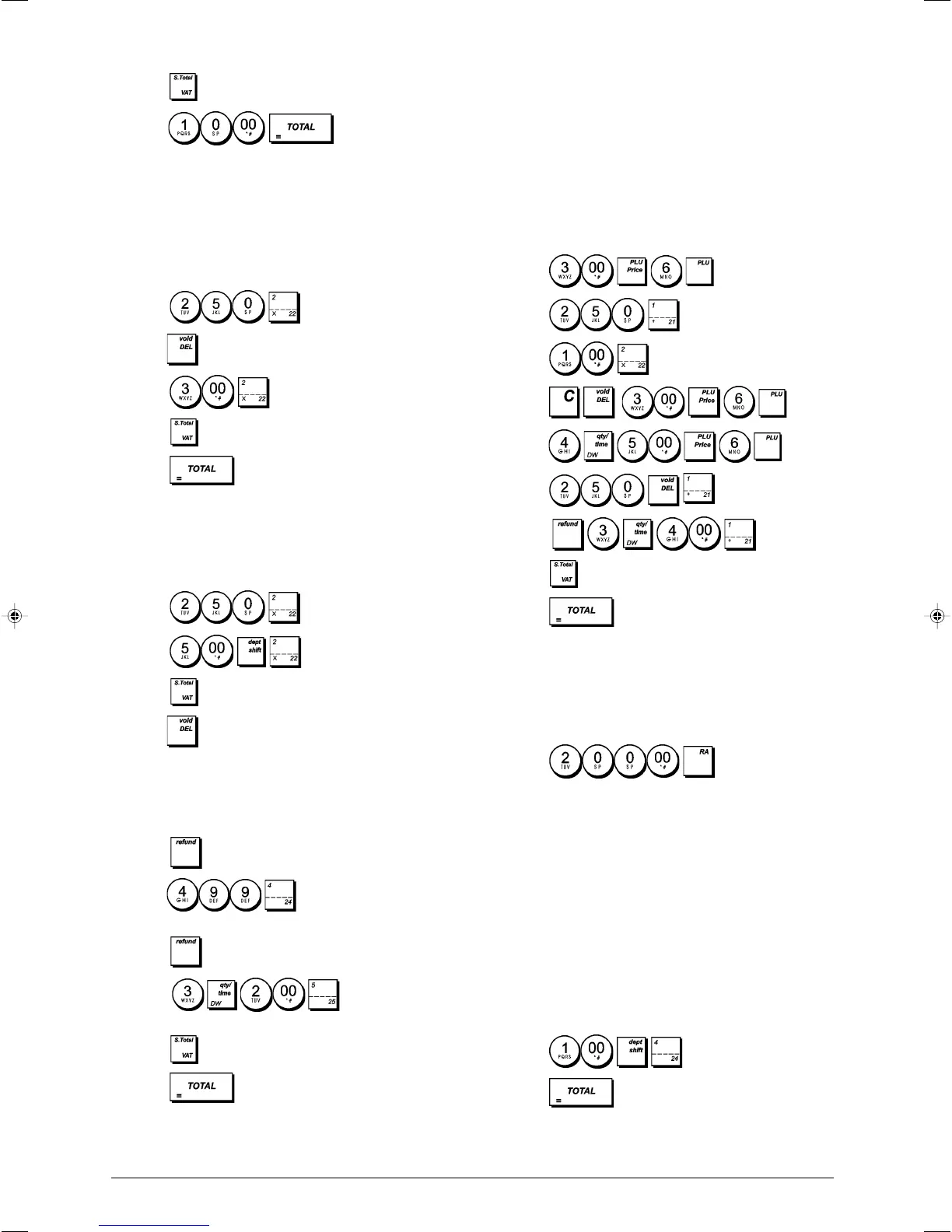
Voiding the Previous Entry in the Middle
of a Sale
Example: Void a £2.50 entry erroneously made to Depart-
ment 2. Then register a £3.00 item to this same Depart-
ment. End the transaction with an exact change tender.
1. Press .
2. Press
. The amount voided is displayed and printed.
3. Press
.
4. Press
.
5. Press
.
Full Void of Transaction Before Any Payment
Example: Void a transaction before starting to register
payment. Register an item of value £2.50 to Department 2
and an item of value £5.00 to Department 22.
1. Press
.
2. Press .
3. Press
.
4. Press
. The amount voided is displayed and printed.
Refunding Multiple Items
Example: Refund a £4.99 item to Department 4 and three
£2.00 items to Department 5.
1. Press .
2. Press
.The amount to be refunded
is displayed.
3. Press
.
4. Press . The amount to be
refunded is displayed.
5. Press
.
6. Press
.
Registering Multiple Void and Refund
Transactions
Example: Overwrite the preset PLU 6 with £3.00, register
the sale of a £2.50 item to Department 1 and of a £1.00 item
to Department 2. Void the £3.00 sale to PLU 6 and then
register the sale of four £5.00 items to PLU 6. Void the sale
of the £2.50 item previously made to Department 1 and
then refund 3 items costing £4.00 each to Department 1.
Subtotal the sale and end the transaction with an exact
cash tender.
1. Press .
2. Press .
3. Press
.
4. Press
.
5. Press
.
6. Press .
7. Press
.
8. Press
.
9. Press .
Registering Money Received on Account
Up to 7 digits can be used for registering money received on
account.
Example: Register £200.00 received on account.
1. Press
.
The cash drawer opens and the transaction is recorded on
receipt.
Registering Negative Department
Transactions
As prerequisite to negative department transactions,
program a normal department to a negative status as
explained in section "Link Multiple/Single Item Sale, Tax
Status and Item Price to a Department". These transactions
are useful when the clerk pays back money to the customer,
such as the refund of a deposit.
Example: With Department 24 activated for Single,
negative item sales, register a deposit refund of £1.00 for
the return of bottles.
1. Press
.
2. Press .















 To Next Page