30
5 Menu operations and functions
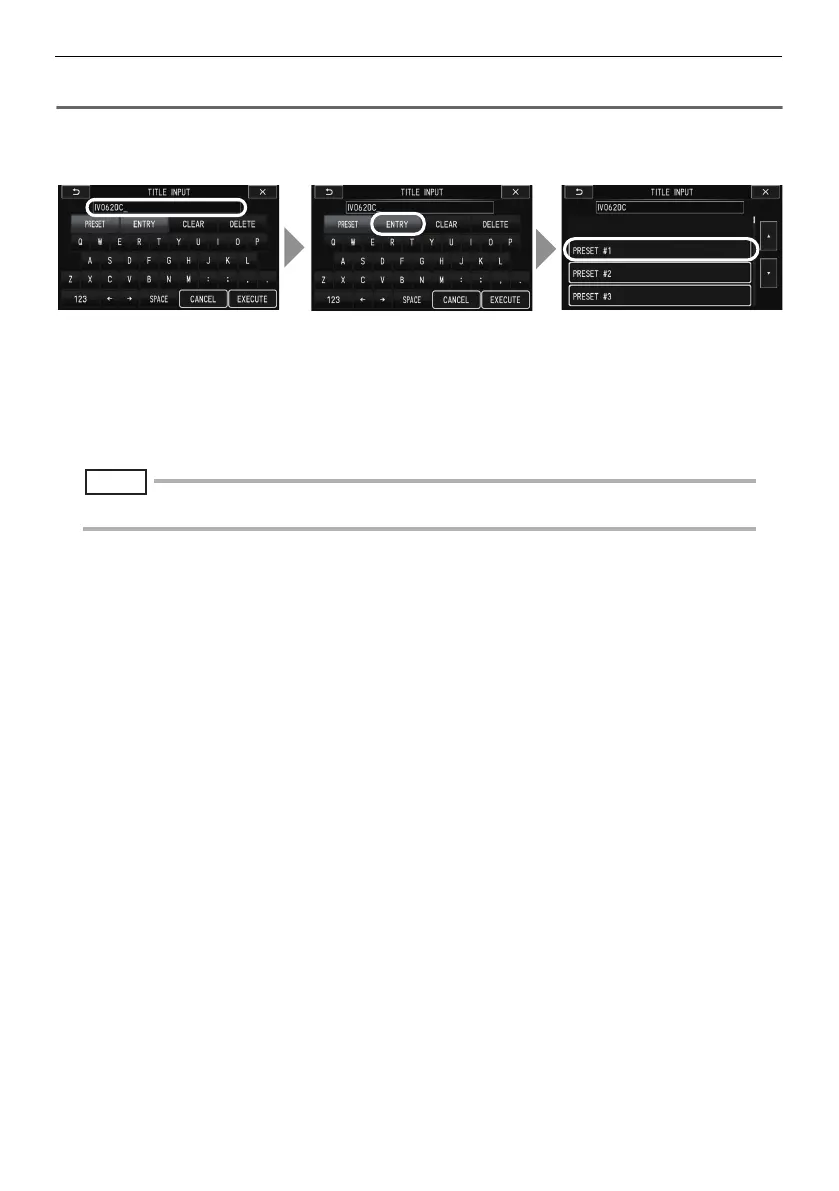
Registering a character string as a preset title
After you register commonly used character strings to favorites, you can recall them when you are
inputting titles. You can register a maximum of 55 character strings to preset titles.
1 Input the character string you want to register into the title input box.
For details about inputting, see "Inputting a title" (P. 28).
2 Touch [ENTRY].
A list of preset titles is displayed.
To stop registering a preset title, touch the
J
(Previous) button.
NOTE
• To jump to the previous or next page of the preset title list, touch the F or G (Page Jump) button.
3 Touch the line where you want to store the text string.
The text string you input in the title input box is registered to preset titles.
Registering a preset title overwrites anything currently in the line you specify in the list. This
means you can delete a preset title by performing the registration operation while the title input
box is blank.
1
32
F-model.book 30


 To Next Page