EasyManua.ls Logo

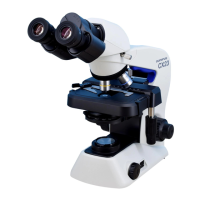
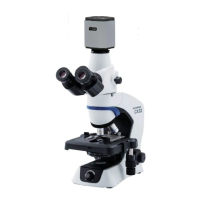
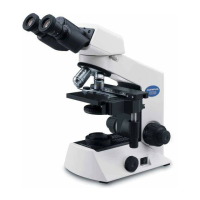
Olympus CX22LED - User Manual

Olympus CX22LED
28 pages
Print Icon
To Next Page IconTo Next Page
Loading...
INSTRUCTIONS
CX22LED
BIOLOGICAL MICROSCOPE
A X 8 0 0 2
This instruction manual is for the Olympus Biological Microscopes Model CX22LED. To ensure the
safety, obtain optimum performance and to familiarize yourself fully with the use of this microscope,
we recommend that you study this manual thoroughly before operating the microscope. Retain this
instruction manual in an easily accessible place near the work desk for future reference.

Questions and Answers

  • U
    ukimAug 15, 2025
    How to fix dust or stains visible in the Olympus CX22LED Microscope observation field?
    • R
      Robert JohnsonAug 16, 2025
      If you see dust or stains in the observation field of your Olympus Microscope, it's likely that the eyepiece, condenser, window lens, and/or specimen glasses are dirty. Clean them thoroughly.
  • D
    Daniel NicholsAug 19, 2025
    Why is my Olympus CX22LED observation image whitish-blurred or unclear?
    • J
      Julie BairdAug 19, 2025
      A whitish-blurred or unclear image on your Olympus Microscope can occur for several reasons: * The objective may not be fully engaged in the light path; ensure it clicks into position. * The objective, eyepiece, condenser, or specimen glasses could be dirty; clean them thoroughly. * If using an immersion objective, immersion oil may be required. If so, use it. * Bubbles might be present in the immersion oil; remove them. * You might not be using the correct immersion oil, so use the immersion oil supplied by Olympus.
  • P
    pfrenchAug 22, 2025
    What to do if my Olympus CX22LED has uneven brightness in the observation field?
    • M
      Mary ScottAug 22, 2025
      Uneven brightness in the observation field of your Olympus Microscope may be due to: * The objective not being fully engaged in the light path; engage it until it clicks. * The condenser being too low; raise it to the upper limit. * Dirty components (objective, eyepiece, condenser, or window lens); clean them thoroughly.
  • K
    Katie RasmussenAug 25, 2025
    Why does my Olympus Microscope image glare?
    • A
      anthonyclayAug 25, 2025
      Glare in the Olympus Microscope image may be caused by: * The condenser being too low; raise it. * The condenser iris diaphragm ring being stopped down excessively; adjust the aperture according to the objective magnification.
  • J
    John CamachoAug 27, 2025
    What to do if part of the Olympus Microscope image is defocused or looks like it’s flowing?
    • T
      Tracie RobersonAug 27, 2025
      If part of the image appears defocused or looks like it's flowing in your Olympus Microscope, it could be due to: * The objective not being properly engaged in the light path; engage it until it clicks. * The specimen not being correctly set on the stage; set the specimen correctly and secure it using the specimen holder.
  • R
    Rachael GillespieAug 30, 2025
    Why does the high-magnification objective touch the specimen just before coming into focus on my Olympus CX22LED Microscope?
    • M
      Mary CainAug 31, 2025
      If the high-magnification objective of your Olympus Microscope touches the specimen just before coming into focus, the specimen may be upside down. Set the specimen correctly with the cover glass on the top.
  • M
    mariahmillerSep 3, 2025
    Why does the Olympus Microscope stage lowers by its own weight?
    • B
      barbara10Sep 3, 2025
      If the stage of your Olympus Microscope lowers by its own weight or focusing is lost due to slippage of the knob, the coarse adjustment knob tension adjustment ring may be set too loose. Tighten the ring to adjust to the proper tension.
  • D
    Dale WhiteSep 5, 2025
    Why doesn't the Olympus Microscope coarse focus adjustment lower the stage low enough?
    • B
      Bill ElliottSep 6, 2025
      If the coarse focus adjustment on your Olympus Microscope cannot lower the stage low enough, the condenser may be too low. Raise it.
  • B
    Brandon WoodsSep 9, 2025
    What to do if the fields of view of two eyes do not match on my Olympus CX22LED Microscope?
    • R
      Rebecca EricksonSep 9, 2025
      If the fields of view of your two eyes do not match when using the Olympus Microscope: * The interpupillary distance may not be adjusted properly; adjust it. * Diopter compensation for the two eyes may not be set; adjust it correctly. * The left and right eyepieces might be different; replace one of them so that they are identical.
  • T
    Timothy BaileySep 12, 2025
    What to do if the Olympus Microscope objective hits the specimen when switching to a higher-magnification objective?
    • C
      Curtis DuranSep 12, 2025
      If the objective hits the specimen when switching to a higher-magnification objective on your Olympus Microscope: * The specimen might be upside down; set it correctly with the cover glass on top. * The cover glass might be too thick; use a cover glass with a thickness of 0.17 mm.

Summary

Safety Precautions

LED (light emitting diode) safety warning

Warning about direct LED light exposure to the eyes.

Safety Symbols

Explanation of symbols used on the microscope for safe operation.

Intended Use

Getting Ready

Maintenance and Storage

Standard Component Units

Nomenclature

Summary of Brightfield Observation Procedure

Detailed Observation Procedure

Turning the LED Illumination ON

How to power on the microscope's LED light source.

Placing Specimen on the Stage

Guide on correctly positioning the specimen slide on the microscope stage.

Detailed Observation Procedure

Adjusting the Focus

Steps for achieving sharp focus using coarse and fine adjustment knobs.

Adjusting the Tension of the Coarse Adjustment Knob

How to adjust the resistance of the coarse focus knob for optimal control.

Detailed Observation Procedure

Pre-focusing Knob

Explanation and usage of the pre-focusing knob to prevent collision.

Adjusting the Interpupillary Distance

How to adjust the distance between eyepieces for comfortable viewing.

Detailed Observation Procedure

Adjusting the Diopter

Steps for compensating for differences in eyesight between users' eyes.

Using the Eye Shades

Guidance on using the eye shades for optimal viewing with/without glasses.

Adjusting the Condenser Position and Aperture Iris Diaphragm

How to adjust the condenser and diaphragm for proper illumination.

Switching the Objectives

Procedure for changing between different magnification objectives.

Detailed Observation Procedure

Using the 100 X Immersion Objective

Instructions for using the 100X objective, including immersion oil.

One-Point Advice

How To Track a Microscopic Image

Explains how image movement relates to specimen slide movement.

Total Magnification

Defines total magnification as eyepiece x objective magnification.

Resolution

Explains factors affecting the microscope's ability to distinguish details.

Field Number (FN)

Defines field number and its relation to observed image diameter.

Actual Field of View

Explains how to calculate the actual observed area on the specimen.

Troubleshooting Guide

Uneven brightness in observation field

Addresses issues with uneven illumination.

Dust or stains are visible in observation field

Solutions for dust or stains appearing in the field of view.

Observation image glares

Tips for resolving glare issues in the observed image.

Observation image is whitish-blurred or unclear

Troubleshooting steps for unclear or blurry images.

Part of image is defocused or image looks like its flowing.

How to fix partial defocusing or image distortion.

Troubleshooting Guide

High-magnification objective touches specimen just before coming into focus.

Solves issues with the objective hitting the specimen.

The tension of coarse adjustment knob it too high.

Adjusting coarse focus knob tension when it's too tight.

Focusing is impossible (because the stage cannot be raised).

Addresses problems with the stage not moving for focusing.

Coarse focus adjustment cannot lower the stage low enough.

Remedies for insufficient coarse focus range.

Fields of view of two eyes do not match.

Solutions for mismatched fields of view between eyes.

The LED illumination does not light.

Troubleshoots issues with the LED illumination not working.

Specifications

Optical Characteristics

Assembly

Connecting the AC Adapter and Power Cord

Step-by-step guide to connect the power supply components.

Optional Accessories

System Diagram of Optional Accessories

Visual representation of how optional accessories connect to the microscope.

Installation and Operation of Optional Accessories

Detailed instructions for installing and using specific optional accessories.

Filter Holder CH2-FH and Darkfield Ring CH2-DS

How to install and use the filter holder and darkfield ring.

Optional Accessories

Reflection Mirror CH20-MM

Instructions for using the reflection mirror for natural light observation.

Eyepieces WHC15 X;WHC15 X-H

Guide for installing alternative eyepieces.

Optional Accessories

Using the Eyepiece Micrometer Disk (Optional)

Instructions for installing and using the eyepiece micrometer.

Cord Hanger CX22 LED-CH

How to attach and use the cord hanger for storage.

Proper Selection of the Power Cord

Olympus CX22LED Specifications

General IconGeneral
TypeBiological Microscope
IlluminationLED
FocusingCoaxial coarse and fine focusing
Magnification40x to 1000x
Objective Lenses4x, 10x, 40x
Eyepiece10x
StageMechanical stage
Power SupplyAC adapter
WeightApprox. 3.5 kg

Related product manuals