40
EN
3
Exposure
3
Exposure
The camera sets the optimum aperture value and shutter speed automatically according to the
subject brightness.
•
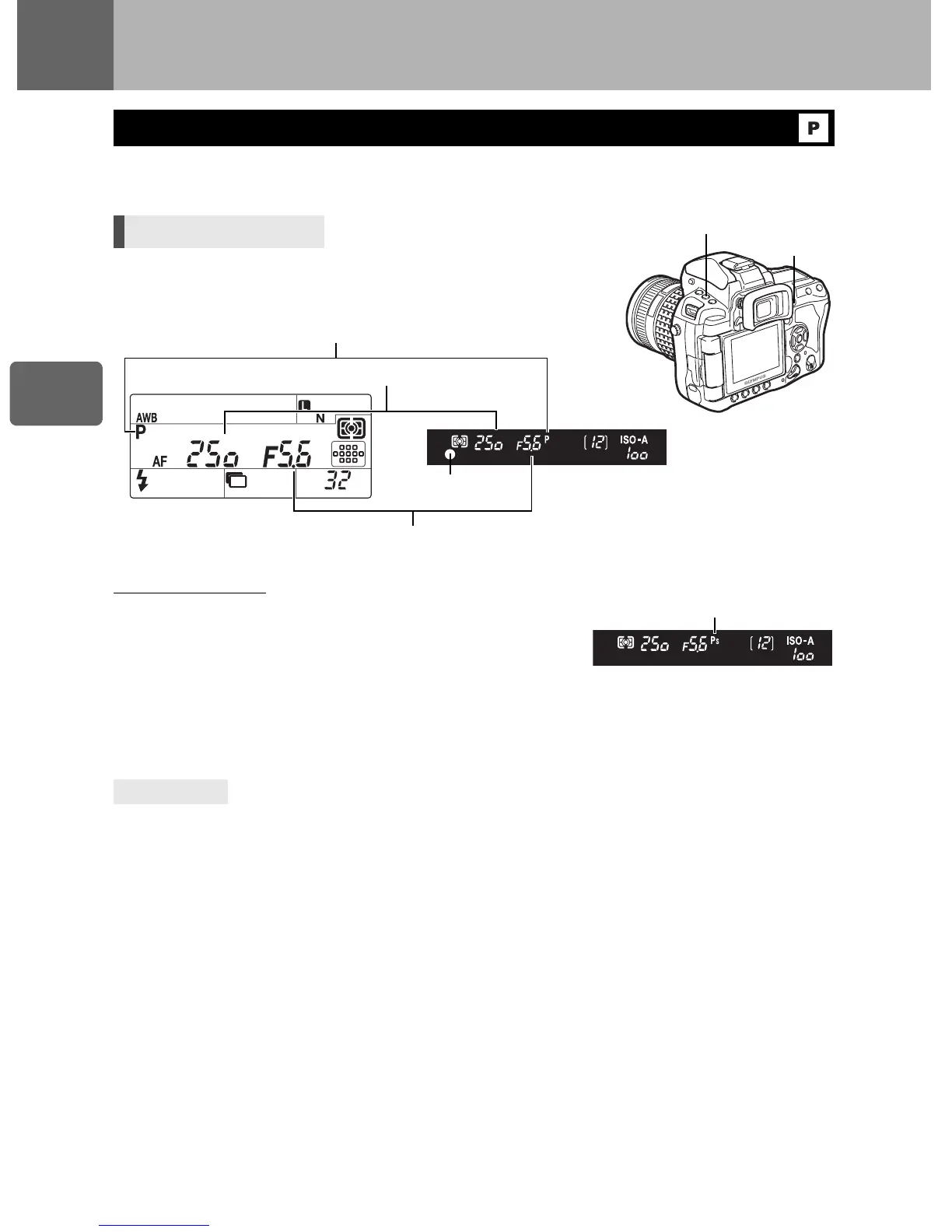
When the shutter button is half-pressed, the shutter speed and
aperture value are displayed on the viewfinder and control panel.
Program shift (
%
)
By turning the main dial (or sub dial) in the
P
mode, you can
change the combination of aperture and shutter speed while
maintaining the optimum exposure.
g
“Program line
diagram (
P
mode)” (P. 136)
•
The program shift setting will not be canceled after shooting. To
cancel program shift setting, turn the main dial (or sub dial) until
the shooting mode indication
%
on the viewfinder or control panel changes to
P
or turn off the
power.
•
Program shift is not available when you are using a flash.
The shutter speed and aperture value are blinking:
j
The optimum exposure cannot be obtained. For details, see “Exposure warning
display” (
g
P. 137).
When you want to change the shooting mode using only your right hand:
j
You can change the shooting mode using the
<
button and dials.
g
“
;
FUNCTION” (P. 99)
Program shooting
Direct button
MODE
+
j
[
P
]
TIPS
AF confirmation mark
Shooting mode
Shutter speed
Aperture value
Control panel
Viewfinder



 To Next Page