107
EN
9
Customizing your camera
w+F
When set to [ON], it will be added to the exposure compensation value and flash intensity
control will be performed.
X K/COLOR/WB
NOISE REDUCT.
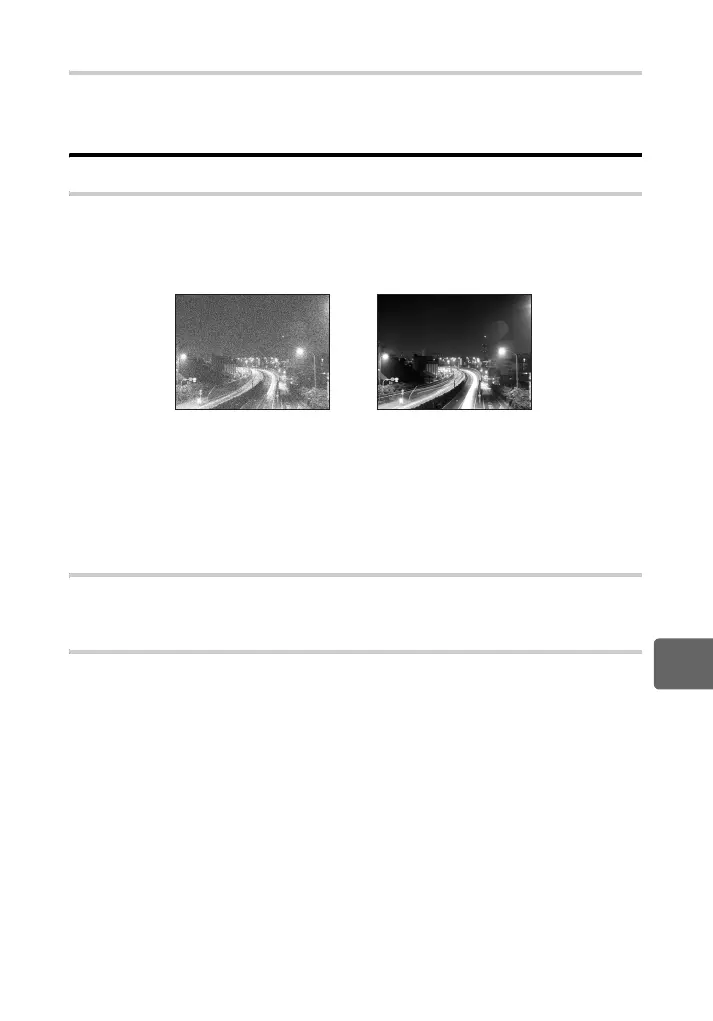
This function reduces the noise that is generated during long exposures. When shooting
night scenes, shutter speeds are slower and noise tends to appear in images. With [NOISE
REDUCT.], you can let the camera reduce noise automatically to produce clearer images.
When set to [AUTO], noise reduction will be activated only when the shutter speed is slow.
When set to [ON], noise reduction will always be activated.
• While noise reduction is activated, it takes about twice the usual time to take a picture.
• The noise-reduction process is activated after shooting.
• During processing the card access lamp blinks. You cannot take more pictures until the
card access lamp turns off.
x Notes
• During sequential shooting, [NOISE REDUCT.] is [OFF] automatically.
• This function may not work effectively with some shooting conditions or subjects.
NOISE FILTER
You can select the noise processing level. Use [STANDARD] for general use. [HIGH] is
recommended during high sensitivity shooting.
WB gP. 67
When set to [OFF]
When set to
[ON] or [AUTO]
s0019_e_00_0_unified.book Page 107 Friday, April 24, 2009 9:21 AM



 To Next Page