38
EN
1
Using live view
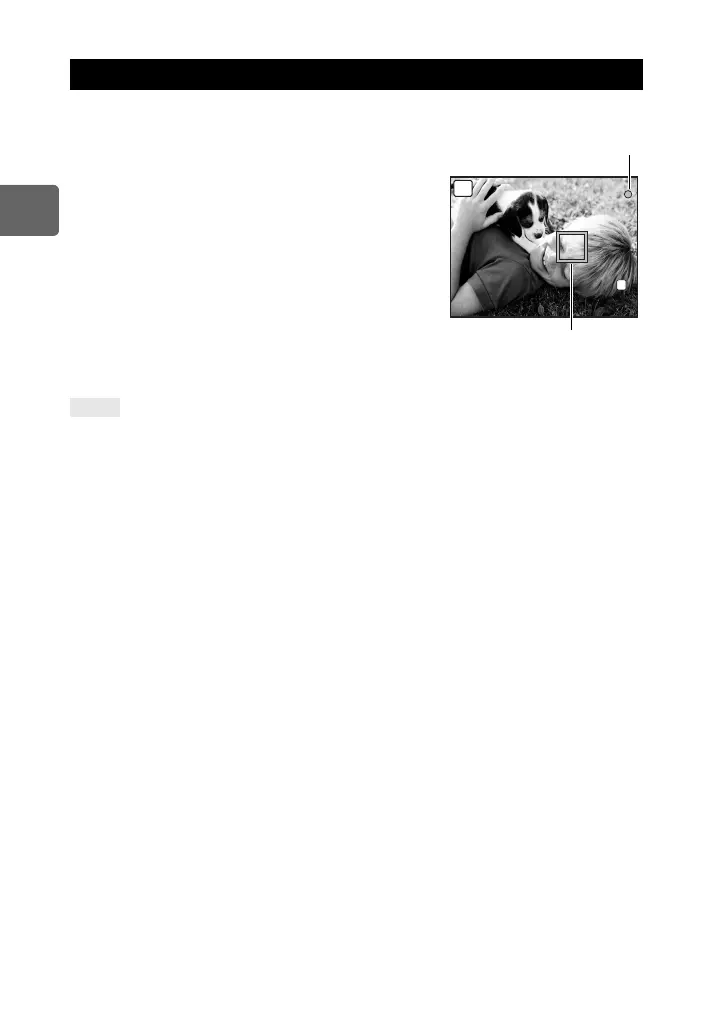
Press the shutter button down halfway to perform autofocus using the imager device.
1 Press the shutter button halfway.
• When the focus is locked, the AF confirmation mark
(( or n) and AF target mark light up.
(: For a high-speed Imager AF-compatible lens which
is a Micro Four Thirds system lens or Four Thirds
system lens*
n: Other Four Thirds system lens
• Check the focus on the LCD monitor.
You can enlarge the view and finely adjust the
focus. g“Enlarged display operation” (P. 42)
2 Press the shutter button all the way to take a
picture.
• You can record sound with the picture you have taken.
g“Adding sound to still pictures” (P. 90)
To adjust the focus by using manual focus:
j In [S-AF+MF] mode or [MF] mode, turn the focus ring to enlarge the subject and achieve focus.
g“MF ASSIST” (P. 98)
* For the latest information about Olympus Four Thirds lenses compatible with Hi-Speed Imager AF, visit the
Olympus website.
Taking a picture using live view
TIPS
250
250
F5.6
38
P
L
N
AF confirmation mark
AF target mark
s0019_e_00_0_unified.book Page 38 Friday, April 24, 2009 9:21 AM



 To Next Page