109
EN
9
Customizing your camera
PIXEL COUNT
You can set the pixel size for the image size [X] and [W].
[Xiddle] Select [3200 × 2400], [2560 × 1920], or [1600 × 1200].
[Wmall] Select [1280 × 960], [1024 × 768], or [640 × 480].
Y RECORD/ERASE
QUICK ERASE
You can erase the picture you have just taken immediately using the D button.
[OFF] When the D button is pressed, the confirmation screen appears, asking you if
you want to erase the picture.
[ON] Pressing the D button erases the picture immediately.
RAW+JPEG ERASE
You can select the method to erase images recorded in RAW+JPEG. This function can only
be used to erase one frame.
[JPEG] Erases all JPEG image files, leaving only the RAW image files.
[RAW] Erases all RAW image files, leaving only the JPEG image files.
[RAW+JPEG] Erases both image file types.
x Notes
• This function is effective only if deleting one frame. For all-frame erase or erasing selected
frames, both RAW and JPEG will be erased regardless of this setting.
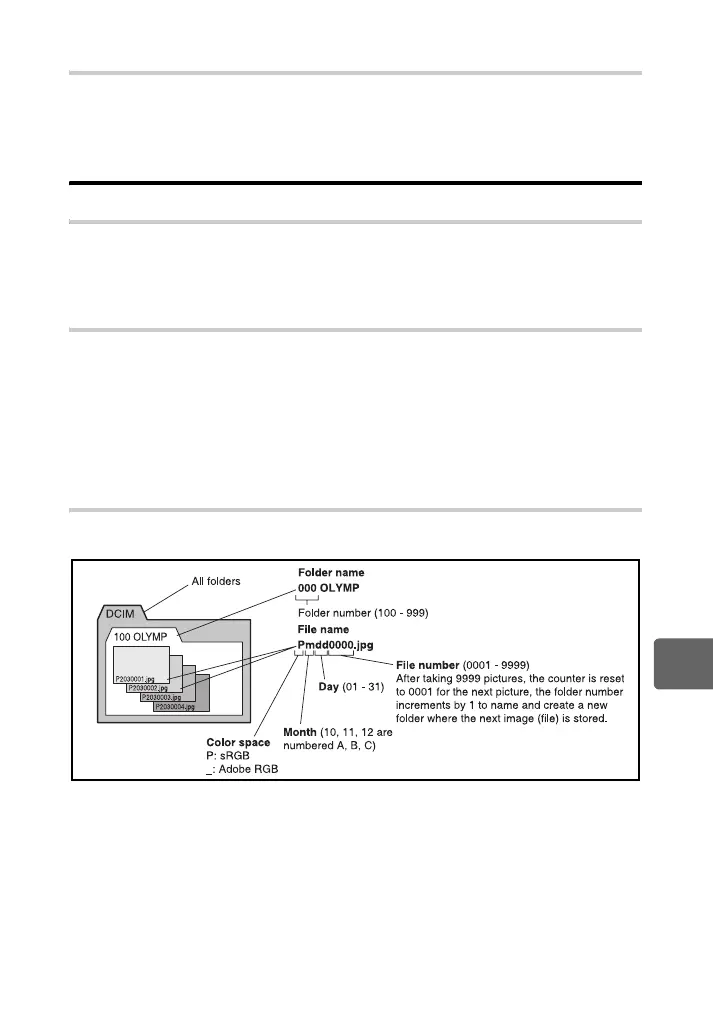
FILE NAME
When you take a picture, the camera assigns it a unique file name and saves it in a folder.
File names are assigned as shown in the illustration below.
s0019_e_00_0_unified.book Page 109 Friday, April 24, 2009 9:21 AM



 To Next Page