20
EN
Menu
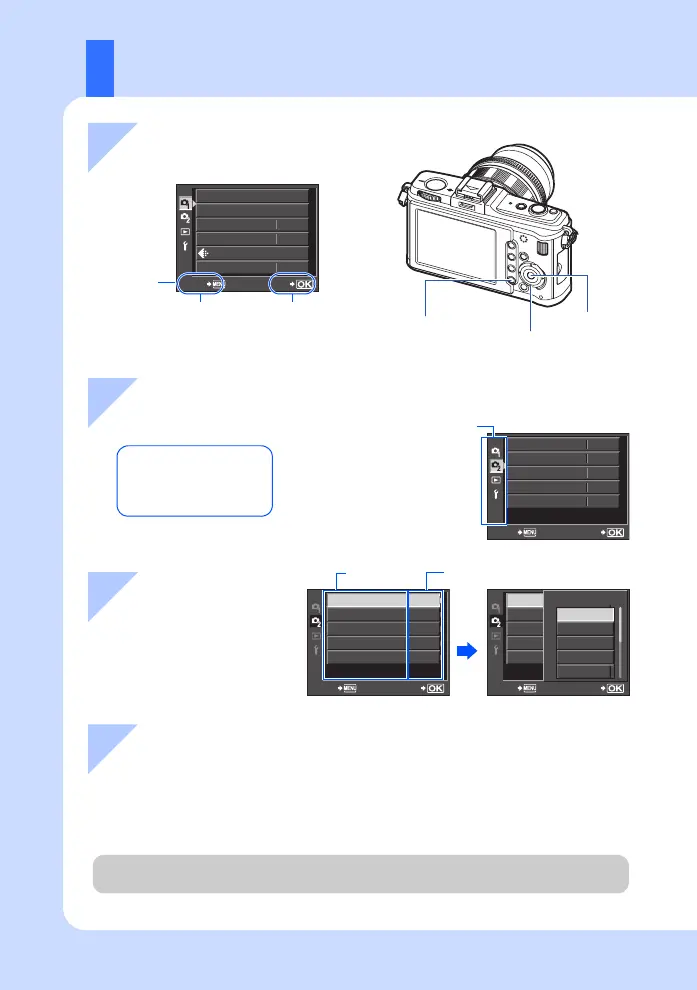
1 Press the MENU button to
display the menu
3 Use fg to select a
function, and i to
go to the settings
screen
2 Use fg to select a tab, then press i
For details on the functions that can be set with the menu, refer to
“Menu directory” (gP. 139).
Press the i button
to confirm the setting
The current setting is displayed
CARD SETUP
NORM
CUSTOM RESET
PICTURE MODE
GRADATION
IMAGE ASPECT
SET
BACK
4:3
j
MOVIE+STILL
IMAGE STABILIZER
SETBACK
OFF
OFF
o
P
OFF
MOVIE AE MODE
j
/
Y
MULTIPLE EXPOSURE
SETBACK
MOVIE+STILL
IMAGE STABILIZER
OFF
OFF
o
P
OFF
MOVIE AE MODE
j
/
Y
MULTIPLE EXPOSURE
SETBACK
MOVIE+STILL
IMAGE STABILIZER
OFF
OFF
o
P
OFF
MOVIE AE MODE
j
/
Y
MULTIPLE EXPOSURE
MOVIE AE MODE
M
A
ART1
P
ART2
Operation
guide
Press the MENU button
to go back one screen.
W Shooting Menu 1
X Shooting Menu 2
q Playback Menu
d Setup Menu
Function
Tab
i
MENU button
k Arrow pad
i button
4 Press the i button to confirm the setting
• Press the MENU button repeatedly to exit the menu.
s0026_e_00_0_unified.book Page 20 Tuesday, September 29, 2009 10:30 AM



 To Next Page