77
EN
5
Playback functions
5 Playback functions
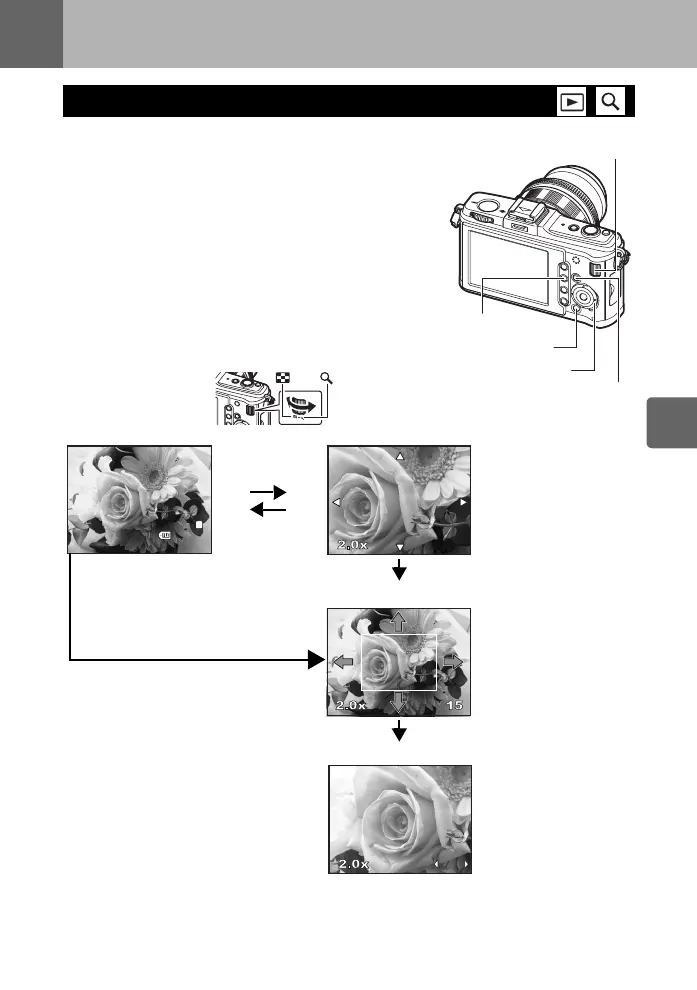
1 Press the q button (Single-frame playback).
• The last recorded image appears.
• The sound recorded when taking the picture is played
back simultaneously.
• The LCD monitor turns off after more than 1 minute if no
operations are performed.
2 Use k to select images you want to view. You can
also turn the sub dial to switch to U for close-up
playback.
Single-frame/Close-up playback
Fn button
j
INFO button
q button
k button
15
15
[4032x3024,1/8]
2009.11.01
21:56
100-0015
15
L
N
Press k to change the
close-up position.
Press k to move the
display of the close-up
position.
When [g FACE DETECT]
(gP. 55) is set to [ON], a
frame is displayed around a
detected face. Press i to
move the frame to another
face.
Press hi to view frame-
by-frame close-ups.
When [g FACE DETECT]
is set to [ON], press fg
to move to another face in
close-up position.
• Press the INFO button to
return to close-up
playback.
(Single-frame playback) (Close-up playback)
Press the INFO button
f : Displays the frame that is
stored 10 frames back
g : Displays the frame that is
stored 10 frames ahead
i : Displays the next frame
h : Displays the previous frame
(Close-up position playback)
Press the INFO button
(Close-up frame-by-frame playback)
• To exit the playback mode, press the
q button again.
• Pressing the shutter button halfway
resumes the shooting mode.
Press the < button
• Plays back the image at a
10× magnified close-up
position.
s0026_e_00_0_unified.book Page 77 Tuesday, September 29, 2009 10:30 AM



 To Next Page