81
EN
5
Playback functions
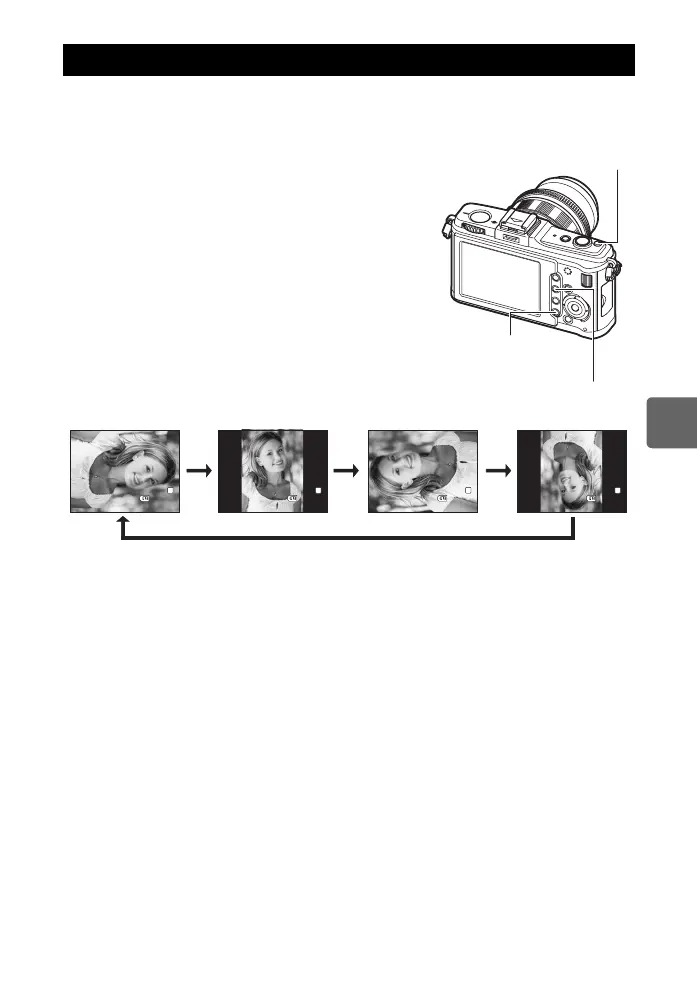
This function lets you rotate images and display them vertically on the monitor during single-
frame playback. This is useful when taking pictures with the camera held vertically. The
images will automatically be displayed in the correct direction even if the camera is rotated.
1 MENU[q][y]
• When set to [ON], images shot vertically will be
automatically rotated and displayed during playback.
You can also press the F button to rotate and display
the image.
• The rotated image will be recorded on the card in that
position.
• Rotating playback is not available for movies.
Rotating images
MENU button
q button
F button
[
4032x3024,1/8
]
2009.11.01
21:56
100-0015
15
[
4032x3024,1/8
]
2009.11.01
21:56
100-0015
15
[
4032x3024,1/8
]
2009.11.01
21:56
100-0015
15
[
4032x3024,1/8
]
2009.11.01
21:56
100-0015
15
L
N
L
N
L
N
L
N
Original image before rotating
FFF
F
s0026_e_00_0_unified.book Page 81 Tuesday, September 29, 2009 10:30 AM



 To Next Page