EasyManua.ls Logo

Omron BU5002R - Names of each Part

Omron BU5002R
135 pages
Print Icon
To Next Page IconTo Next Page
To Previous Page IconTo Previous Page
Loading...
1 Preparation
1-4 Names of each part
BU5002R/BU3002R/BU3002RH
27
1
1-4 Names of each part
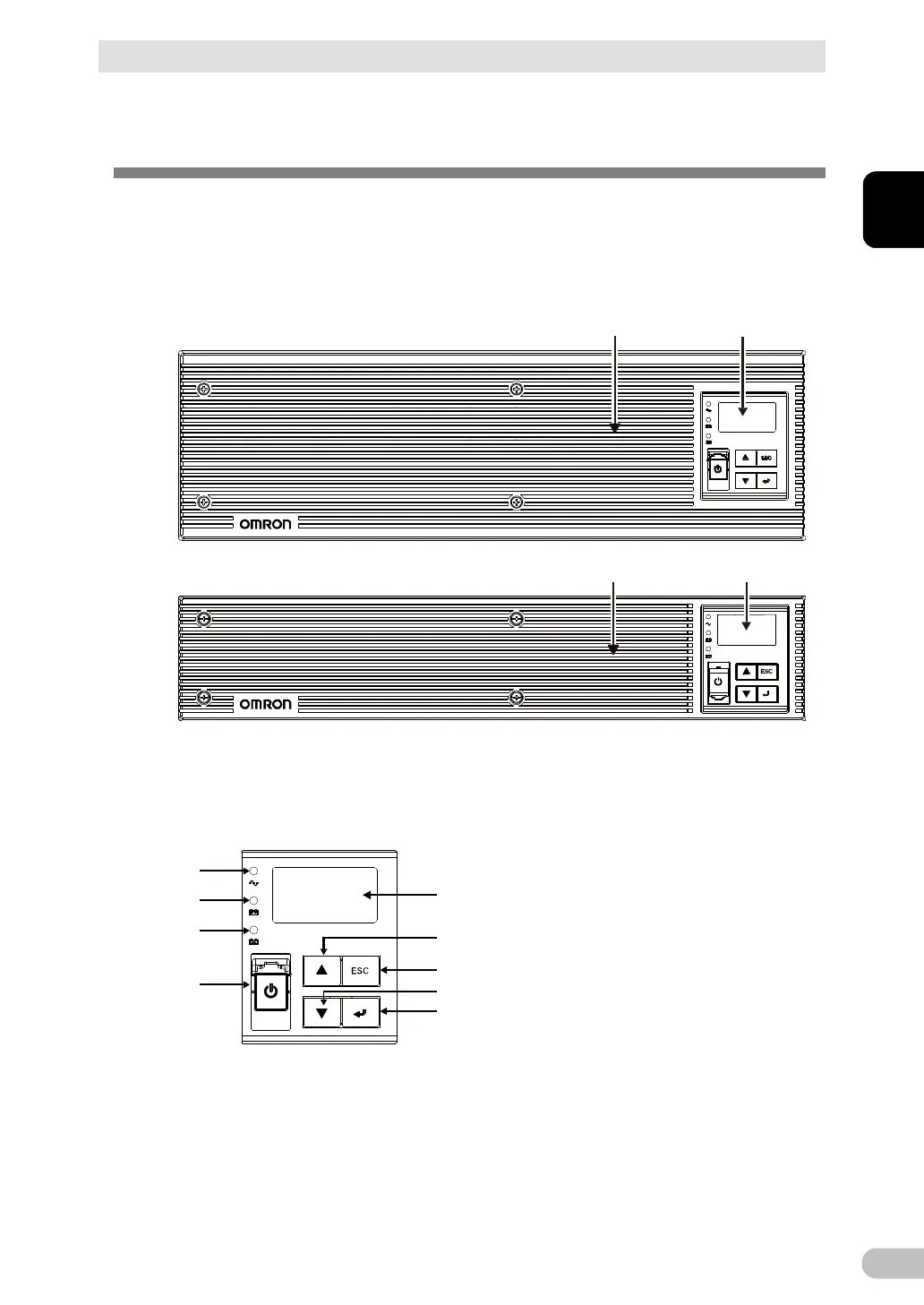
This section describes the name of each part of the UPS.
For information on the function of each part, refer to “2. Installation and connection” on
page 30 and “3. Check and start the operation” on page 59 that provide the details.
Front view
· BU3002R, BU3002RH
· BU5002R
1 2
21
1. Air vent
2. Operation panel
<Enlarged view of the operation panel>
A
E
F
G
H
I
B
C
D
A: “Power supply output” LED
B: “Battery mode” LED
C: “Battery replacement” LED
D: “Power” switch cover/“Power” switch
E: LCD
F: “Up” switch
G: “ESC” switch
H: “Down” switch
I: “Enter” switch

Table of Contents

Related product manuals