EasyManua.ls Logo

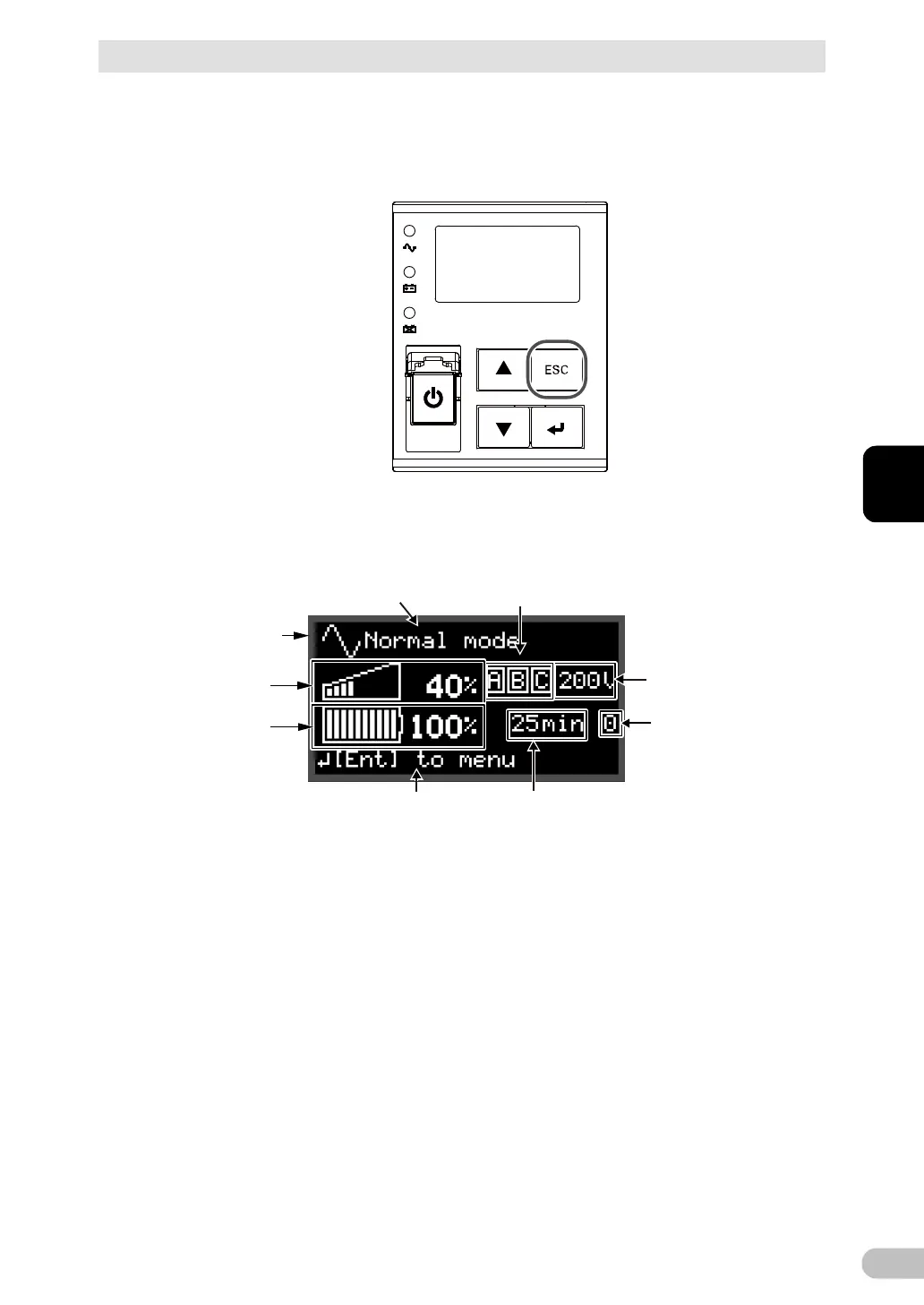
Omron BU5002R - Status Screen on the LCD

Omron BU5002R
135 pages
Print Icon
To Next Page IconTo Next Page
To Previous Page IconTo Previous Page
Loading...
3 Checking and starting the operation
3-1 Names and functions of each part of the operation and display sections
BU5002R/BU3002R/BU3002RH
63
3
■ To pause the buzzer sound
When the buzzer is sounding, hold down the “ESC” switch for 0.5 seconds or longer to
pause the buzzer sound.
3-1-5 Status screen on the LCD
Icon
Text displayed at top
Output voltage
Power output status
Text displayed at bottom
Load level
Backup time
Battery level
Number of expansion
battery units
■ Icon
An icon representing the status of the UPS is displayed. See “3-1-7 How to interpret icons,
LED, and buzzer sounds” (page 66).
■ Text displayed on top/bottom
Messages indicating the status or prompting user action are displayed in conjunction with
the icons.

Table of Contents

Related product manuals