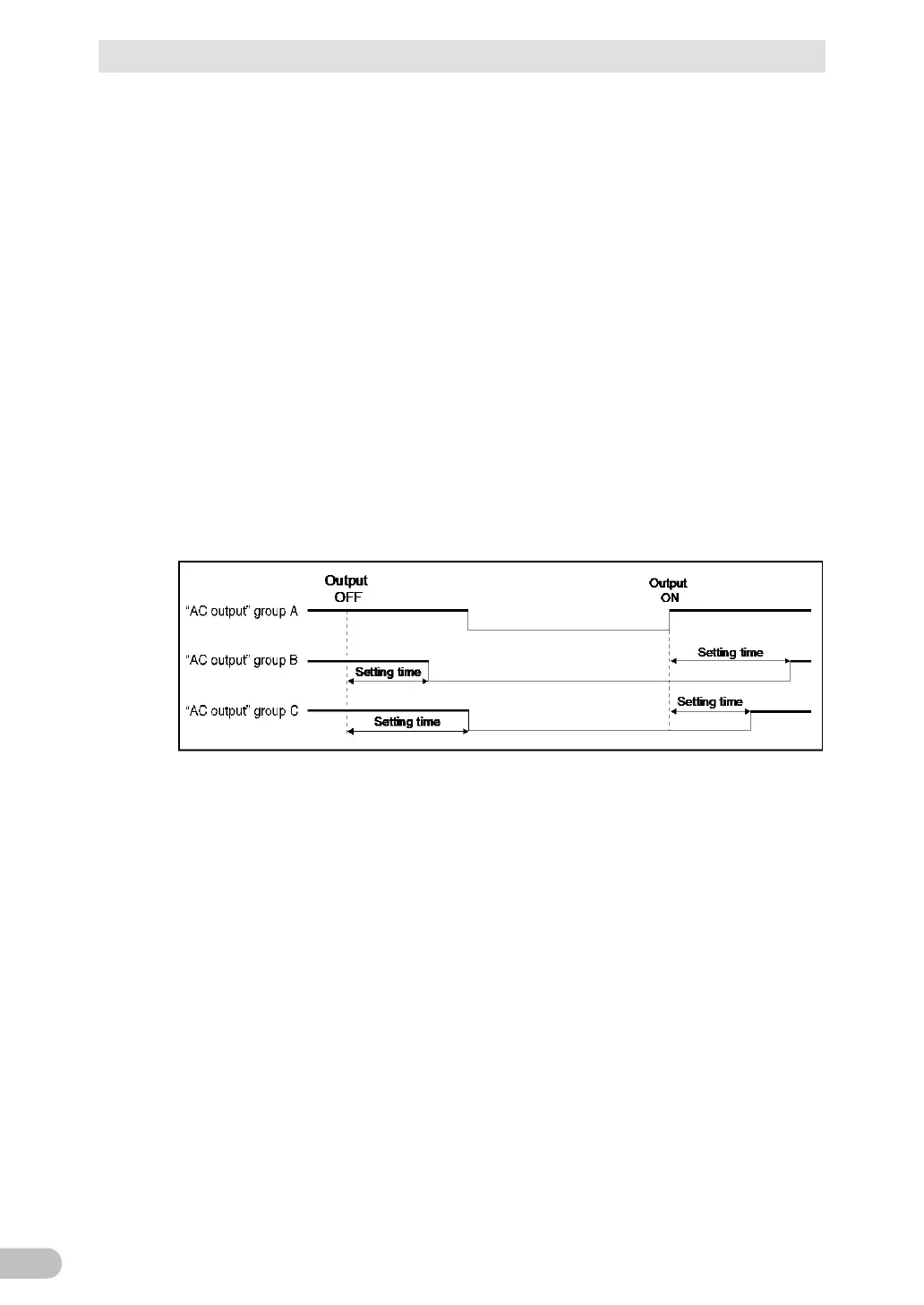
■ Group control of AC output
Use of the shutdown software enables this function.
The output receptacles of the UPS are divided into 3 groups: A, B, and C.
1. AC output group A
Output starts simultaneously with start up.
2. AC output groups B and C
・ The output start times for AC output groups B and C are independent of AC
output group A, so they can be delayed or set to precede the output stop time.
・ The output start/stop time control function is available when using
“PowerAttendant Lite”, “PowerAct Pro”, “SimpleShutdownSoftware”, “Network
Card”, or “SNMP/Web Card”.
・ Output ON/OFF can be controlled with the shutdown software while the UPS is
operating.
・ The delay settings and ON/OFF control described here can be performed
independently for AC output group B and AC output group C. Changes can also
be made using the LCD settings on the main unit.
This function can be used to set the startup order of servers, peripheral devices, etc.
Also, the output receptacles can also be forcibly turned ON/OFF remotely
* At the time of shipment of the product, the setting time is set to 0 seconds.
The separate output overcurrent protection switches of group B and group C are activated
to turn the switch off in the event of an excess current flowing. In this case, after removing
the cause, press the switch that had tripped to cancel it.



 To Next Page