l
Changing the Layout Number from a Layout with a Hidden Top Menu
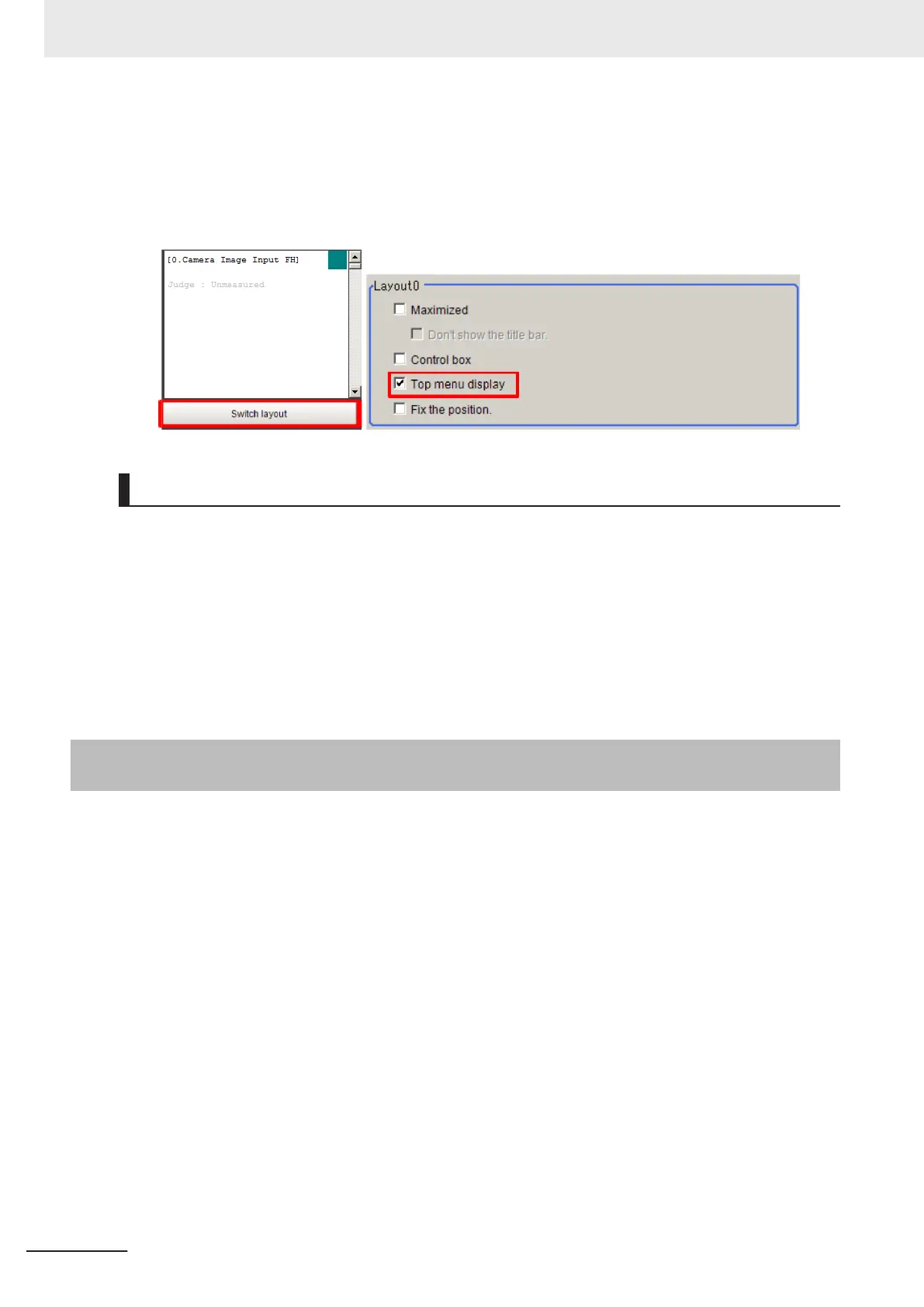
When you click Layout ended on a layout where theTop menu display is hidden, the Switch
layout button will automatically appear under the Detail Result Pane. Click theSwitch layout but-
ton and switch to a layout number where the Top menu display option is selected in the Layout
modification dialog box.
Saving the Layout in the Controller or a File
l
Saving the Layout in the Controller
After you end Layout Modification Mode, click the Data save button.
Restart the Sensor Controller to reflect the layout modifications that were saved.
l
Saving the Layout as a file
Select Save to File from the Function menu. Under Settings data, set the Data to be saved to
System data or System + Scene group 0, specify the destination, and then click the OK button.
8-3-2
Setting the Behavior of Output Signals for Each Layout [Layout
setup]
For each layout, you can set the behavior of output signals after the layout is changed.
1 Select Layout setup from the Window Menu for the main window for layout 0.
2 The following Layout setup dialog box is displayed.
Set the name for layouts 0 to 8, and whether to use the RUN signal output and external output
signals.
8 Setting Windows
8 - 22
FH/FHV Series Vision System User’s Manual (Z365-E1)

 To Next Page
 Loading...