4-14
4-2 Function Mode
4
Functions
External Frequency (Voltage/Current) Adjustment
•External analog input (frequency reference)
FV-FC terminal: 0 to 10 V (voltage input)
FI-FC terminal: 4 to 20 mA (current input)
FE-FC terminal: -10 to 10 V (voltage input)
Also set an output frequency for the FREQ adjuster on the Digital Operator.
Adjusting the FE-FC and FI-FC Terminals
•To input voltage ranging from 0 to 5 V on the FI-FC terminal, set A014 to 50%.
FW
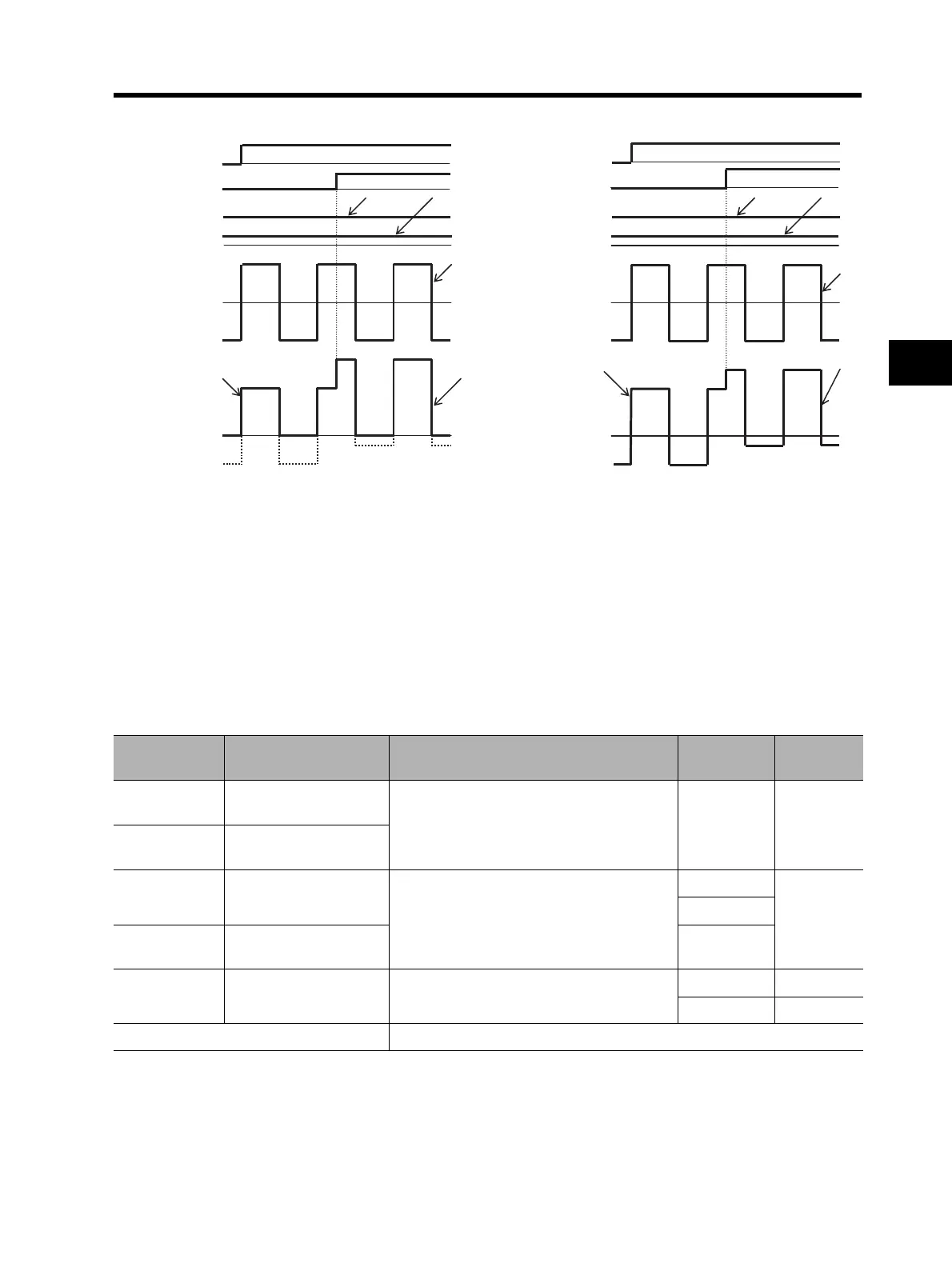
(Example 1) Not reversible (Example 2) Reversible
AT
Main frequency
reference
FI or FV terminal
O
O
Auxiliary
frequency
reference
FE terminal
Real frequency
reference
f
FV
+ f
FE
Forward
f
FI
f
FV
f
FE
f
FI
+ f
FE
FW
AT
Main frequency
reference
FI or FV terminal
O
O
Auxiliary
frequency
reference
FE terminal
Real frequency
reference
f
FE
+ f
FI
Forward
Reverse
f
FI
f
FV
f
FE
f
FE
+ f
FI
Parameter No. Function name Data
Default
setting
Unit
A011
A101
FV/FI start frequency
0.00 to 400.0
(Set a start/end frequency.)
0.0 Hz
A012
A102
FV/FI end frequency
A013
A103
FV/FI start ratio
0. to 100.
(Set a start/end ratio relative to an external
frequency reference of 0 to 10 V and 4 to 20
mA.)
0.
%
20.
A014
A104
FV/FI end ratio 100.
A015
A105
FV/FI start selection
00: Start frequency (A011 set value)
01: 0 Hz
01
00
Related functions A003, A203, A303, A081, A082












 To Next Page