4-64
4-2 Function Mode
4
Functions
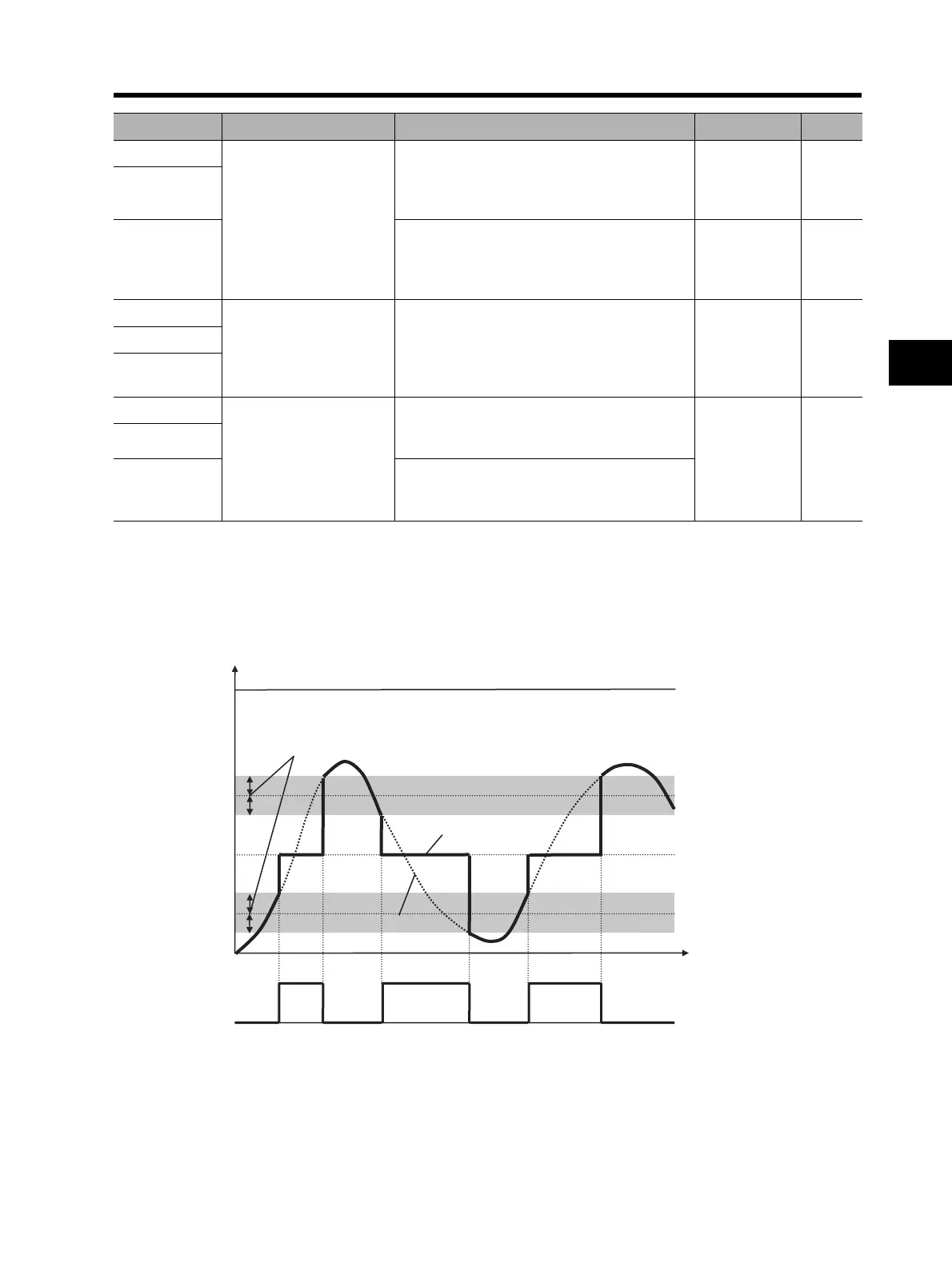
•You can set hysteresis widths for the window comparator upper and lower limit levels.
•You can set limit levels and a hysteresis width individually for FV, FI, and FE inputs.
•For the WCFV/WCFI/WCFE output, you can fix the analog input application value to the desired
value. Set values in FV/FI/FE disconnection operation levels b070/b071/b072. If "no" is set, the
analog input value is directly reflected.
•FVDc/FIDc/FEDc outputs are the same as WCFV/WCFI/WCFE, respectively.
b061 (FV)
Window comparator
FV/FI/FE lower limit level
Set a lower limit level.
Setting range: 0 to 100
Upper limit: Upper limit level - Hysteresis
width × 2
0
%
b064 (FI)
b067 (FE)
Set a lower limit level.
Setting range: -100 to 100
Upper limit: Upper limit level - Hysteresis
width × 2
-100 %
b062 (FV)
Window comparator
FV/FI/FE hysteresis
width
Set a hysteresis width for the upper and lower
limit levels.
Setting range: 0 to 10
Upper limit: (Upper limit level - Lower limit
level) × 2
0%
b065 (FI)
b068 (FE)
b070 (FV)
Analog operation level at
FV/FI/FE disconnection
0 to 100/no (ignored): Set an analog input
application value used for WCFV/WCFI/
WCFE (FVDc/FIDc/FEDc) output.
no
b071 (FI)
b072 (FE)
-100 to 100/no (ignored): Set an analog input
application value used for WCFV/WCFI/
WCFE (FVDc/FIDc/FEDc) output.
Parameter No. Function name Data Default setting Unit
WCFV/WCFI/WCFE
FVDc/FIDc/FEDc
Max (100%)
Min (O/OI: 0%)
(O2
: -100%)
FV/FI/FE inputs
Analog application value
Analog input value
Analog operating level on
disconnection
(b070/b071/b072)
Window comparator upper
limit level (b061/b064/b067)
Window comparator lower
limit level (b060/b063/b066)
Hysteresis width
(b062, b065, b068)












 To Next Page