4-108
4-2 Function Mode
4
Functions
*2. Below are the specifications of the output torque (signed).
*3. When "sensor vector control" is selected (A044 = 05), the real frequency (detected frequency) is displayed.
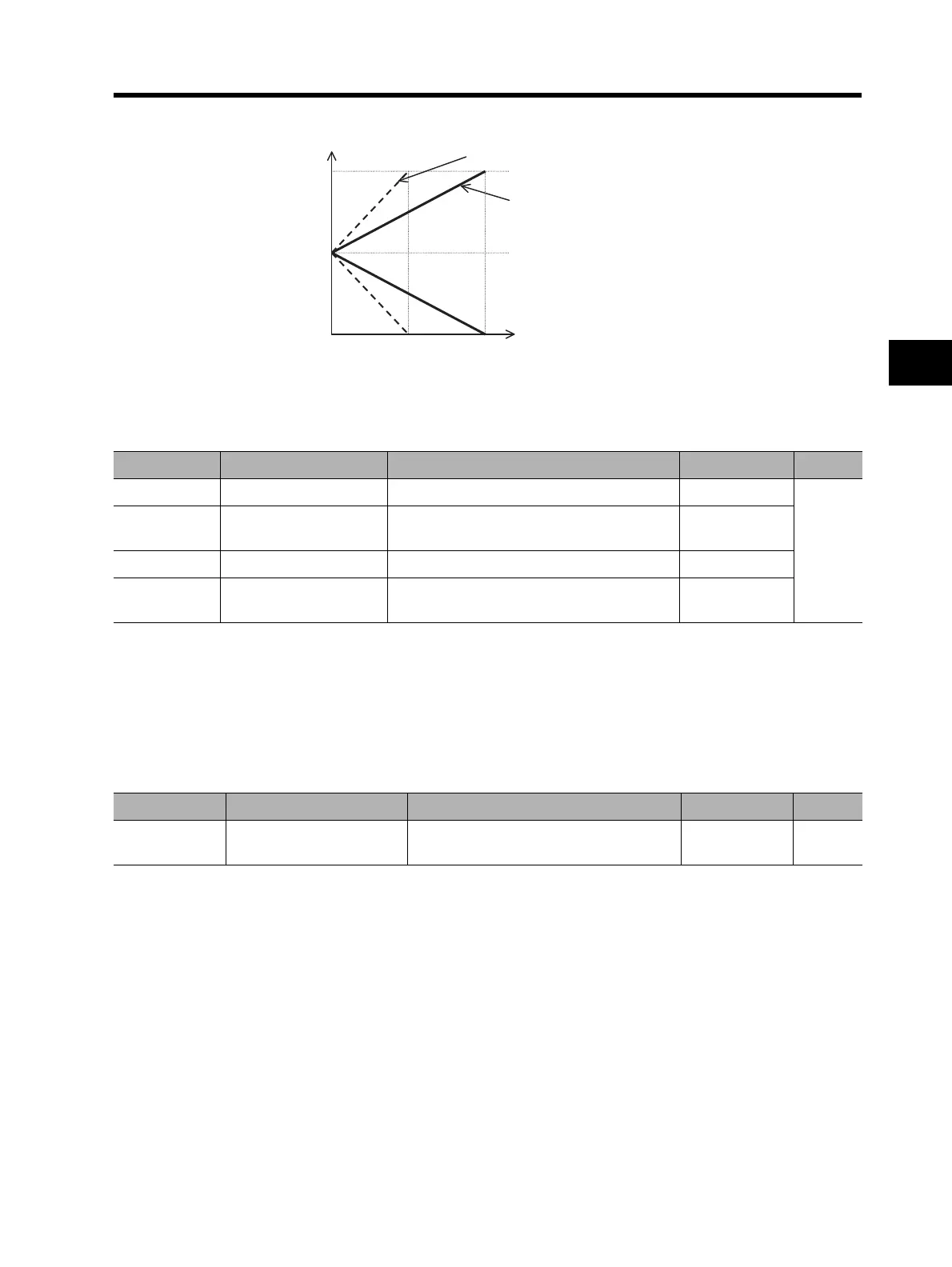
AM/AMI Adjustment
•Adjust the Inverter output gain according to the meters connected to the AM and AMI terminals.
Note: The offset data is set in %.
(Example) If AMI provides 4 to 20 mA output, the offset value is 20% (= 4/20). (Default value)
Operation Selection During Option Error
If the built-in optional board causes an error, you can set whether the Inverter trips or continues to
run regardless of the option error.
<Group H: Motor Control Parameters>
Offline Auto-Tuning Function
•This function enables measurement and automatic setting of the motor parameters required for
"sensorless vector control", "0-Hz sensorless vector control", and "sensor vector control".
•To perform "sensorless vector control", "0-Hz sensorless vector control", or "sensor vector control"
for a motor with unknown motor parameters, perform offline auto-tuning to determine the motor
parameters.
•To use the online auto-tuning function described later, be sure to perform offline auto-tuning.
•This function is applicable to 1st/2nd control, not to 3rd control.
AM output (V)
10
5
0
100 200
AM gain setting (C106) = 100%
AM gain setting (C106) = 200%
AM bias setting (C109) = 50%
Torque (%)
Parameter No. Function name Data Default setting Unit
C106 AM gain setting 50. to 200.: Set a gain for the AM monitor. 100.
%
C109 AM bias setting
0 to 100:
Set an offset for the AM monitor.
0.
C107 AMI gain setting 50. to 200.: Set a gain for the AMI monitor. 100.
C110 AMI bias setting
0 to 100:
Set an offset for the AMI monitor.
20.
Parameter No. Function name Data Default setting Unit
P001/P002
Operation selection at
option error
00: TRP (Outputs an alarm.)
01: RUN (Continues to operate.)
00












 To Next Page