76
Zone 2
With the Zone 2 function, you can enjoy one input
source in the main room and a different source in another
room.
There are two connection methods: using a receiver/inte-
grated amp in Zone 2 or using only a pair of speakers in
Zone 2.
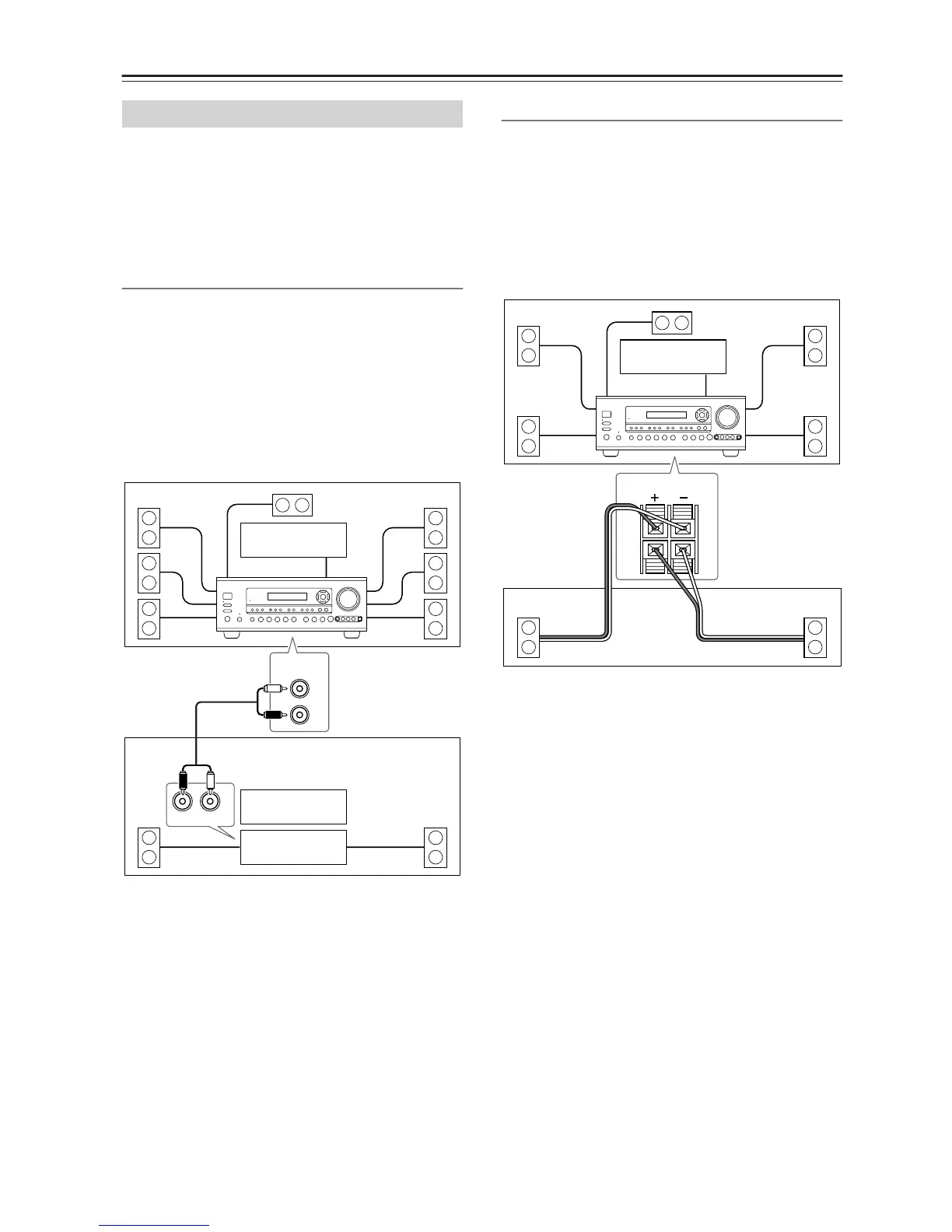
Using a Receiver/Integrated Amp in Zone 2
With this connection method, you can use 7.1 surround
sound in the main room and play a different AV source
in Zone 2. The volume for Zone 2 is set on the receiver/
integrated amp.
• Use an RCA audio cable to connect the AV receiver’s
ZONE 2 LINE OUT L/R jacks to an analog audio
input on your receiver/integrated amp.
• Connect the Zone 2 speakers to the speaker terminals
on the receiver/integrated amp.
Using Only Speakers in Zone 2
With this connection method, you can use 5.1 surround
sound in the main room and play a different AV source
in Zone 2. The volume for Zone 2 is set on the AV
receiver.
• Set the Powered Zone 2 setting to Activated (see
page 77).
• Connect your Zone 2 speakers to the AV receiver’s
ZONE 2 SPEAKERS terminals.
Connecting Zone 2
R
L
IN
ZONE 2
LINEOUT
R
L
Main room
Zone 2
TV
TV
Receiver/
integrated amp
AV receiver
ZONE 2
SPEAKERS
L
R
RL
Main room
TV
Zone 2
AV receiver


 To Next Page