122 Infotainment system
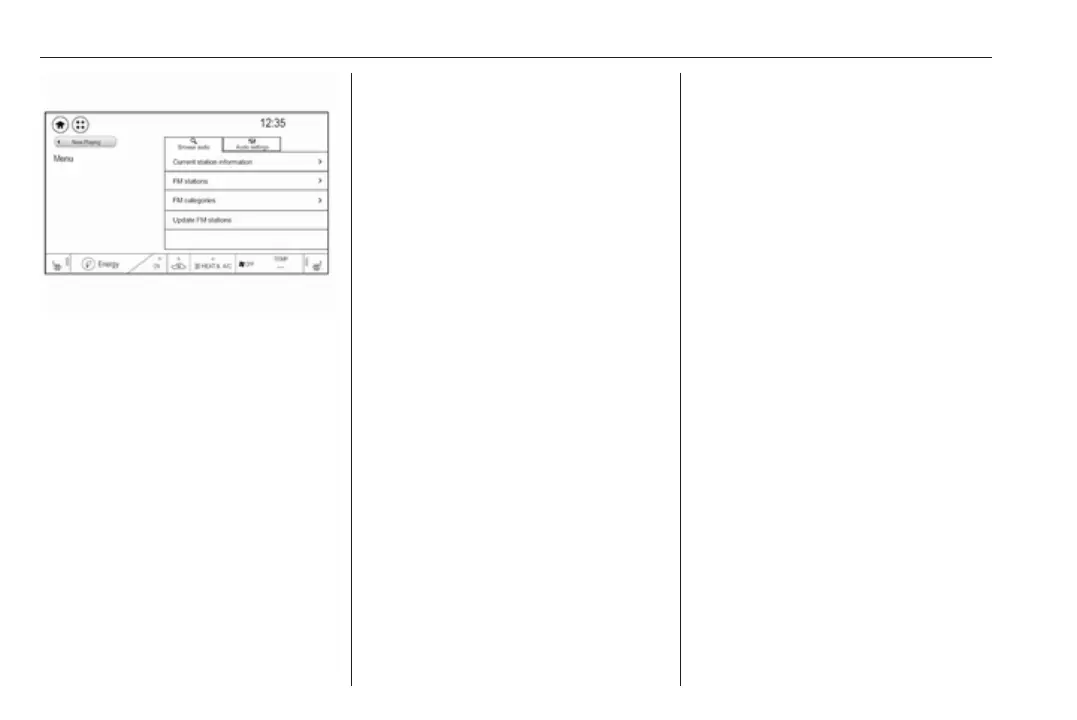
Select the Browse audio tab and then
select the respective station list, e.g.
FM stations. All receivable stations of
the relevant waveband and in the
current reception area are displayed.
Alternatively, select the waveband
symbol tab, e.g. ~ to directly
display the stations.
Select the desired station.
Categories
Numerous radio stations broadcast a
PTY code, which specifies the type of
programme transmitted (e.g. news).
Some stations also change the PTY
code depending on the content which
is currently transmitted.
The Infotainment system stores these
stations, sorted by programme type in
the corresponding category list.
Note
The categories list item is only
available for the FM and the DAB
wavebands.
To search for a programme type
determined by the stations, select
Menu and then select the Browse
audio tab. Select FM categories or
DAB categories.
A list of programme types currently
available is displayed.
Select the desired programme type. A
list of stations is displayed
transmitting a programme of the
selected type.
Select the desired station.
Update station lists
If the stations stored in the waveband-
specific station list are no longer
received, the station lists must be
updated.
Select Menu and then select the
Browse audio tab. Depending on the
waveband, select Update FM
stations, Update DAB stations or
Update AM stations.
Note
If a waveband-specific station list is
updated, the corresponding
category list is also updated.
A station search is started and a
corresponding message is displayed.
Once the search is finished, the
respective station list is displayed.
Favourites
Favourites of all audio sources can be
stored manually in the favourites list.
The favourites list contains up to
15 favourites.



 To Next Page