186 Driving and operating
e.g. below the bumper or
underneath the vehicle, are not
displayed.
Do not reverse the vehicle by only
looking at the Info-Display and
check the surrounding area
behind and around the vehicle
before reversing.
Activation
Rear view camera is automatically
activated when reverse gear is
engaged.
Functionality
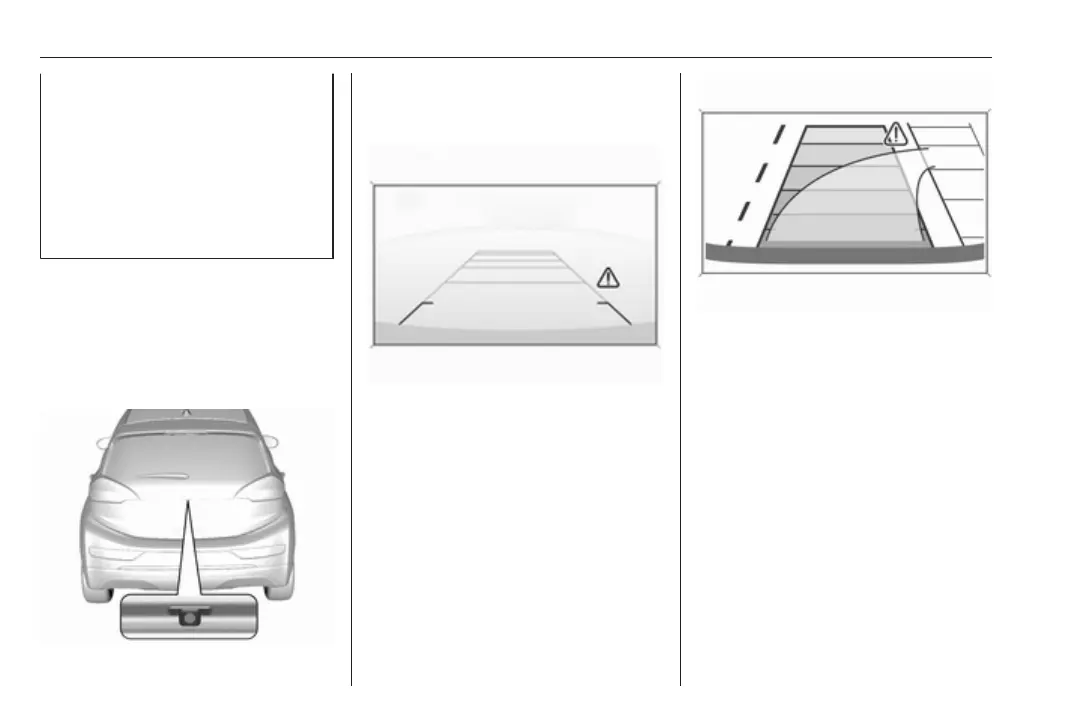
The camera is mounted between the
number plate lights and has a viewing
angle of 130°.
The area displayed by the camera is
limited. The distance of the image that
appears on the display differs from
the actual distance.
Guiding lines
Dynamic guiding lines are horizontal
lines at one metre intervals projected
onto the picture to define the distance
to displayed objects.
Trajectory lane of the vehicle is
shown in accordance with the
steering angle.
Warning symbols
Warning symbols are indicated as
triangles 9 on the picture, which
show obstacles detected by the rear
sensors of the advanced parking
assist.
Additionally, 9 appears on the top
line of the Info display with the
warning to check the vehicle
surroundings.



 To Next Page