EX765/EW766/EX765W/EW766W Condential
5-11
(1)
(3)
(2)
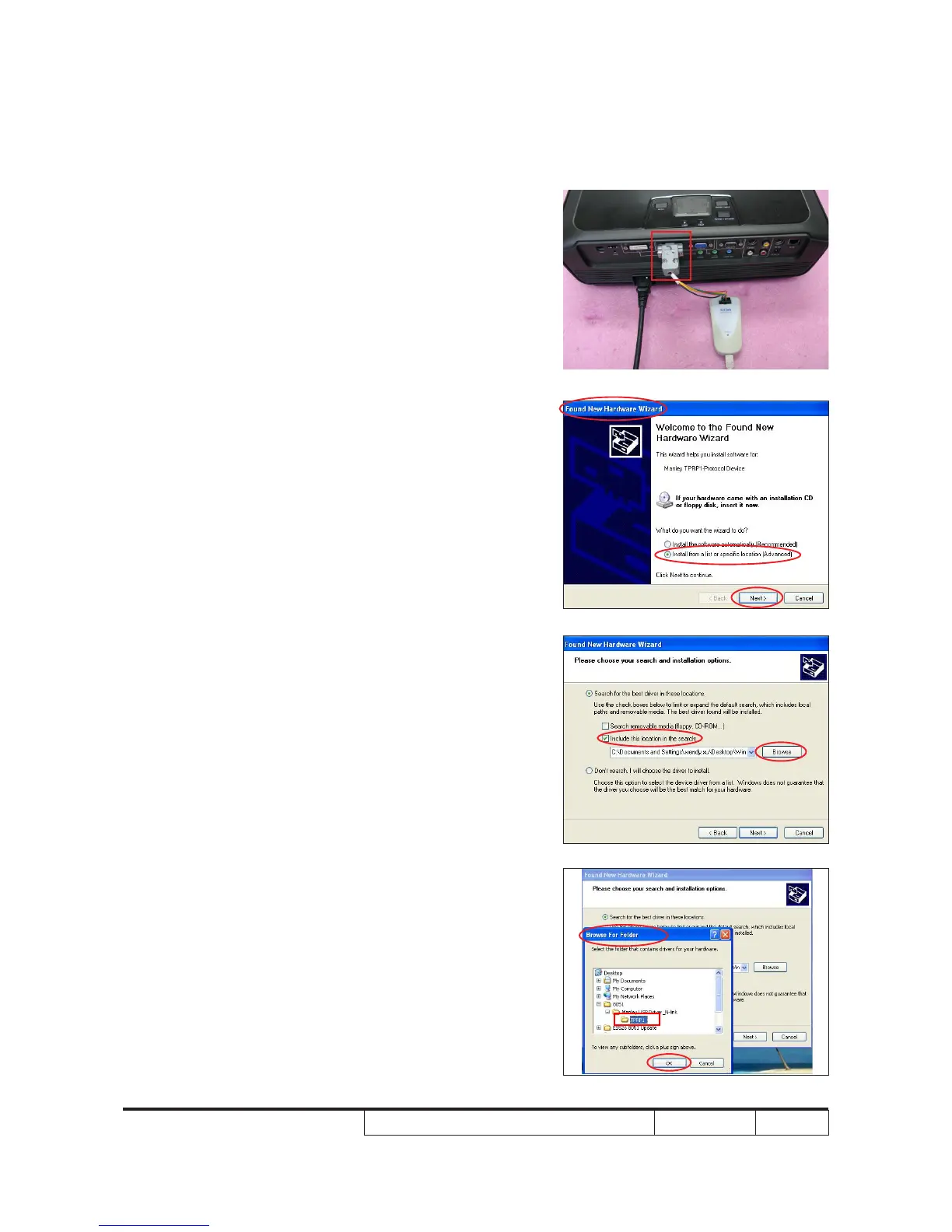
5-2-3 Install Manley USB
Driver
1. Set-up
- Plug in the power cord, the power
LED will light on red.
- Connect VGA Port of projector with
NLINK Fixture.
Note: Please connect VGA1 IN Port of EX765
with NLINK Fixture.
- Connect NLINK Fixture with PC by
USB cable.
2. Execute Program
(1) "Found New Hardware Wiszard" picture
will appear on the screen.
(2) Select "Install from a list or specic
location (Advanced)".
(3) Then click "Next".
(4) Select "Include this location in the
search", then click "Browse".
(5) "Browse For Folder" picture will appear
on the screen.
(6) Select "TPRP1" folder in the "Manley
USB Driver_N-Link" folder, then click
"OK".
(4)
(6)
(5)
VGA Port



 To Next Page