EX765/EW766/EX765W/EW766W Condential
5-13
5-2-4 8051 Firmware Upgrade
Procedure
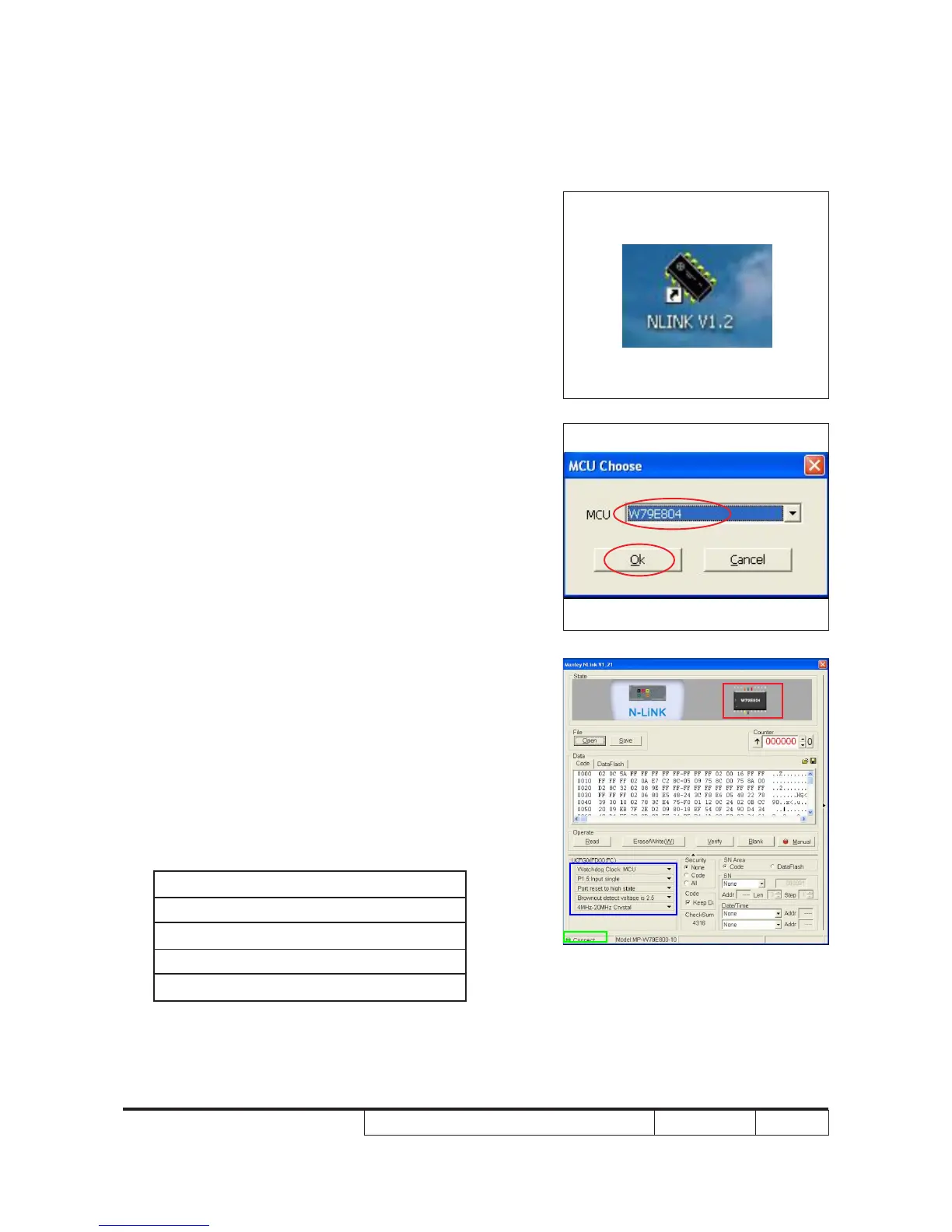
1. Execute 8051 FW Program
- Double click "NLINK V1.2" to execute
NLINK program.
Note: when we execute NLINK program, the
power LED ashes red or green
alternately, the Fixture LED ashes red.
2. Choose the right type of MCU
- "MCU Choose" picture will appear on the
screen, select "W79E804".
- Click "OK".
3. Program settings
- "Manley Nlink" picture will appear on the
screen.
- Ensure "MCU" is the one you chose in the
last step (as red square).
- Ensure NLlNK Fixture and PC are
securely connected: the indicator lights
on green and the state is "Connect"(as
green square).
- Conrm the settings in blue square are as
listed below:
Watchdog Clock: MCU
P1.5: Input signal
Port reset to high state
Brownout detect voltage is 2.5
4MHz-20MHz Crystal



 To Next Page