EasyManua.ls Logo

Optoma Projectors - Remote Control Overview

Optoma Projectors
81 pages
Print Icon
To Next Page IconTo Next Page
To Previous Page IconTo Previous Page
Loading...
10
English
Introduction
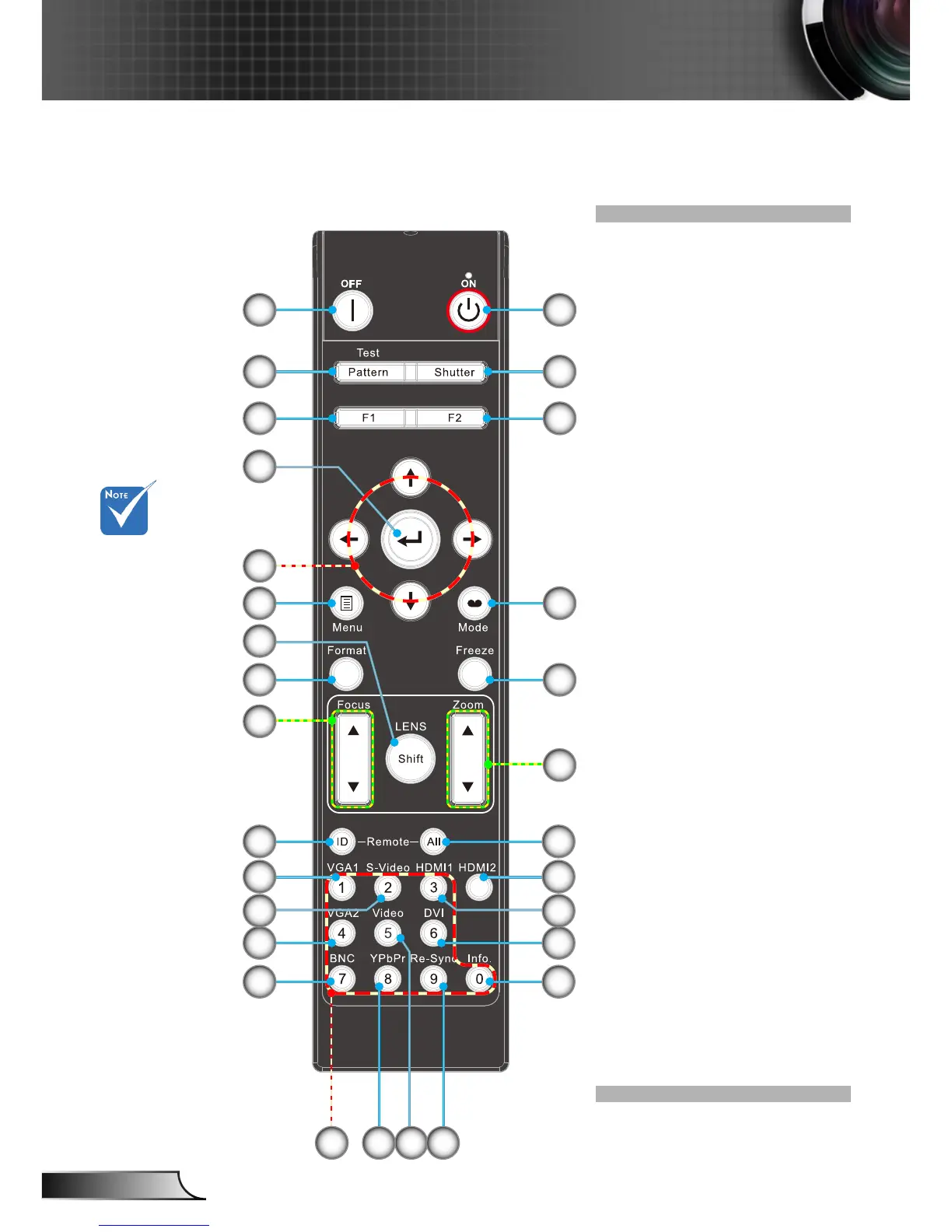
Remote Control
1. Power On
2. Shutter
3. Function 2 (Program-
mable see P.51)
4. Display Mode
5. Freeze
6. Lens Zoom +/-
7. All
8. HDMI 2
9. HDMI 1
10. DVI (Reserved Key)
11. Information
12. Re-Sync
13. Video
14. YPbPr
15. Numbered keypad
(for password input)
16. Power Off
17. Pattern
18. Function 1 (Program-
mable see P.51)
19. Enter/Help
20. Four Directional
Select Keys
21. Menu
22. Lens Shift
23. Format (Image Aspect
Ratio)
24. Lens Focus +/-
25. ID
26. VGA 1
27. S-Video
28. VGA 2
29. BNC
8
10
1314
19
11
20
17
16 1
2
3
6
5
4
26
28
29
23
21
25
9
24
22
18
15 12
7
27
Number
keypad (for
password input
exclude “0”,
“0” can not use
as part of the
password)

Table of Contents

Related product manuals