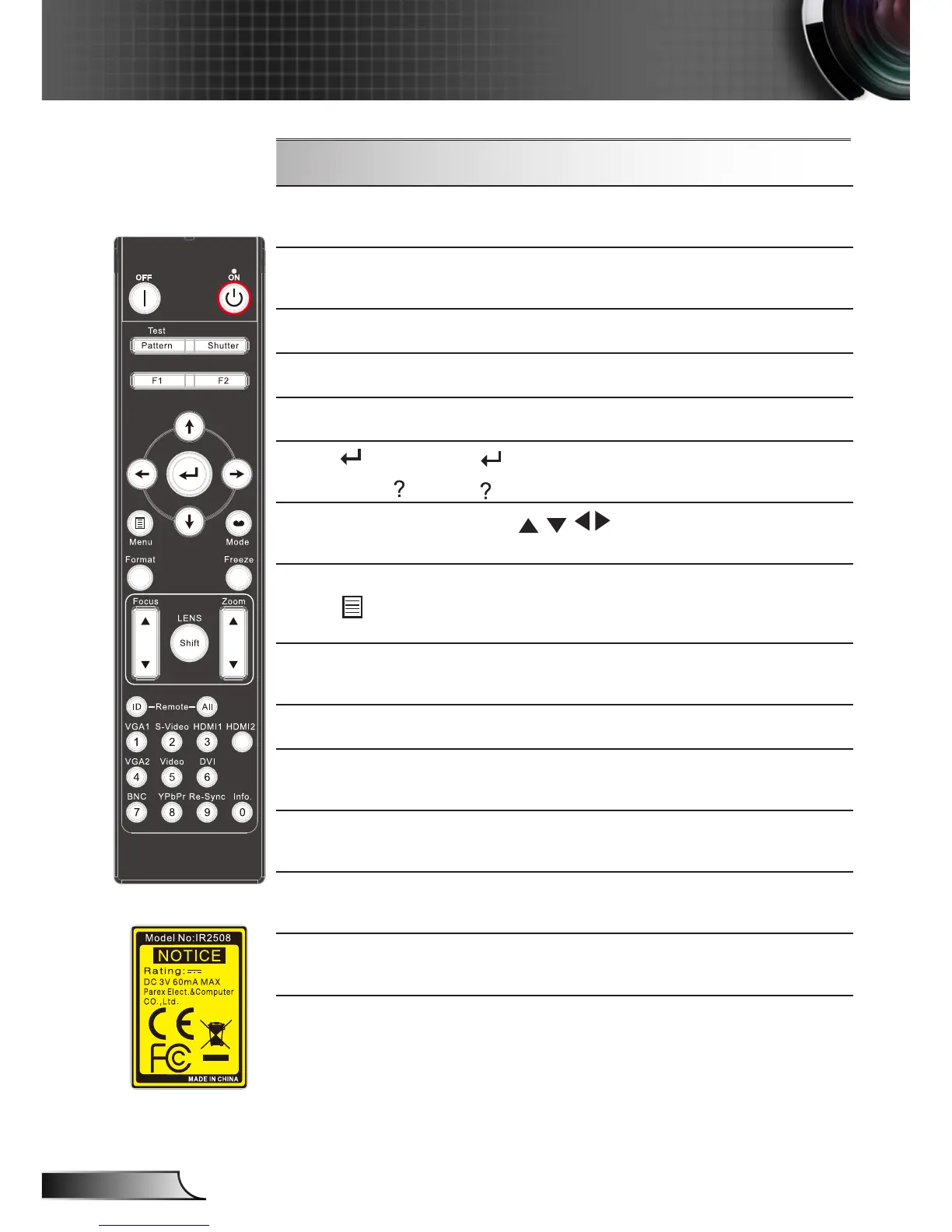
Using the Remote Control
Numbered keypad
Press “0~9” to input a password in the “Se-
curity” settings.
Freeze
Press “Freeze” to pause the screen image.
Press this button again to unlock.
Shutter
Open/close the built-in shutter.
Function 1
Adjust Function 1 settings.
Lens Focus +/-
Adjust lens focus function.
Enter /
Information
Conrm your item selection.
Display the projector’s information.
Four Directional
Select Keys
Use to select items or make
adjustments to your selection.
Menu
Press “Menu” to launch the on-screen
display (OSD) menu. To exit OSD, press
“Menu” again.
Format
Select the desired aspect ratio (refer to
page 33).
Info. (Information)
Display the projection’s information.
HDMI 1
Press “HDMI 1” to choose HDMI 1 input
connector source.
HDMI 2
Press “HDMI 2” to choose HDMI 2 input
connector source.
Video
Press “Video” to choose composite video
source.
DVI
This button is Reserved Key and does not
function on this projector.



 To Next Page