This AMX function is only to support AMX Device Discovery.
The broadcast information only send out through valid interface.
Both LAN and Wireless LAN interfaces could be supported at the same time.
If “Beacon Validator” was used. Please take care below information
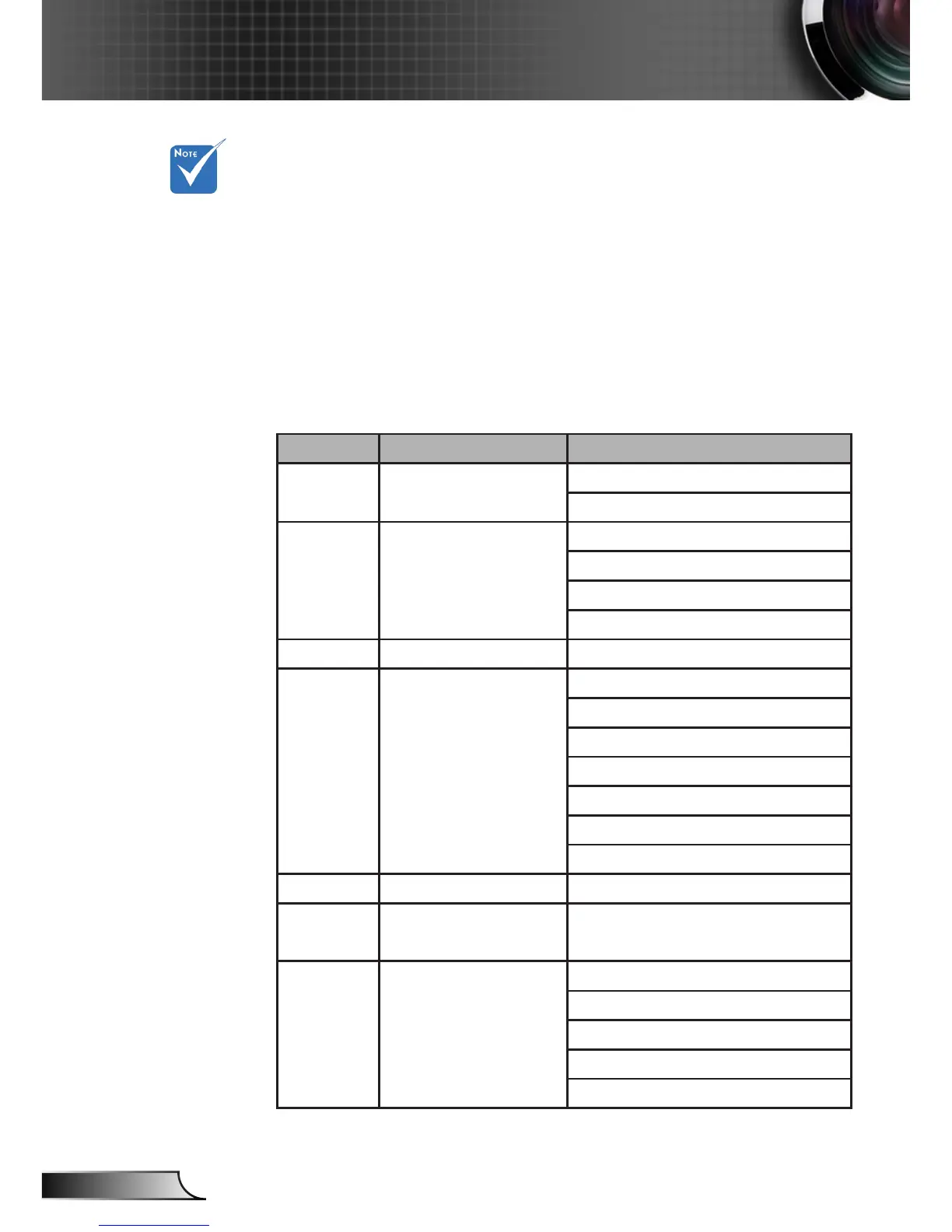
PJLink™ supported commands
The table below shows commands to control the projector
using the PJLink™ protocol.
Command Description Remark (Parameter)
Command Description Remark (Parameter)
POWR Power control 0 = Standby
1 = Power on
POWR? Inquiry about the power
state
0 = Standby
1 = Power on
2 = Cooling down
3 = Warming up
INPT INPT Input switching 11 = VGA1
INPT? Inquiry about input switch-
ing
12 = VGA2
13 = Component
14 = BNC
21 = VIDEO
22 = S-VIDEO
31 = HDMI 1
32 = HDMI 2
AVMT Mute control 30 = Video and audio mute disable
AVMT? Inquiry about the mute
state
31 = Video and audio mute enable
ERST? Inquiry about the error
state
1st byte: Fan error, 0 or 2
2nd byte: Lamp error, 0 to 2
3rd byte: Temperature error, 0 or 2
4th byte: Cover open error, 0 or 2
5th byte: Filter error, 0 or 2



 To Next Page