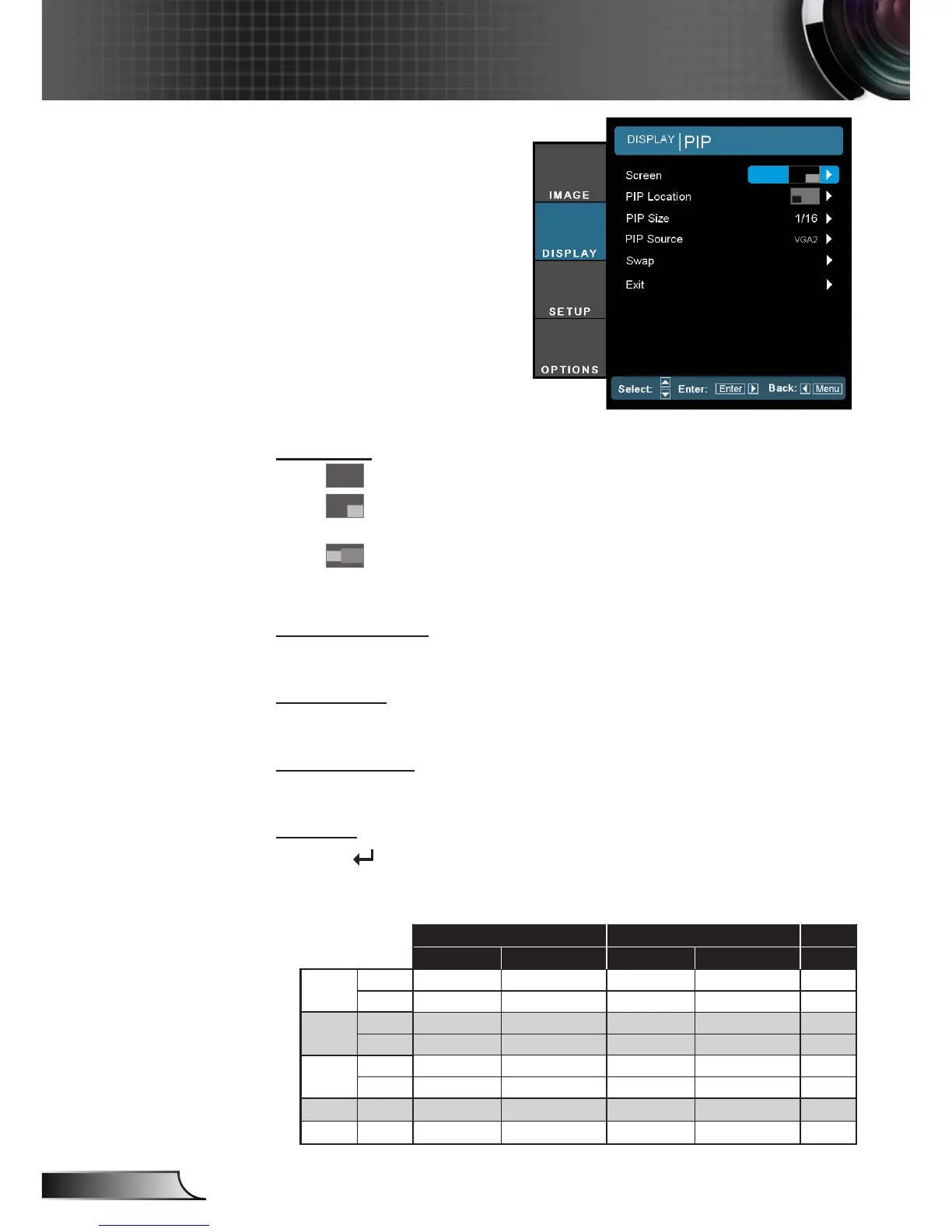
Screen
Single: Projection single screen.
PIP Window: Main Screen is large screen; PIP Screen is
small and displays in the corner of the main screen.
Split Screen: Main Screen and PIP Screen equal size and
side by side.
PIP Location
Choose the PIP screen position on the display screen.
PIP Size
Choose the PIP size from 1/16, 1/25 or 1/36 on the display screen.
PIP Source
Choose the PIP source to switch PIP screen source.
Swap
Press to swap main screen and PIP screen.
DISPLAY | PIP
Some source/signal combinations may not be compatible with PIP function.
Please refer to the table below:
VGA-2 HDMI-2 YPbPr
Static Images Full Motion Video Static Images Full Motion Video Video
VGA-1
Static Yes - Yes - -
Dynamic - - - - -
HDMI-1
Static Yes - Yes - -
Dynamic - - - - -
BNC
(RGB)
Static Yes - Yes Yes -
Dynamic - - Yes Yes -
Video Dynamic Yes
-
- -
-
S-Video Dynamic Ye s
-
Yes Yes
-
If you still experience issues, try altering the refresh rate or resolution of one or more of the source
devices.



 To Next Page