EasyManua.ls Logo

Optoma Projectors - Using a Wire Remote Control

Optoma Projectors
81 pages
Print Icon
To Next Page IconTo Next Page
To Previous Page IconTo Previous Page
Loading...
23
English
User Controls
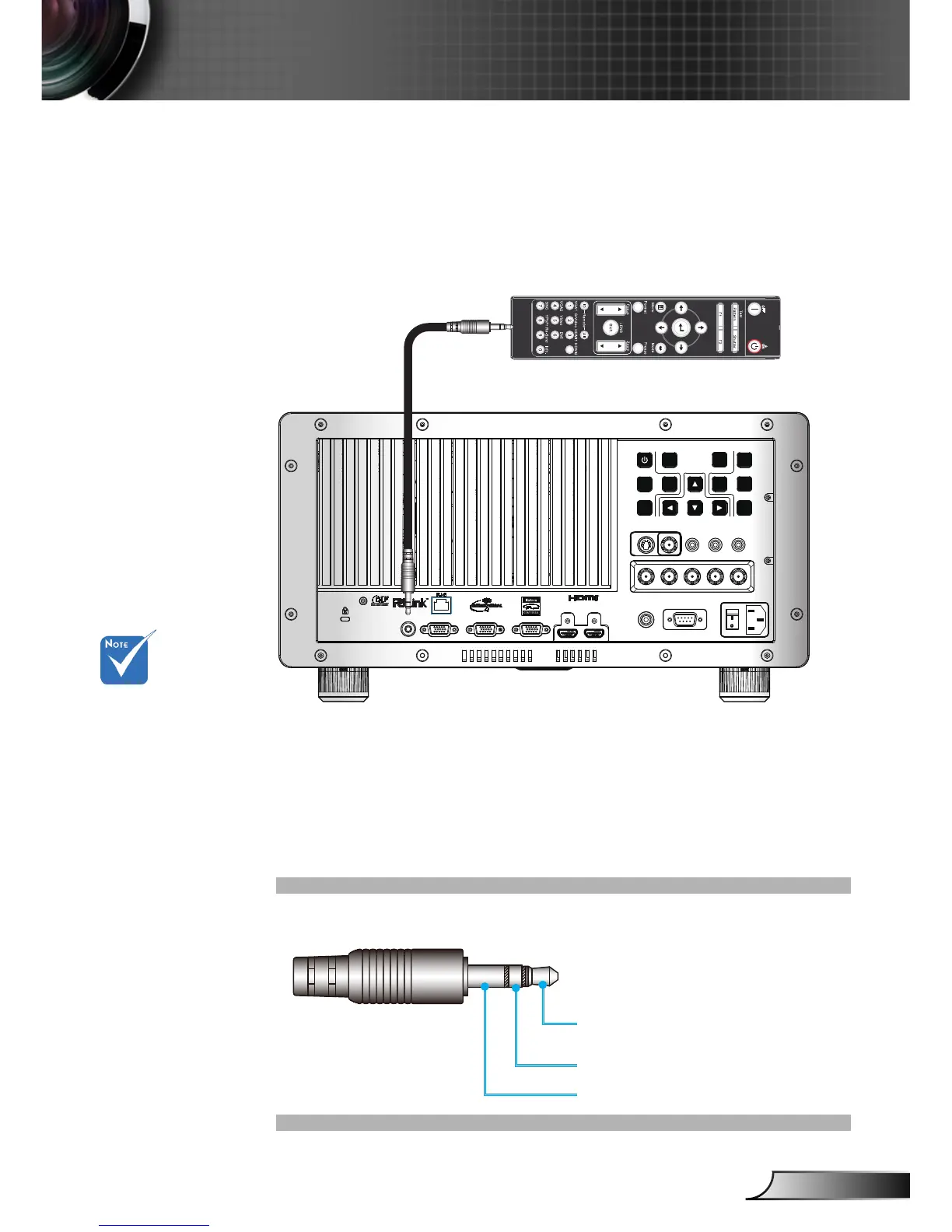
Using a Wire Remote Control
To connect the projector and remote control with a 3.5mm mini
jack commercial cable through the “wire remote in” terminal to
control the projector.
12V OUT
RS232
R G B H V
S-VIDEO VIDEO Y Pb Pr
HDMI 2 HDMI 1
VGA-OUT
VGA 2-IN VGA 1-IN
WIRED
REMOTE-IN
SOURCE
INFO.
MENU
SHUTTER
ENTER
RE-SYNC LENS
FOCUS
ZOOM
Use the 3 pin type
3.5mm mini jack
cable of length
20mm or less, if
the cable length
exceed 20m, the
remote control may
not work normally.
3.5mm Mimi Jack Cable (commercial)
Reserved
IR_IN & detect
GND
The 3 pin 3.5mm mini jack cable connector is shown below:

Table of Contents

Related product manuals