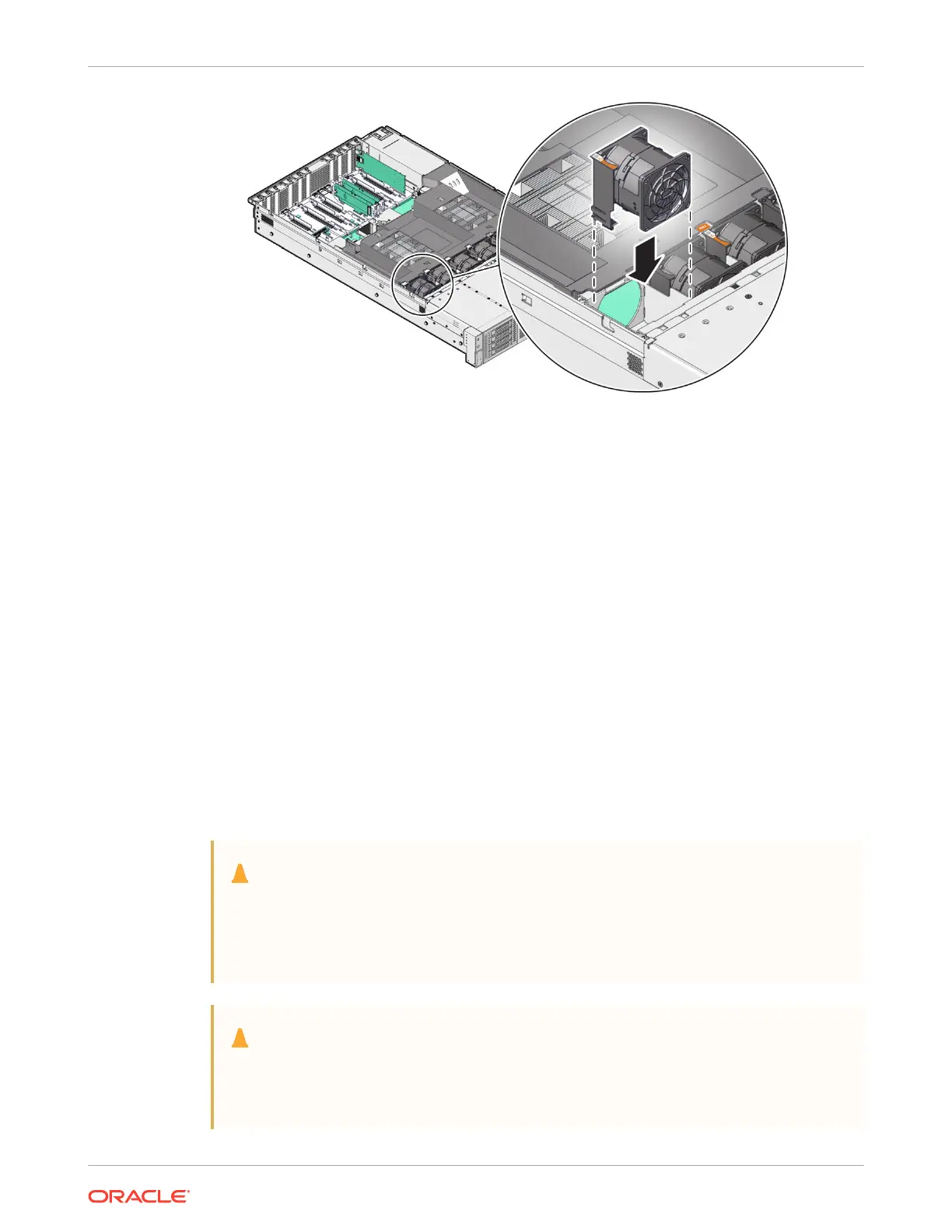
3. Press down on the fan module to fully seat the fan module.
4. Verify that the fan module status indicator (LED) for the replacement fan module is not
illuminated.
5. Install the server top cover.
See Install the Server Top Cover.
6. Verify that the Top Fan Fault LED on the front of the server and the Fault-Service Required
LEDs on the front and back of the server are not illuminated.
7. Return the server to operation.
See Returning the Server to Operation.
Replacing the Battery
The system battery is a replaceable component that requires you to power off the server before
servicing.
The real-time clock (RTC) battery maintains system time when the server is powered off and a
time server is unavailable. If the server does not maintain the correct time when the system is
powered off and not connected to a network, replace the battery.
Caution:
These procedures require that you handle components that are sensitive to
electrostatic discharge. This sensitivity can cause the components to fail. To avoid
damage, ensure that you follow antistatic practices, as described in Electrostatic
Discharge Safety under "Safety Precautions".
Caution:
Ensure that all power is removed from the server before removing or installing the
battery. You must disconnect the power cables from the system before performing
these procedures.
Chapter 4
Replacing the Battery
4-11















 To Next Page