System Operation Configuring Host Hardware Interfaces
OceanTRx
TM
4-500 Installation and Operations Manual 8-21
8.5.2.1 ADVANCED - Configuring NMEA-0183 Compass Defaults
This procedure can be performed only when using an NMEA-0183 compass.
To configure NMEA-0183 compass defaults:
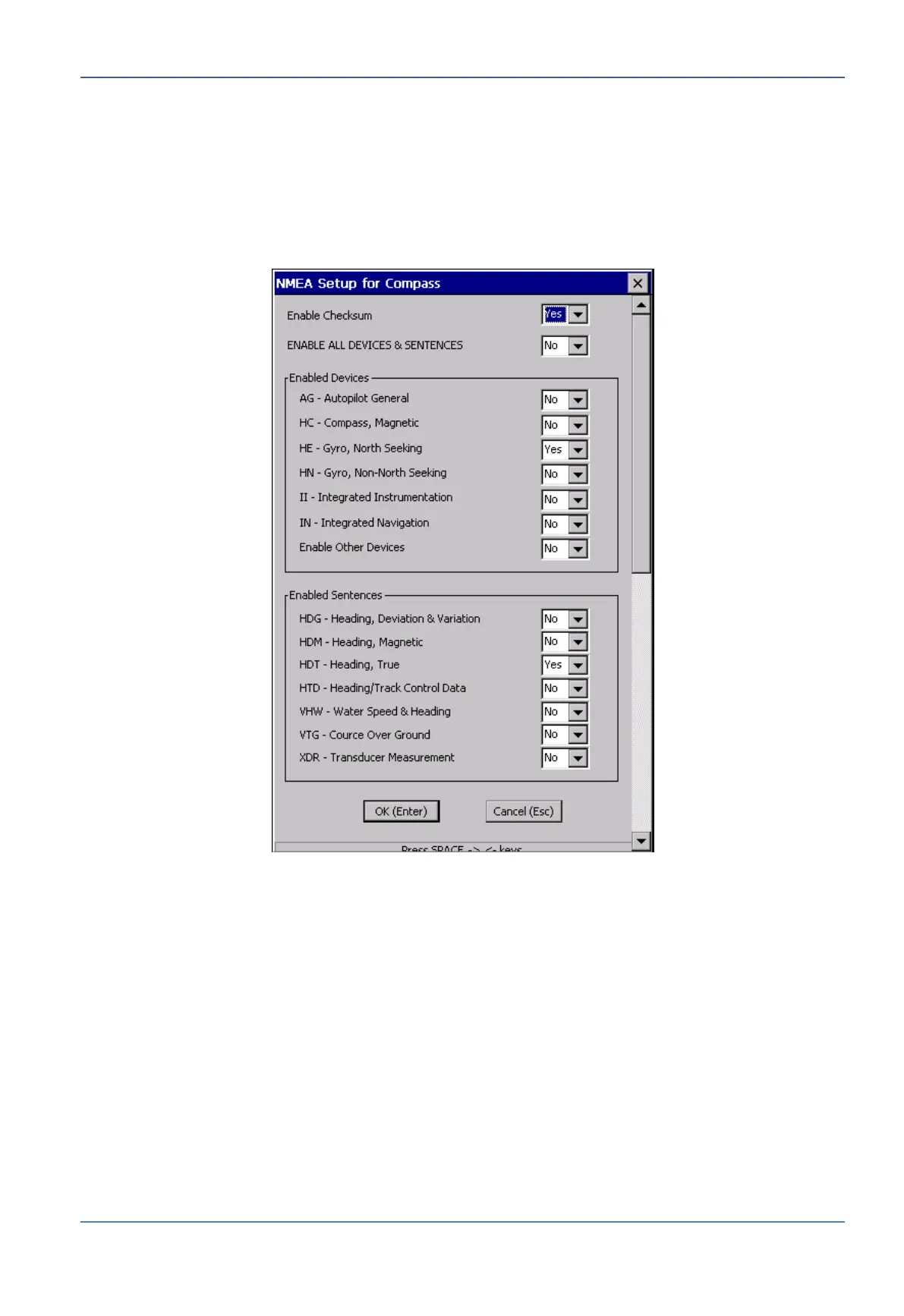
1. Open the Config menu and select Compass NMEA. The NMEA Setup for Compass
dialog box appears.
Figure 8-19: NMEA Setup for Compass Dialog Box
2. Make sure the Enable Checksum option is set to ‘Yes'.
3. The following values are factory preconfigured, and should only be changed if the
ship’s compass is using a different NMEA telegram:
Under Enabled Devices, HE – Gyro, North Seeking
Under Enabled Sentences: HDT – Heading, True
4. Click OK (Enter). The NMEA Setup for Compass dialog box closes.


 To Next Page