Setup Procedure Compass Input Configuration
OceanTRx
TM
4-500 Installation and Operations Manual 7-3
To select the compass type
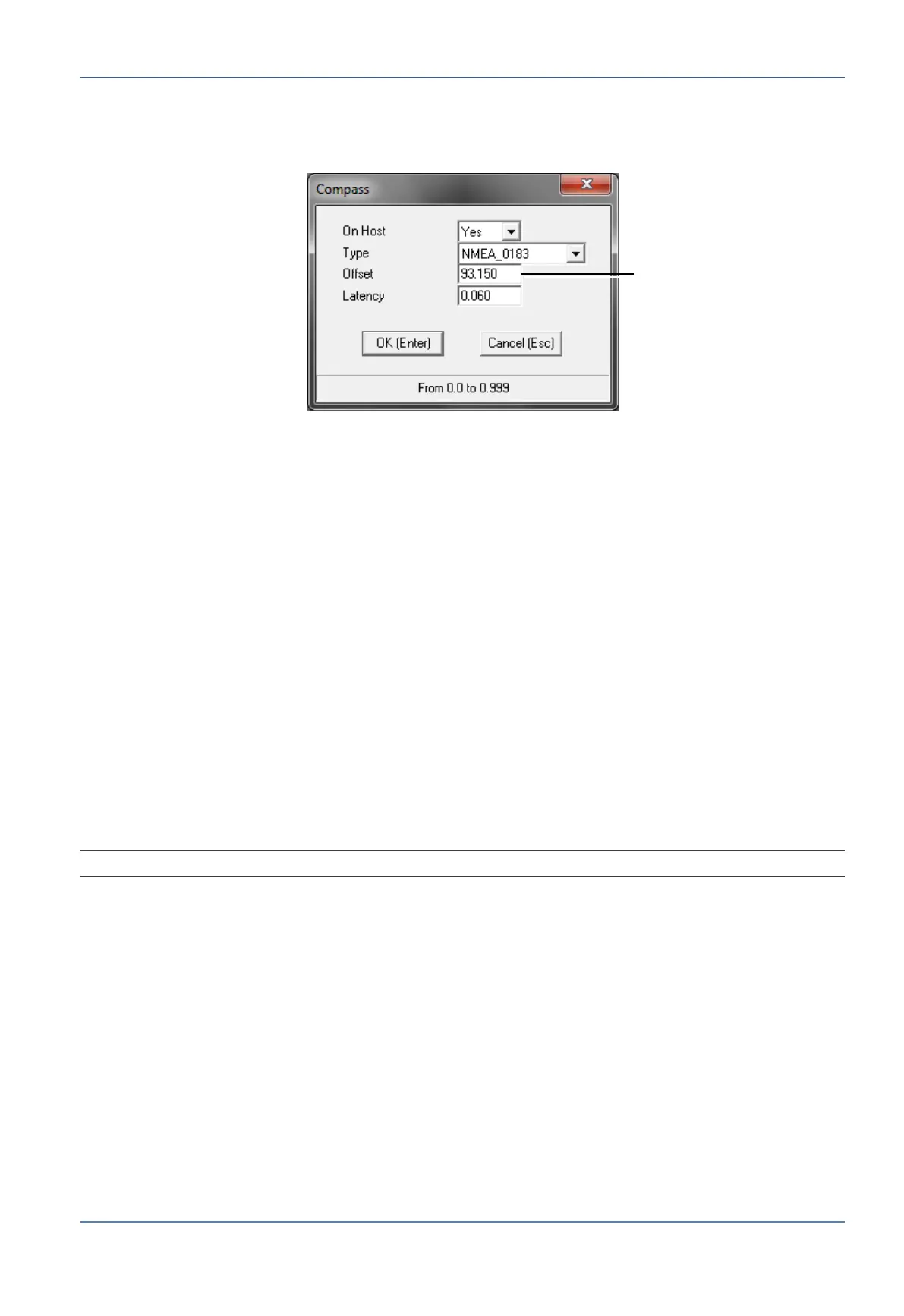
1. From the Config menu, select Compass. The following dialog appears:
Figure 7-1: Compass Dialog Box
2. Verify On Host field is set to Yes.
3. Select the compass Type (default = NMEA_0183).
4. Enter the following information:
Offset - enter a preliminary compass offset value. This will be updated during the
Compass Offset procedure. Section 7.4.
Latency – factory setting = 0.060 seconds. Do not modify unless specific
compass data latency (in seconds) is known.
5. Click OK.
7.2.2 Set Compass Communication Parameters
These parameters allow communication between the compass and the CCU.
The configuration differs for NMEA type compasses and for non-NMEA type compasses.
For NMEA type compasses (only), additional (advanced) compass parameters may be
configured according to section 8.5.2.1.
NOTE: Take note of the Data Sharing parameter required for dual-system installations.
Set initial value. To
be updated after
accurate offset value
is calculated


 To Next Page