81
Why you might want it: In time, a user can determine patterns in energy usage and demands
on batteries. Must Run times the generator usage to the heaviest user demands during a day,
thus avoiding depleting the batteries or requiring a long recharging period. is might happen
in the mornings or early evenings when a family’s power demand is higher.
Must Run Time is a daily time period when the MATE commands the generator to run. Must
Run Times can be set individually for weekdays and weekends and consist of a must run start
time and a must Run stop time. Setting must run start and stop times to the same time disables
the Must Run function. To go to the Must Run screens, press the <Must Run> so key on the
ADV/MATE/AGS/P2 screen.
ADV/MATE/AGS/PG2---------------
choose category
LOAD MUST
PG1 START RUN PG3
ADV/MATE/AGS/MR----------------
weekday 12:00A
must run start time
DOWN AGS CHANGE
WEEKDAY MR START
adj hour 12:00A
DOWN INC DEC
WEEKDAY MR START
adj min 12:00A
INC DEC DONE
Weekday Start
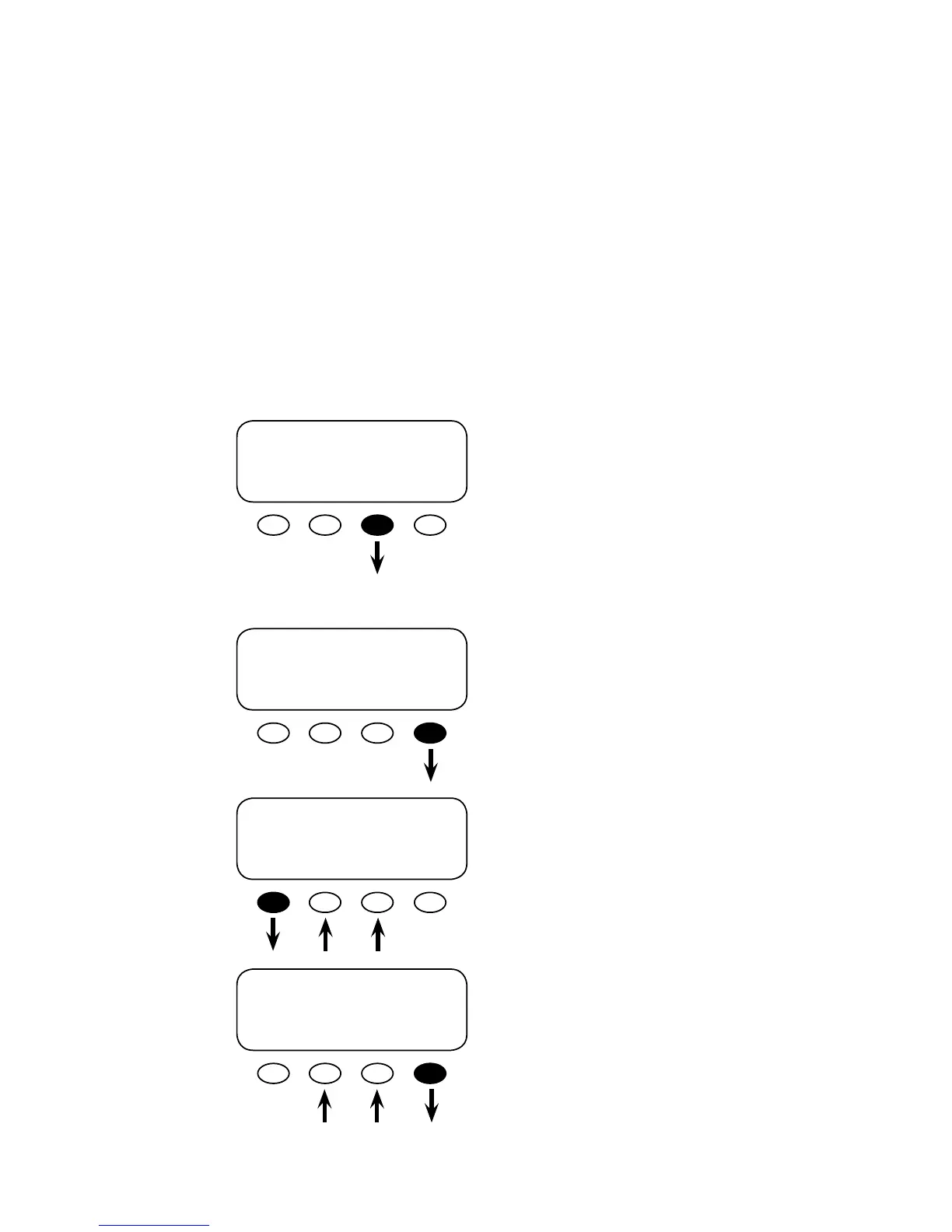
From the ADV/MATE/AGS/PG2 screen, press
the <MUST RUN> so key and open the ADV/
MATE/AGS/MR weekday must run start time
screen.
weekday must run start time is the beginning of
the time period Monday-Friday that the generator
will be forced to run. Press <CHANGE> to adjust
the hour and minutes settings using the <INC>
and <DEC> so keys.
Adjust the weekday must run start time minutes
with the <INC> and <DEC> so keys. Press the
<DOWN> so key to view the adj min screen.
Aer the minutes have been set, press the
<DONE> so key to return to the ADV/MATE/
AGS/MR weekday must run start time screen.
Must Run


 To Next Page