0
0.5 1.0 1.5
2.0
2.5
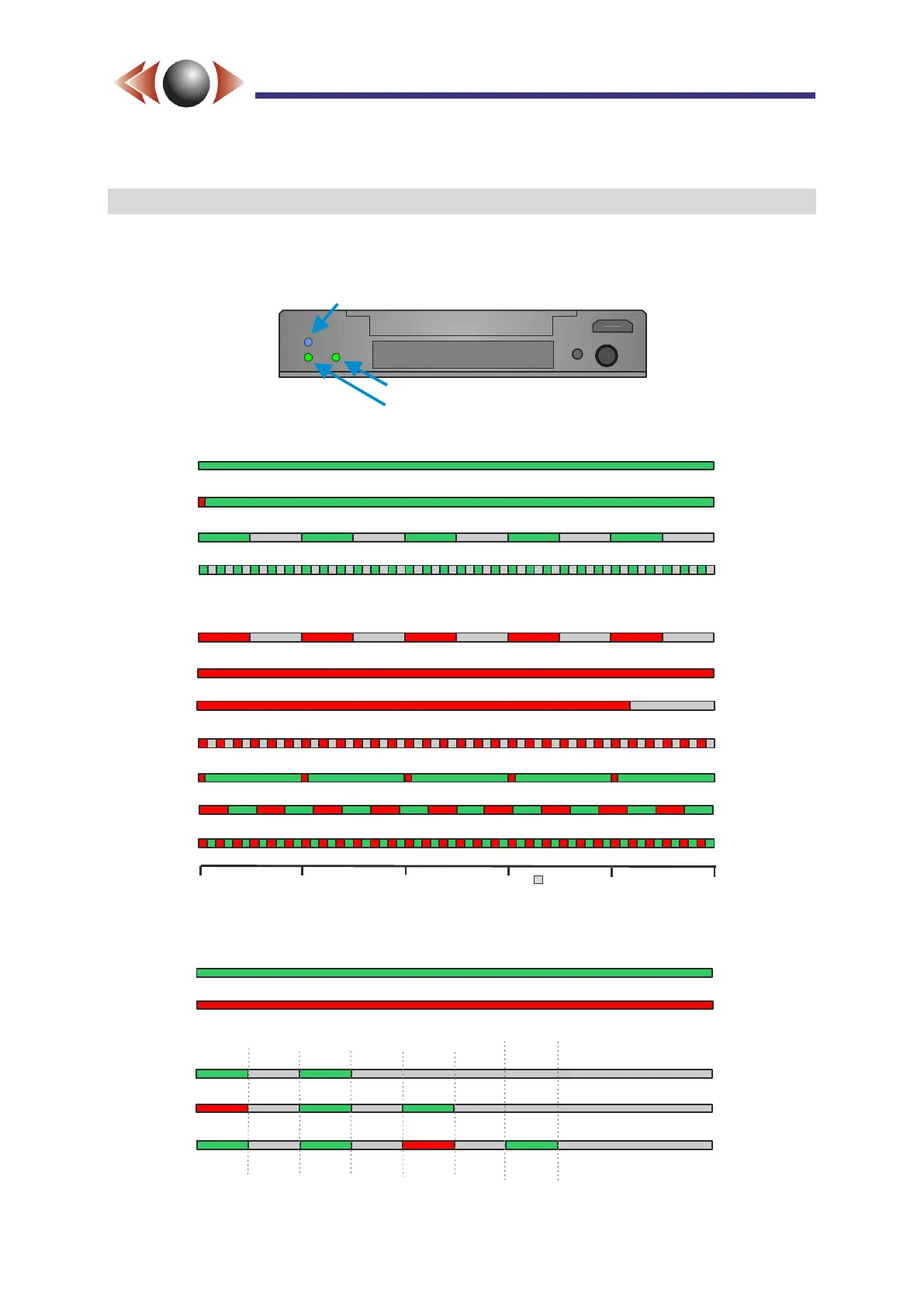
Flashing green: recording OK.
Flashing red: booting.
Fast blinking green: starting or stopping recording.
Fast flashing red: SD card needs formatting.
Single channel mode (HD or SD) with good video.
Single channel mode (HD or SD) with no video input.
3 channel mode with input 1 missing, 2 & 3 good.
2 channel mode with two good inputs.
When configured for 2 or more inputs the Video LED flashes the status of each input:
Fast flashing red / green: system error.
Medium flashing red / green: loading settings from SD card.
Static green with red blink: ready to record but GPS not connected or not locked.
Static green: ready to record.
Static red: SD card full.
Long red flash: Idle, but SD card missing.
Seconds
= No LED
Warning or Error Conditions:
Input 1
Input 2
Input 3
Input 4
4 channel mode with inputs1,2 & 4 good and 3 missing.
DVR Status LED:
Video Status LED:
Green with short red flash: Checking SD card & Player & Wizard (ready to record).



 To Next Page