Issue: 1.2-17-2 Ovation Systems Ltd Page 18
www.ovation.co.uk
5.1 Playing with VLC
Video files, which are limited to
5 minutes long, are located on
the SD card in the folder marked
"Recordings". See file structure
above. To play the recordings,
open the relevant day folder and
play the files with VLC media
player.
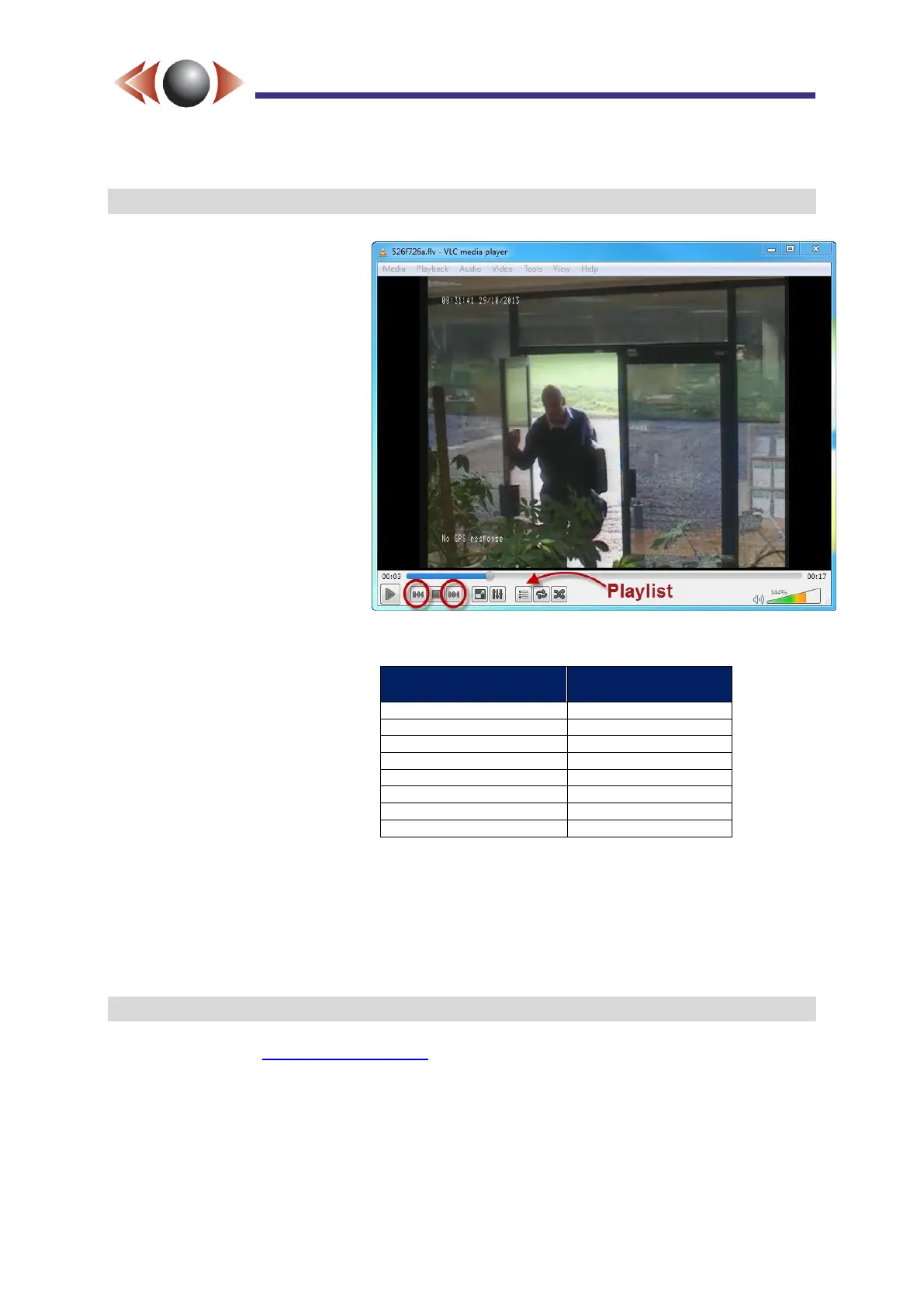
TIP► You can easily load all the
files in each folder into VLC by
opening “playlist.m3u” with
VLC (eg drag this file onto the
VLC window). You can then
navigate forwards and
backwards through the files by
clicking the highlighted buttons
or select a start point using the
“Play list” button.
Figure 19: Playing FlashBack-4 FLV Files in VLC
VLC has several useful shortcut
keys as shown opposite >>
IMPORTANT ► 1) The 32 bit version of VLC is recommended it can operate as a plug-in
with Firefox for viewing the stream etc.
2) When playing time-lapse video VLC has to be configured as described in
section 8, page 24.
5.2 Playing with Microsoft Media Player
Microsoft Media Player requires a plug-in to play FLV files. K-Lite Codec pack is
recommended (see www.codecguide.com).



 To Next Page