Issue: 1.2-17-2 Ovation Systems Ltd Page 24
www.ovation.co.uk
8 Setting up VLC
1) Firstly, ensure you have VLC version 2.2.1 32 bit (specifically not 64 bit), or higher,
installed by clicking “Help” > “About”. Updates are available from www.videolan.org .
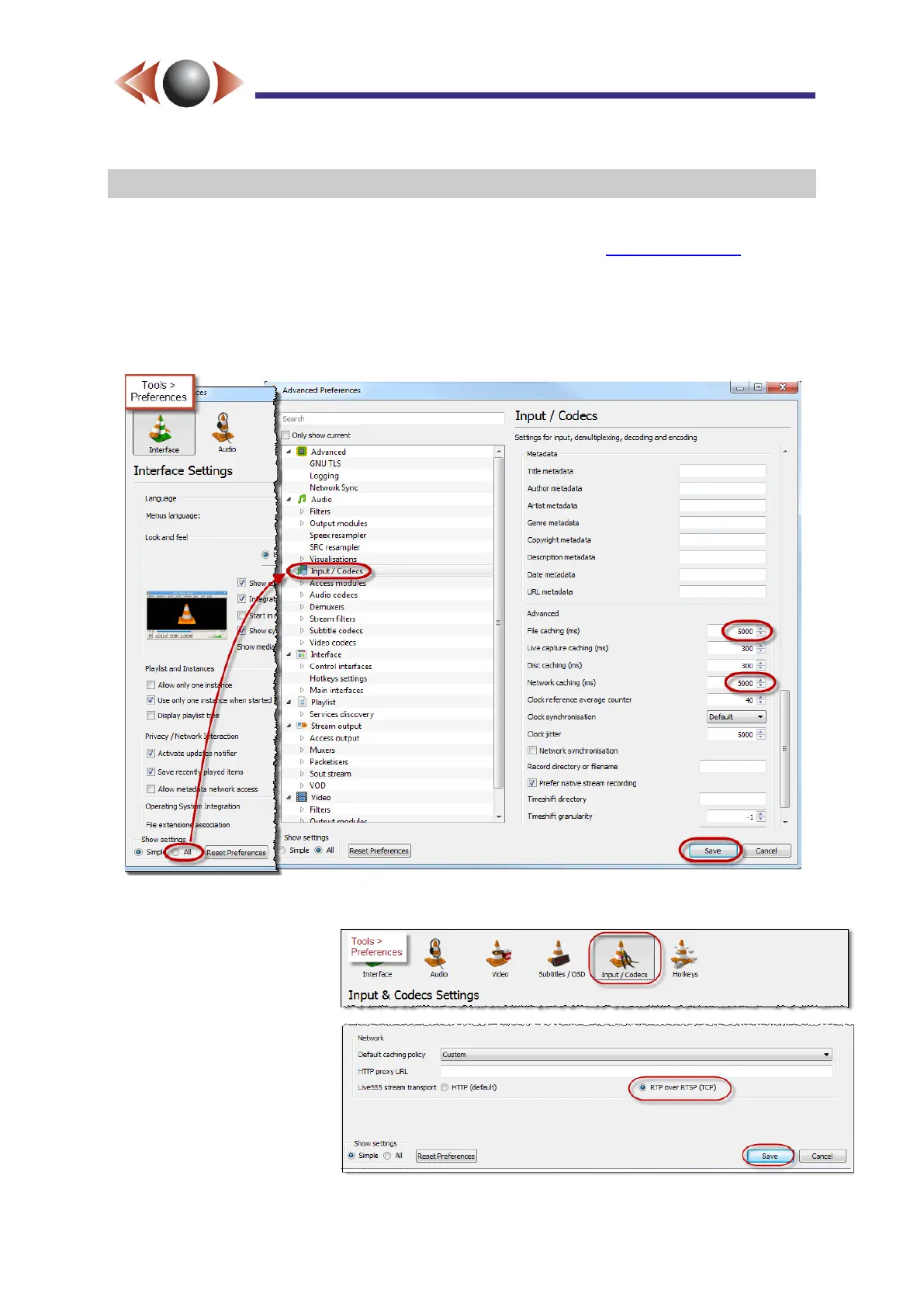
2) When displaying time-lapse video files and streams, you have to increase the caching
times to accommodate the delay between frames via “Tools” > “Preferences” and select the
“All” option (located bottom-right). Select “Input / Codecs” and scroll down the options list and
set “File caching” and “Network caching” to 5000, as highlighted in the screen shot below:
Figure 23: Setting VLC to view Time-Lapse files & streams.
3) When streaming, the
RTP data is sent within the
RTSP stream so VLC has
to be configured via “Tools”
> “Preferences” > [Input
/Codecs] and configure the
“Live555 stream transport”
to “RTP over RTSP (TCP)”.
Figure 24: Configuring VLC for Streaming from FlashBack-4



 To Next Page