Issue: 1.2-17-2 Ovation Systems Ltd Page 21
www.ovation.co.uk
6.1 Setting the IP Address
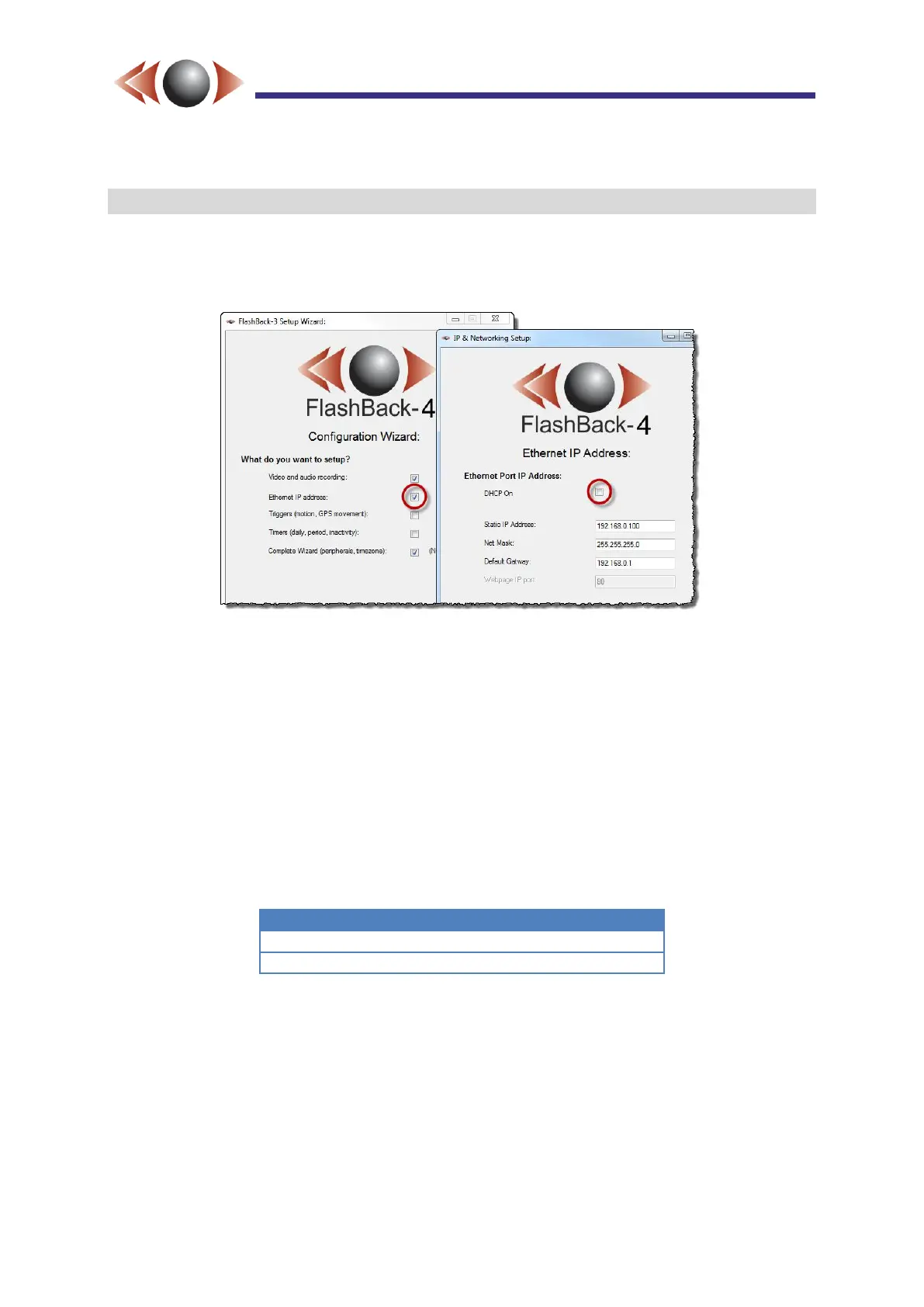
The IP address may be set to either static, or DHCP, via the SD card Wizard. Run the
Wizard and check the “Ethernet IP address:” option on the first page. Then navigate to the
Ethernet page via the [Next] button (see below and Section 4, page 15).
Figure 21: Setting the IP address using the Wizard.
For static IPs, uncheck the “DHCP On” check box and enter the required IP address, net
mask and default gateway.
For DHCP addressing check “DHCP on”. Complete the Wizard and transfer the
configuration to the target FlashBack-4. Once the IP address has been served, it is written to
the SD card as an HTML link called “fb4_webpage.html” Note: to allow the link to be updated
keep the card in place for at least 20 seconds. The Wizard also reads the IP address which
is shown as the “Last known IP address” on the Ethernet setup page, when DHCP is
enabled.
If operating from behind a router firewall, or a wireless modem, it is necessary to forward the
following ports to the local address of the FlashBack-4:



 To Next Page