Issue: 1.2-17-2 Ovation Systems Ltd Page 8
www.ovation.co.uk
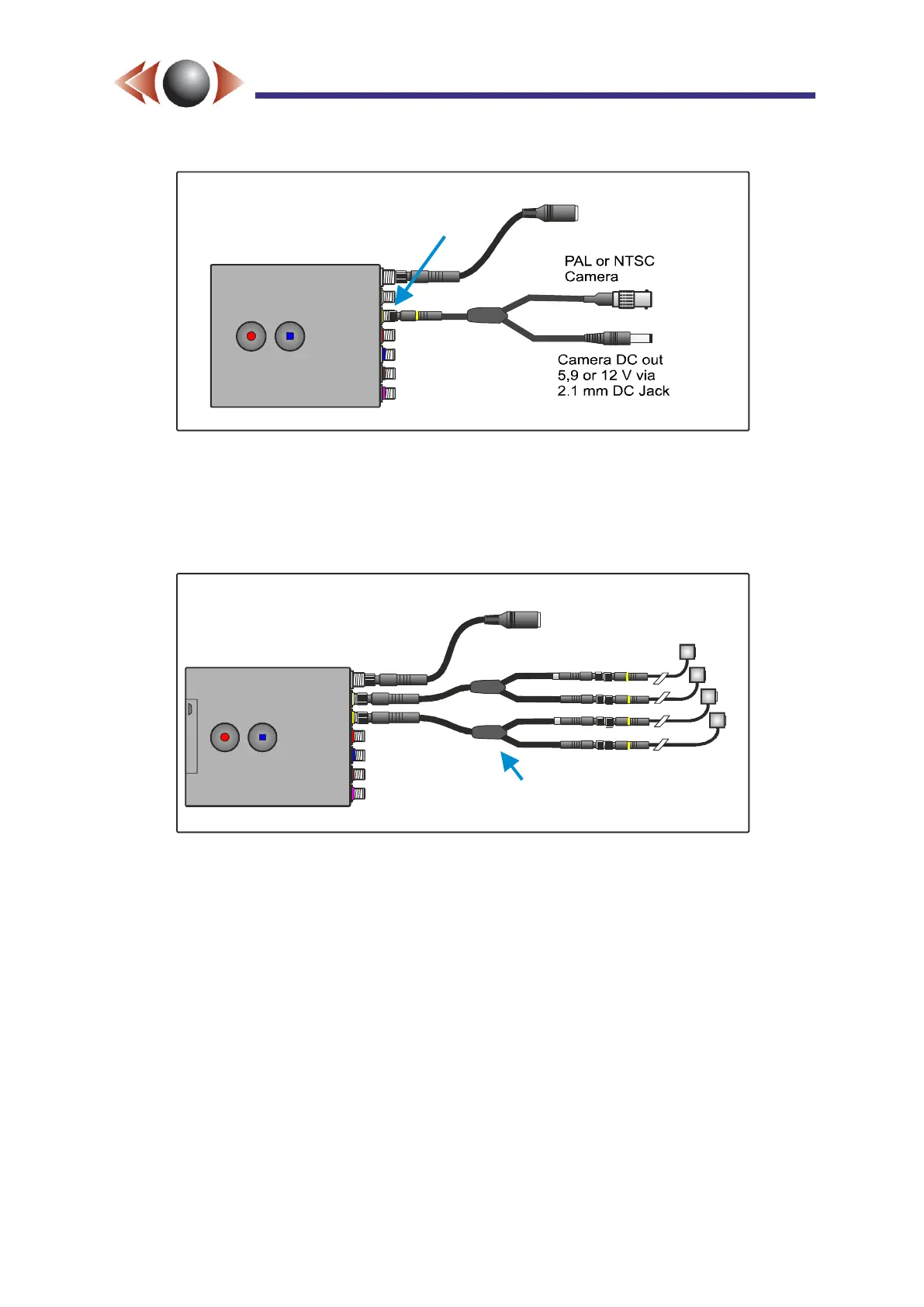
Figure 7: Basic Single Channel SD Installation
In its most basic form, just two connections are required for FlashBack-4 operation, power
and video. Fit the power cable and the BNC / Camera DC power adaptor cable to the yellow
input, and apply DC power as shown above. Configuration and operation is as Sections 3
and 4)
Figure 8: Multi-Channel SD installation
The yellow and cream i-Conex inputs support up to two SD inputs each. Two splitter cables
are provided allowing up to 4 SD camera operation. The above is showing a 4 channel SD
installation using Ovation micro-Cams.
TIP► If using 2 SD cameras, there is no need for the splitter cables. The yellow input is
Cam 1, the cream input is Cam 2.
TIP► The SD channels can be recorded individually, or all four combined as one HD quad
via the Wizard or Webpage interface.
DC Power Skt
6 to V DC30
(centre +)
Yellow
i-Conex
input
DC Power Skt
6 to V DC30
(centre +)
Cam 1
4 x i-Conex
micro-Cam
Cam 2
Cam 3
Cam 4
NB: Splitters are not required
for 2 SD inputs.



 To Next Page