36
1/4Alarm list
3
+ Suction T. circuit 1: Com. fault
+ Condensing P. circuit 1: Com.
+ Fault supp.pump: Alarm
Acknowledge
1/3Alarm liste detail
08:13:33
Critical(A)
18.02.2016
1
+ Fault supp.pump: Alarm
3
1/2
Execute
1/4Alarm list
3
+ Suction T. circuit 1: Com. fault
+ Condensing P. circuit 1: Com.
+ Fault supp.pump: Alarm
Acknowledge
1/4Alarm list
3
+ Suction T. circuit 1: Com. fault
+ Condensing P. circuit 1: Com.
+ Fault supp.pump: Alarm
Acknowledge
1/5Alarm history
+ i compressor oil heating
+ Suction T. circuit 1: Com. fault
+ Condensing P. Circuit 1:..
+ Fault supp.pump: Alarm
- i compressor oil heating
1/3Alarm hist.detail
18.02.2016
1
+ Fault supp.pump: Alarm
08:13:33
Critical(A)
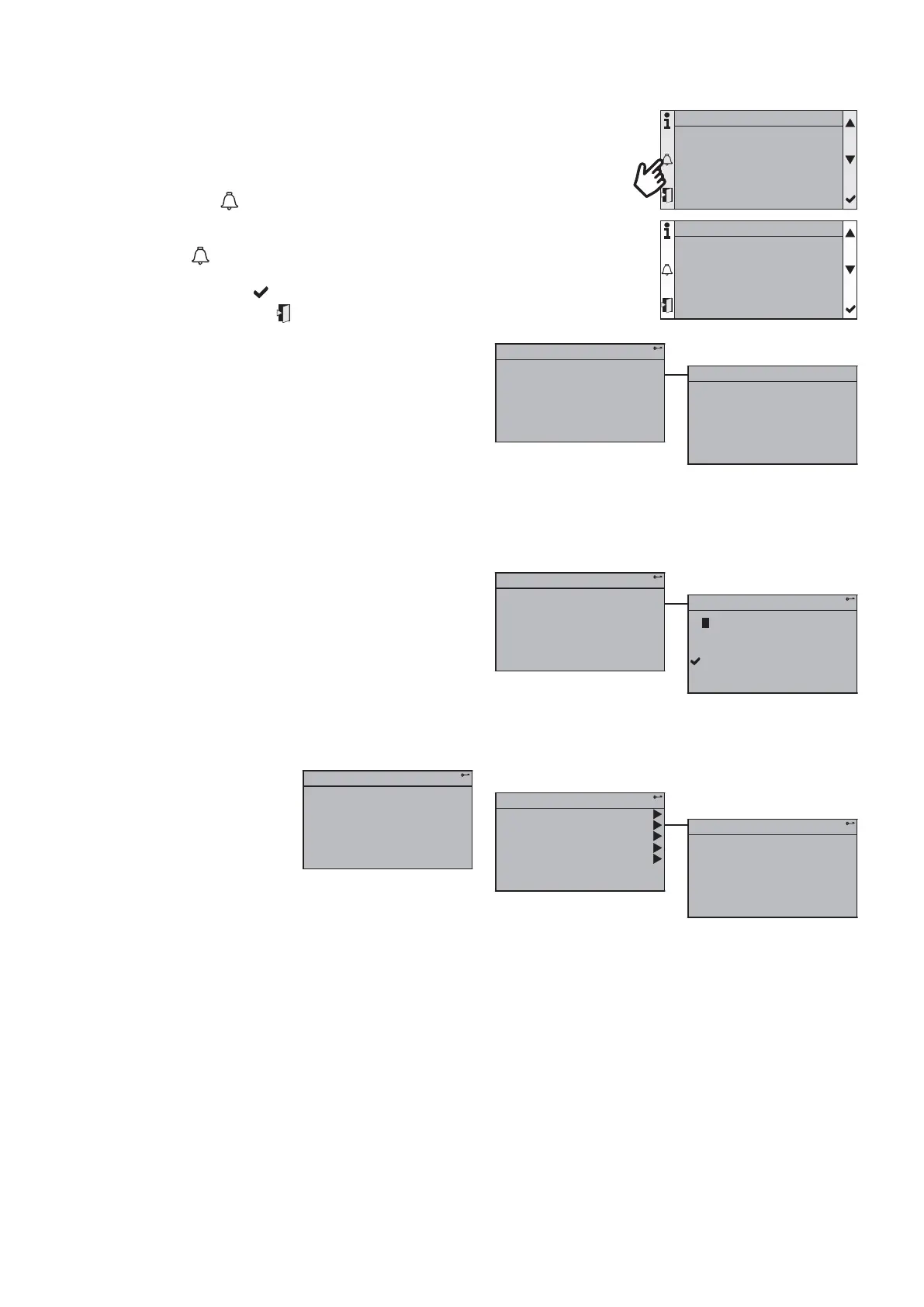
13.5. Alarms
Trigger all circuit breakers. Silence the alarm.
If at least one alarm or warning is in progress, the alarm button fl ashes.
Press the ‘Alarm’ button
to access the latest current alarm. The screen displays
the latest alarm activated with a description, the date and time at which it occurred.
Pressing the button
a second time gives access to the list of alarms and
warnings that are currently active. You can scroll the alarm list and obtain details by
clicking on the “Enter” button . To exit the alarm detail and return to the alarm list
menu, press the “Escape” button
.
If the list of alarms is displayed, pressing the "Alarm" button takes you to the alarm history. Here again, the detail of the alarms
can be displayed (max. 50).
The fi rst "Remove" line is used to remove alarms that are not active but require acknowledgment. To do this:
• ensure that you have an "Installation" or "Maintenance"' access menu
• select this line, validate and select "Execute".
The number on the fi rst line shows the number of alarms or warnings that are currently active.
In the alarm history, a line beginning with a + identifi es when an alarm is activated. A line beginning with a - shows that the
alarm was reset or acknowledged.
1/3Alarm liste detail
08:13:33
Critical(A)
18.02.2016
1
+ Fault supp.pump: Alarm
1/3
45,2°C
42,3°C
Red. H
Leaving water T.
Entering water T.
Current mode
Main overview



 To Next Page